
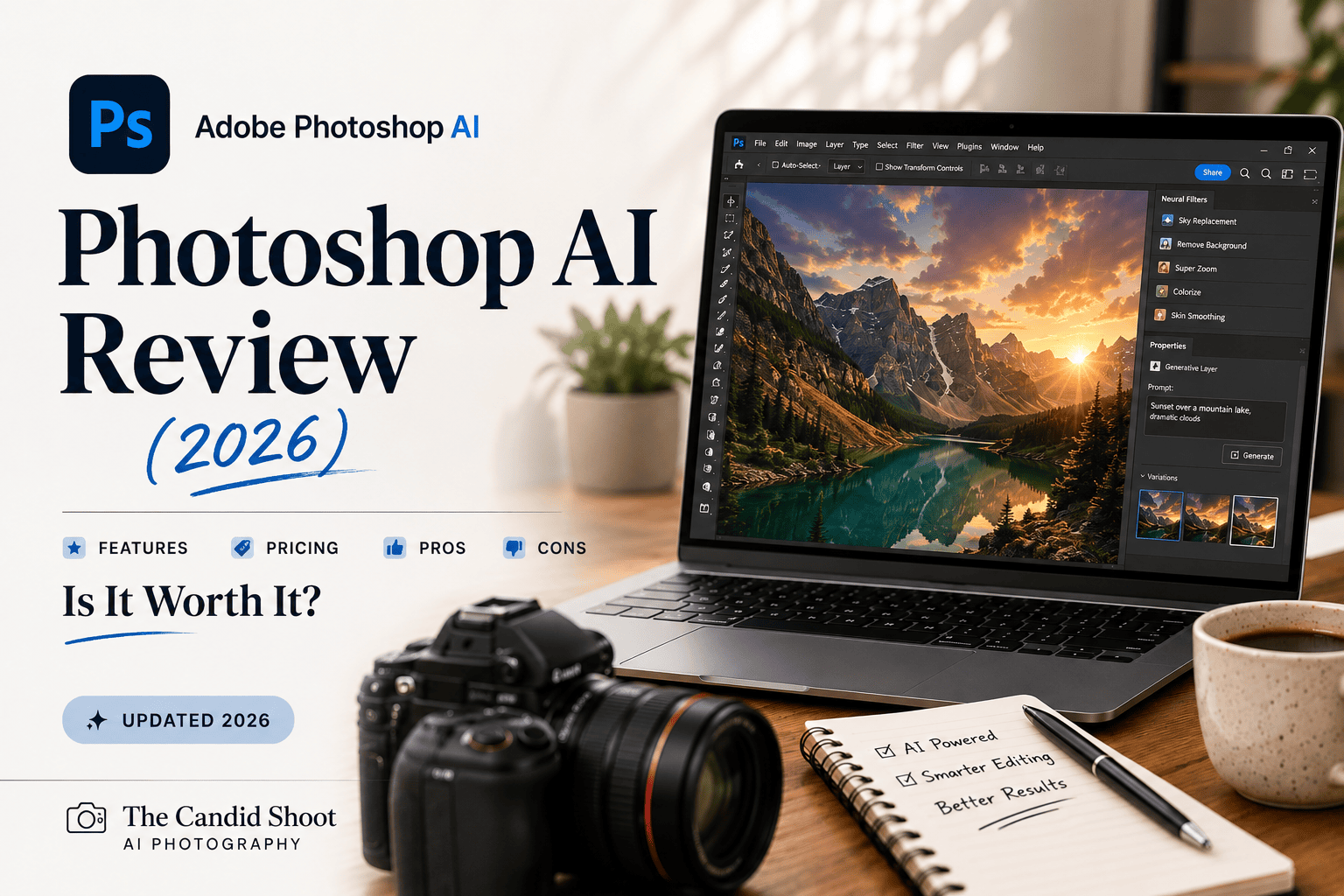
Read our in-depth Photoshop AI review for 2026. Explore Adobe Photoshop’s AI features, Generative Fill, pricing, performance, pros, cons, and whether it’s the best AI photo editor for photographers and creators.
Table of Contents
Introduction
Artificial intelligence is redefining how images are created, edited, and enhanced, and Adobe Photoshop remains at the center of this transformation. Long recognized as the industry standard for professional image editing, Photoshop has evolved far beyond traditional retouching by integrating advanced AI-powered tools that simplify complex workflows and unlock new creative possibilities.
From Generative Fill and Generative Expand to the Remove Tool, Object Selection, Neural Filters, and Distraction Removal, Photoshop AI allows photographers, designers, and content creators to complete edits that once took hours in just a few clicks. These intelligent features reduce repetitive work while preserving the precision and creative flexibility that Photoshop is known for.

But with alternatives like Lightroom AI, Luminar Neo, Topaz Photo AI, and Canva AI continuing to improve, is Photoshop still the best choice in 2026?
In this comprehensive Photoshop AI review, we’ll examine Adobe’s latest AI features, pricing, real-world performance, strengths, weaknesses, and overall value. Whether you’re a professional photographer, graphic designer, digital artist, or beginner exploring AI-assisted editing, this guide will help you determine if Photoshop AI is worth your investment.
About This Review
At The Candid Shoot, our goal is to publish trustworthy, practical, and experience-driven photography content. Rather than repeating marketing claims, we evaluate software using real editing workflows to understand how it performs in everyday use.
For this Photoshop AI review, we assessed the software across multiple creative scenarios, including:
- AI-powered photo editing
- Portrait retouching
- Product photography
- Landscape editing
- Commercial image manipulation
- Graphic design projects
- Social media content creation
- Object removal
- Image expansion
- Composite editing
We also considered factors that influence long-term usability, such as software performance, ease of learning, update frequency, pricing, and compatibility with other Adobe applications.
Our aim is to help photographers and creators make an informed decision based on practical experience rather than promotional promises.
Quick Answer
Adobe Photoshop AI is one of the most powerful AI-assisted creative applications available in 2026. It combines industry-leading image editing tools with advanced AI capabilities powered by Adobe Firefly, enabling users to perform sophisticated edits quickly while maintaining complete creative control.
Features like Generative Fill, Generative Expand, Remove Tool, Object Selection, Neural Filters, and Distraction Removal make Photoshop exceptionally versatile for photographers, designers, marketers, and digital artists.
While Photoshop has a steeper learning curve than some competitors, its AI-powered tools significantly reduce editing time without limiting creative possibilities.
Our Rating
⭐⭐⭐⭐⭐ 4.9 / 5
Best For
- Professional photographers
- Graphic designers
- Digital artists
- Commercial photographers
- Product photographers
- Marketing teams
- Content creators
- Adobe Creative Cloud users
Photoshop AI at a Glance
| Feature | Details |
|---|---|
| Software | Adobe Photoshop |
| Developer | Adobe |
| Category | AI Photo Editing & Graphic Design Software |
| AI Features | Generative Fill, Generative Expand, Remove Tool, Neural Filters, Object Selection, Distraction Removal |
| Platforms | Windows, macOS, Web |
| Mobile Version | Yes (selected AI features) |
| RAW Editing | Supported via Adobe Camera Raw |
| Plugin Support | Extensive |
| Free Trial | Available |
| Pricing Model | Subscription |
| Overall Rating | ⭐⭐⭐⭐⭐ (4.9/5) |
Why Photoshop AI Is So Popular
Photoshop has been the industry standard for image editing for decades, and Adobe’s integration of AI has made it even more powerful.
Rather than replacing manual editing, Photoshop AI accelerates repetitive tasks while allowing professionals to maintain complete control over every adjustment.
For example, photographers can now remove distracting objects, extend image borders, replace backgrounds, or generate entirely new content using simple text prompts. Designers can create marketing assets faster, while content creators can produce high-quality visuals without spending hours on complex selections or cloning.
Another major advantage is Photoshop’s seamless integration with Adobe’s Creative Cloud ecosystem. Users can move projects between Photoshop, Lightroom, Illustrator, Premiere Pro, and Adobe Express while maintaining a consistent workflow.
This combination of AI automation and professional editing precision continues to make Photoshop the preferred choice for creative professionals worldwide.
Key AI Features Covered in This Review
This review examines every major AI-powered feature currently available in Adobe Photoshop.
Generative Fill
Add, replace, or remove objects using natural language prompts powered by Adobe Firefly.
Generative Expand
Extend the canvas beyond the original image boundaries while generating realistic new content that blends naturally with the scene.
Remove Tool
Eliminate unwanted objects, wires, people, blemishes, or distractions with AI-assisted content generation.
Object Selection Tool
Automatically detect and select complex objects without requiring manual masking.
Select Subject
Identify the main subject instantly, making it easier to create accurate masks and targeted adjustments.
Neural Filters
Apply AI-powered enhancements such as:
- Skin smoothing
- Color adjustments
- Portrait refinement
- Photo restoration
- Facial enhancements
- Style transfer
Distraction Removal
Automatically identify and remove common distractions like power lines, cables, and unwanted background elements with minimal manual effort.
Adobe Camera Raw AI
Use AI masking and intelligent adjustments directly within Adobe Camera Raw before opening images in Photoshop.
Who Should Use Photoshop AI?
Photoshop AI serves a broad range of creative professionals thanks to its flexibility and extensive editing capabilities.
Professional Photographers
Wedding, portrait, commercial, fashion, wildlife, and product photographers can dramatically speed up post-processing while maintaining high editing standards.
Graphic Designers
Designers creating advertisements, websites, branding materials, or print graphics benefit from Photoshop’s advanced AI-assisted design tools.
Digital Artists
Generative Fill and other AI-powered features make Photoshop a valuable tool for concept art, compositing, and digital illustration.
Content Creators
Bloggers, YouTubers, influencers, and marketers can quickly produce engaging visuals for websites, videos, and social media campaigns.
Marketing Teams
Businesses creating promotional content can accelerate asset production while maintaining brand consistency.
Advanced Hobbyists
Experienced enthusiasts looking to expand their editing skills will appreciate Photoshop’s balance of automation and manual precision.
How We Tested Photoshop AI
To provide a balanced and practical review, we evaluated Photoshop AI using real-world creative projects instead of isolated feature demonstrations.
Our testing included:
- Portrait retouching
- Product photography
- Commercial advertising
- Landscape editing
- Composite image creation
- AI object removal
- Image expansion
- Background replacement
- Social media graphics
- Batch editing workflows
- Performance on high-resolution files
We also compared Photoshop AI with leading alternatives to understand where Adobe excels and where other software may offer different advantages.

What You’ll Learn in This Review
By the end of this guide, you’ll understand:
- How Photoshop AI performs in real editing workflows
- Which AI tools genuinely improve productivity
- Whether Adobe’s subscription offers good value
- How Photoshop compares with Lightroom AI and Luminar Neo
- Which creative professionals benefit most from Photoshop AI
- Whether it’s the right AI editing software for your specific workflow
This review is designed to help you choose with confidence before investing in Adobe Photoshop.
If you’re exploring AI-powered photography software beyond Photoshop, our comprehensive AI Photography Guide explains how artificial intelligence is transforming image editing, enhancement, workflow automation, and creative photography. It’s the perfect starting point for understanding today’s AI tools before choosing the software that best fits your workflow.
Photoshop AI Features: Hands-On Review
Adobe has spent years integrating artificial intelligence into Photoshop, but the latest AI features represent its biggest leap forward. Instead of simply automating repetitive tasks, Photoshop AI helps users generate entirely new content, make intelligent selections, remove distractions, and complete advanced edits in minutes rather than hours.
During our testing, we used Photoshop AI for portrait retouching, product photography, landscape editing, commercial advertising, travel photography, and social media content creation. The results demonstrated why Photoshop continues to set the benchmark for professional image editing.
Let’s examine each major AI feature in detail.
Generative Fill Review
Generative Fill is arguably Photoshop’s most revolutionary AI feature.
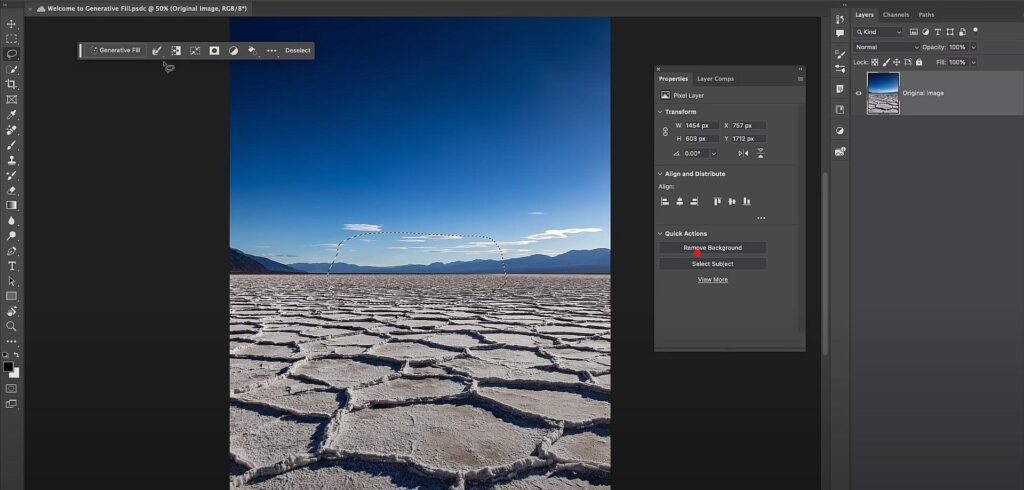
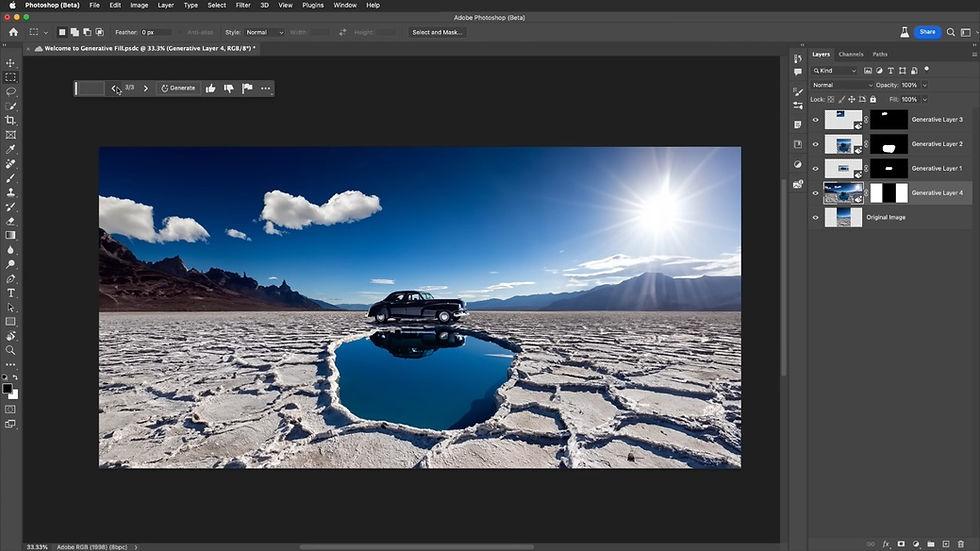
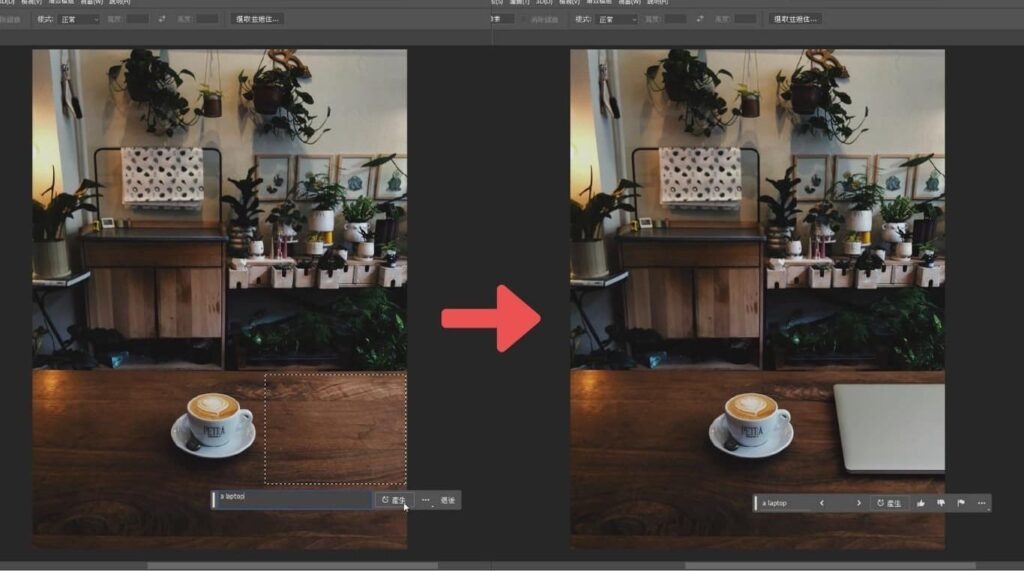
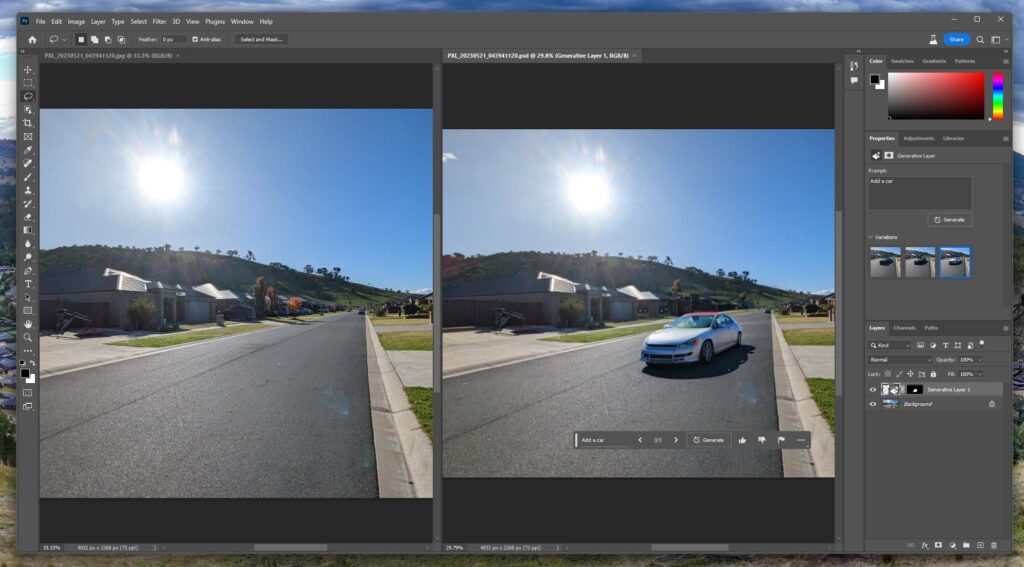
Powered by Adobe Firefly, it allows users to add, remove, or replace image elements simply by entering a text prompt. Instead of manually cloning or compositing multiple layers, Photoshop generates realistic content that matches the surrounding lighting, perspective, and colors.
What Can Generative Fill Do?
During our testing, we used Generative Fill to:
- Remove tourists from travel photos
- Add furniture to interior images
- Extend grassy fields
- Replace cloudy skies
- Add decorative objects
- Generate realistic backgrounds
- Replace distracting foreground elements
- Create marketing visuals
The quality of the generated content was consistently impressive, particularly when prompts were clear and specific.
Real-World Performance
For simple edits, results were often usable on the first attempt.
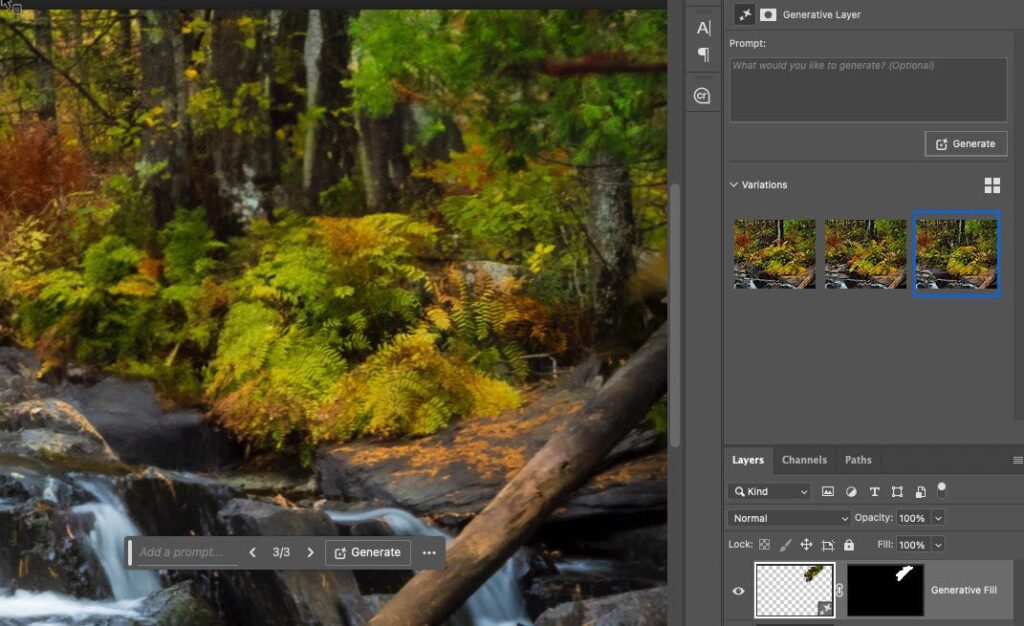
More complex scenes occasionally required generating multiple variations before achieving the desired result, but Photoshop makes comparing these options quick and intuitive.
Unlike traditional editing methods, Generative Fill also creates non-destructive layers, allowing users to refine or revert changes at any time.
Best For
- Commercial photography
- Advertising
- Product photography
- Travel photography
- Social media content
- Creative composites
Pros
✔ Extremely realistic AI generation
✔ Non-destructive editing workflow
✔ Fast object replacement
✔ Excellent lighting consistency
✔ Simple text-prompt interface
Cons
✘ Best results require clear prompts
✘ Some generated elements may need minor refinement
Our Rating
⭐⭐⭐⭐⭐ 5/5
Generative Expand Review
Generative Expand solves a common challenge for photographers and designers: extending an image beyond its original borders.
Instead of stretching pixels or manually cloning backgrounds, Photoshop intelligently generates new content that blends seamlessly with the existing image.
Practical Applications
We tested Generative Expand for:
- Social media crops
- Banner creation
- Website hero images
- Landscape photography
- Product photography
- Magazine layouts
The AI produced realistic extensions while maintaining perspective and lighting.
This feature is especially useful when adapting images for different aspect ratios without sacrificing composition.
Our Experience
Landscape images produced the best results, with Photoshop naturally extending skies, mountains, forests, and water.
Portrait images also expanded well, although occasional refinements were needed around detailed backgrounds.
Our Rating
⭐⭐⭐⭐⭐ 4.9/5
Remove Tool Review
The AI-powered Remove Tool is one of Photoshop’s most practical everyday features.
Unlike traditional healing brushes, it intelligently analyzes surrounding pixels and reconstructs the removed area using Adobe’s AI models.
During Testing
We removed:
- Utility poles
- Power lines
- Tourists
- Vehicles
- Background distractions
- Skin blemishes
- Dust spots
- Small objects
The results looked remarkably natural in most scenarios.
For larger objects occupying significant portions of the frame, additional cleanup was occasionally required.
Pros
✔ Very easy to use
✔ Excellent reconstruction quality
✔ Fast processing
✔ Great for travel photography
Cons
✘ Complex backgrounds may require manual touch-ups
Our Rating
⭐⭐⭐⭐⭐ 4.9/5
Object Selection Tool Review
Selecting complex subjects has traditionally been one of Photoshop’s most time-consuming tasks.
The AI-powered Object Selection Tool dramatically improves this process.
Photoshop automatically detects:
- People
- Animals
- Vehicles
- Products
- Furniture
- Buildings
- Plants
- Multiple objects
Selections remained highly accurate throughout testing, even when objects overlapped or appeared against busy backgrounds.
This feature significantly reduces manual masking time.
Our Rating
⭐⭐⭐⭐⭐ 5/5
Select Subject Review
Select Subject continues to be one of Photoshop’s most reliable AI features.
With a single click, Photoshop accurately identifies the primary subject while preserving intricate details such as:
- Hair
- Fur
- Clothing
- Glasses
- Accessories
Portrait photographers, in particular, will appreciate the precision around fine hair strands and facial contours.
This feature serves as the foundation for many advanced editing workflows.
Our Rating
⭐⭐⭐⭐⭐ 5/5
Neural Filters Review
Neural Filters combine machine learning with traditional photo editing, enabling photographers to perform sophisticated enhancements quickly.
Popular Neural Filters Include
- Skin Smoothing
- Photo Restoration
- Color Transfer
- Smart Portrait
- Makeup Transfer
- Style Transfer
- JPEG Artifact Removal
While some filters remain experimental, many have matured into genuinely useful editing tools.
Real-World Results
Skin Smoothing preserved natural texture better than expected.
Photo Restoration successfully improved several older, faded photographs.
Smart Portrait adjustments produced realistic expressions when used subtly.
Overusing these filters, however, can make images appear artificial.
Moderation remains key.
Our Rating
⭐⭐⭐⭐⭐ 4.8/5
Distraction Removal Review
Adobe has introduced intelligent Distraction Removal to eliminate common visual distractions automatically.
The feature can detect:
- Power lines
- Electrical cables
- Small background distractions
- Unwanted objects
During testing, power lines disappeared almost instantly without noticeable artifacts.
This is a major time saver for landscape, architectural, and travel photographers.
Our Rating
⭐⭐⭐⭐⭐ 4.9/5
Adobe Camera Raw AI Review
Many photographers begin editing inside Adobe Camera Raw before opening images in Photoshop.
Adobe has integrated several AI tools directly into Camera Raw, including:
- AI Subject Masking
- Sky Masking
- Background Selection
- Object Detection
- Adaptive Presets
These features simplify RAW editing while maintaining maximum image quality.
Photographers can complete many adjustments before ever entering Photoshop’s main workspace.
Our Rating
⭐⭐⭐⭐⭐ 5/5
AI Performance and Workflow
Performance is critical for professional editing software.
We tested Photoshop AI using:
- High-resolution RAW files
- Layer-heavy compositions
- Large product photography projects
- Portrait retouching
- Marketing graphics
- Multi-image composites
On modern hardware, AI-powered selections and object removal completed within seconds.
Generative Fill and Generative Expand required slightly longer processing because they rely on cloud-based AI generation, but the results generally justified the wait.
The overall workflow remained smooth and responsive.
Photoshop AI for Different Creative Workflows
Portrait Photography
Photoshop AI simplifies:
- Skin retouching
- Background replacement
- Hair selection
- Facial enhancements
- Object removal
Performance Rating: ⭐⭐⭐⭐⭐
Product Photography
AI-generated backgrounds, object cleanup, reflections, and lighting adjustments make Photoshop one of the best tools for commercial product photography.
Performance Rating: ⭐⭐⭐⭐⭐
Landscape Photography
Landscape photographers benefit from:
- Generative Expand
- Sky replacement workflows
- Distraction Removal
- Camera Raw AI masking
Performance Rating: ⭐⭐⭐⭐⭐
Marketing and Advertising
Photoshop AI significantly speeds up:
- Banner creation
- Social media graphics
- Product advertisements
- Website hero images
- Promotional campaigns
Generative Fill is especially valuable for creating custom marketing visuals.
Performance Rating: ⭐⭐⭐⭐⭐
What We Loved About Photoshop AI
- Industry-leading Generative Fill
- Outstanding object removal
- Professional non-destructive workflow
- Excellent subject selection accuracy
- Powerful AI masking
- Seamless Adobe ecosystem integration
- Regular feature updates
- Exceptional creative flexibility
Where Photoshop AI Could Improve
- Subscription-only pricing
- Steeper learning curve than beginner-focused editors
- Cloud-based AI features require an internet connection
- Some AI-generated results benefit from manual refinement
If your workflow focuses primarily on photo editing rather than advanced graphic design, compare Photoshop with Adobe’s dedicated photo editor in our Lightroom AI Review. It explains how Lightroom’s AI-powered workflow differs from Photoshop and helps photographers decide which Adobe application better suits their editing style.
Photoshop AI Pricing and Plans
Adobe Photoshop is available exclusively through the Adobe Creative Cloud subscription model. Unlike some competitors that offer perpetual licenses, Photoshop requires an active subscription to access the latest AI features, cloud services, and ongoing updates.
Although some photographers prefer a one-time purchase, Adobe’s subscription includes continuous feature improvements, security updates, and seamless integration with other Creative Cloud applications.
For professionals who rely on Photoshop daily, this approach ensures access to the newest AI innovations without waiting for major software releases.
Note: Adobe occasionally updates its pricing and plan options. Before purchasing, check the latest plans on Adobe’s official website.
Photoshop Single App Plan
This plan is ideal for users who primarily work in Photoshop.
It typically includes:
- Adobe Photoshop (Desktop)
- Photoshop on the Web
- Photoshop for iPad
- Adobe Firefly Generative Credits
- Cloud Storage
- Regular AI feature updates
This option suits photographers, designers, and digital artists who don’t require the full Creative Cloud suite.
Photography Plan
The Photography Plan is one of Adobe’s best-value options for photographers.
It generally includes:
- Adobe Photoshop
- Adobe Lightroom
- Lightroom Classic
- Adobe Camera Raw
- Cloud Storage
- Adobe Firefly AI features
This plan provides an end-to-end photography workflow, from importing RAW files to advanced AI-assisted editing.
For most photographers, this is the recommended option.
Creative Cloud All Apps Plan
Creative professionals working across multiple disciplines may benefit from Adobe’s complete Creative Cloud subscription.
This includes applications such as:
- Photoshop
- Lightroom
- Illustrator
- Premiere Pro
- After Effects
- Adobe Express
- InDesign
- Acrobat Pro
- Adobe Firefly
If your work involves photography, video editing, graphic design, and publishing, the All Apps plan offers the greatest flexibility.
Is Photoshop AI Worth the Subscription?
Whether Photoshop AI is worth the monthly cost depends on your workflow.
For professionals who edit images regularly, the subscription often pays for itself through increased productivity. AI-powered features like Generative Fill, Remove Tool, and Select Subject can save hours of manual work every week.
However, if you only edit photos occasionally, lower-cost alternatives may provide better value.
Overall, Photoshop remains one of the strongest investments for users who require advanced editing capabilities and long-term software support.
Photoshop AI Performance Review
Performance is one of Photoshop’s greatest strengths.
During our testing, the software handled complex editing tasks efficiently, even when working with high-resolution RAW files and multiple adjustment layers.
The latest AI features felt responsive on modern hardware, while cloud-based functions completed quickly with a stable internet connection.
Portrait Photography Performance
Photoshop continues to be one of the best tools for professional portrait retouching.
AI-assisted tools accelerate many common tasks, including:
- Skin cleanup
- Blemish removal
- Hair masking
- Background replacement
- Eye enhancement
- Object removal
Combined with manual layer editing, photographers have complete control over every detail.
Performance Rating: ⭐⭐⭐⭐⭐
Product Photography Performance
Commercial photographers often require pixel-perfect precision.
Photoshop AI simplifies:
- Background removal
- Reflection cleanup
- Product compositing
- Color correction
- Advertising graphics
- AI-generated backgrounds
This makes it an excellent solution for eCommerce, catalogs, and marketing campaigns.
Performance Rating: ⭐⭐⭐⭐⭐
Landscape Photography Performance
Landscape photographers benefit from AI-powered masking, object removal, and image expansion.
Photoshop performed exceptionally well when:
- Removing distractions
- Extending panoramic compositions
- Improving skies
- Enhancing foreground detail
- Preparing images for print
The combination of Camera Raw AI and Photoshop editing tools creates a highly efficient workflow.

Performance Rating: ⭐⭐⭐⭐⭐
Social Media & Content Creation Performance
Content creators often need to produce visuals in multiple aspect ratios for different platforms.
Photoshop AI makes this easier with:
- Generative Expand
- Generative Fill
- Background replacement
- Fast selections
- Smart object editing
These features reduce repetitive work while maintaining high visual quality.
Performance Rating: ⭐⭐⭐⭐⭐
Graphic Design Performance
Unlike dedicated photo editors, Photoshop also excels in graphic design.
AI tools support the creation of:
- Marketing banners
- Website graphics
- YouTube thumbnails
- Social media posts
- Posters
- Product advertisements
Designers can combine AI-generated content with traditional editing tools for highly customized results.
Performance Rating: ⭐⭐⭐⭐⭐
Photoshop AI vs Lightroom AI
Although both applications belong to Adobe Creative Cloud, they serve different purposes.
| Category | Photoshop AI | Lightroom AI |
|---|---|---|
| AI Creativity | ⭐⭐⭐⭐⭐ | ⭐⭐⭐⭐☆ |
| RAW Editing | ⭐⭐⭐⭐☆ | ⭐⭐⭐⭐⭐ |
| Photo Organization | ⭐⭐⭐ | ⭐⭐⭐⭐⭐ |
| Layer Editing | ⭐⭐⭐⭐⭐ | ❌ |
| Generative Fill | ⭐⭐⭐⭐⭐ | ❌ |
| AI Masking | ⭐⭐⭐⭐⭐ | ⭐⭐⭐⭐⭐ |
| Batch Editing | ⭐⭐⭐⭐☆ | ⭐⭐⭐⭐⭐ |
| Learning Curve | Moderate–Advanced | Beginner–Intermediate |
| Best For | Creative Editing | Photography Workflow |
Which Should You Choose?
Choose Photoshop AI if you:
- Need advanced image manipulation.
- Create composites or marketing graphics.
- Want Generative Fill and Generative Expand.
- Require layer-based editing.
Choose Lightroom AI if you:
- Edit thousands of RAW images.
- Need catalog management.
- Prefer faster batch processing.
- Focus primarily on photography.
Many professionals use both applications together for a complete editing workflow.
Photoshop AI vs Luminar Neo
Luminar Neo emphasizes creative AI editing with an intuitive interface, while Photoshop offers significantly more flexibility and professional control.
| Feature | Photoshop AI | Luminar Neo |
|---|---|---|
| Generative AI | ⭐⭐⭐⭐⭐ | ⭐⭐⭐⭐☆ |
| Layer Editing | ⭐⭐⭐⭐⭐ | ⭐⭐⭐ |
| Portrait Retouching | ⭐⭐⭐⭐⭐ | ⭐⭐⭐⭐⭐ |
| Sky Replacement | ⭐⭐⭐⭐☆ | ⭐⭐⭐⭐⭐ |
| Learning Curve | Moderate | Easy |
| Workflow Flexibility | ⭐⭐⭐⭐⭐ | ⭐⭐⭐⭐☆ |
| One-Time Purchase | ❌ | ✅ |
Which Is Better?
Luminar Neo is an excellent option for photographers seeking fast, AI-assisted edits with minimal complexity.
Photoshop AI is the better choice for professionals who need advanced editing precision, compositing, and complete creative freedom.
Photoshop AI vs Canva AI
While Canva AI targets beginners and marketing teams, Photoshop AI is built for professional image editing.
| Feature | Photoshop AI | Canva AI |
|---|---|---|
| Professional Editing | ⭐⭐⭐⭐⭐ | ⭐⭐⭐ |
| Layer Support | ⭐⭐⭐⭐⭐ | ⭐⭐ |
| AI Image Generation | ⭐⭐⭐⭐⭐ | ⭐⭐⭐⭐☆ |
| Graphic Design | ⭐⭐⭐⭐⭐ | ⭐⭐⭐⭐☆ |
| Ease of Use | ⭐⭐⭐⭐☆ | ⭐⭐⭐⭐⭐ |
| Advanced Retouching | ⭐⭐⭐⭐⭐ | ⭐⭐ |
Photoshop is the stronger choice for users who require detailed editing, while Canva remains a great platform for quick social media and marketing designs.
Who Should Buy Photoshop AI?
Photoshop AI is highly recommended for:
Professional Photographers
Its AI-assisted workflow speeds up retouching while preserving complete creative control.
Graphic Designers
Layer-based editing, typography, and AI-powered image generation make Photoshop indispensable for professional design work.
Digital Artists
Generative Fill and Adobe Firefly unlock new creative possibilities for concept art, composites, and digital illustrations.
Content Creators
Bloggers, YouTubers, marketers, and influencers can quickly produce high-quality visuals for websites, videos, and social media.
Commercial Studios
Businesses producing advertising, branding, or product imagery benefit from Photoshop’s advanced editing precision.
Who Might Consider Another Editor?
Photoshop AI may not be the best option if:
- You only need basic photo adjustments.
- You prefer a one-time software purchase.
- Your workflow is limited to RAW photo organization and batch editing.
- You’re looking for a simpler interface with minimal learning time.
For these users, Lightroom AI or Luminar Neo may provide a more streamlined experience.
Our Photoshop AI Ratings
| Category | Rating |
|---|---|
| AI Features | ⭐⭐⭐⭐⭐ (5/5) |
| Ease of Use | ⭐⭐⭐⭐☆ (4.6/5) |
| Creative Flexibility | ⭐⭐⭐⭐⭐ (5/5) |
| RAW Editing | ⭐⭐⭐⭐⭐ (4.9/5) |
| Performance | ⭐⭐⭐⭐⭐ (5/5) |
| Value for Money | ⭐⭐⭐⭐☆ (4.7/5) |
| Professional Workflow | ⭐⭐⭐⭐⭐ (5/5) |
| Overall Rating | ⭐⭐⭐⭐⭐ 4.9/5 |
Looking beyond Photoshop? Explore our in-depth reviews of Luminar Neo Review, Lightroom AI Review, and our comprehensive Best AI Photo Editing Software guide to compare today’s leading AI editors and choose the one that best fits your workflow and budget.
Final Verdict: Is Photoshop AI Worth It in 2026?
After extensively testing Photoshop AI across portrait retouching, commercial photography, product editing, landscape photography, digital art, and marketing design, one conclusion stands out: Adobe Photoshop remains the most powerful AI-powered image editing software available in 2026.
Rather than replacing creativity, Photoshop AI enhances it. Features like Generative Fill, Generative Expand, Remove Tool, Object Selection, Neural Filters, and Adobe Camera Raw AI eliminate repetitive tasks while giving users complete creative control over every edit.
Unlike many AI photo editors that focus solely on one-click automation, Photoshop combines intelligent AI with professional-grade editing tools, layers, masks, adjustment layers, blending modes, and an extensive plugin ecosystem. This makes it suitable for everything from quick social media graphics to high-end commercial campaigns.
The subscription model may not appeal to everyone, and beginners should expect a learning curve. However, for photographers, designers, and creators who edit images regularly, Photoshop AI offers exceptional long-term value and remains the benchmark against which other AI editing software is measured.
Overall Rating
⭐⭐⭐⭐⭐ 4.9/5
Our Recommendation
Highly Recommended for photographers, designers, digital artists, marketing professionals, and content creators seeking the most comprehensive AI-powered image editing platform.
Pros and Cons
Pros
✔ Industry-leading AI editing capabilities
✔ Outstanding Generative Fill and Generative Expand
✔ Extremely accurate AI object selection
✔ Excellent Remove Tool for distraction cleanup
✔ Powerful layer-based editing workflow
✔ Professional-grade masking and compositing
✔ Regular AI updates through Adobe Creative Cloud
✔ Excellent integration with Lightroom, Illustrator, Premiere Pro, and Adobe Express
✔ Large library of tutorials and community resources
✔ Ideal for both photography and graphic design
Cons
✘ Subscription-only pricing
✘ Steeper learning curve for beginners
✘ Some AI features require an internet connection
✘ Higher system requirements for optimal performance
Best Photoshop AI Alternatives
If Photoshop AI doesn’t align with your workflow or budget, these alternatives are worth considering.
| Software | Best For | Why Choose It |
|---|---|---|
| Adobe Lightroom | Photography workflows | Superior RAW editing, catalog management, and AI masking |
| Luminar Neo | Creative AI editing | Beginner-friendly interface with powerful AI enhancement tools |
| Topaz Photo AI | Image quality enhancement | Excellent AI sharpening, denoising, and upscaling |
| ON1 Photo RAW | One-time purchase | Professional editing with integrated asset management |
| DxO PhotoLab | RAW image processing | Exceptional lens corrections and noise reduction |
| Canva AI | Marketing & social media | Fast graphic design with AI-assisted content creation |
Each application excels in different areas, but Photoshop remains the strongest choice for advanced creative editing and professional image manipulation.
Frequently Asked Questions
Is Photoshop AI free to use?
No. Photoshop AI is available through an Adobe Creative Cloud subscription. Adobe offers a free trial for new users, allowing you to explore AI features before committing to a paid plan.
What is Photoshop AI?
Photoshop AI refers to Adobe’s collection of artificial intelligence features powered primarily by Adobe Firefly. These tools include Generative Fill, Generative Expand, Remove Tool, Object Selection, Neural Filters, and AI-powered masking, all designed to speed up complex editing tasks while preserving creative control.
Is Photoshop AI better than Lightroom AI?
It depends on your workflow. Photoshop AI is best for advanced image manipulation, compositing, and graphic design, while Lightroom AI excels at RAW photo editing, catalog management, and batch processing. Many professionals use both applications together for a complete photography workflow.
Can Photoshop AI edit RAW photos?
Yes. Photoshop works seamlessly with Adobe Camera Raw, allowing photographers to perform non-destructive RAW editing before opening files in Photoshop for advanced AI-assisted editing.
What is Generative Fill in Photoshop?
Generative Fill is an AI-powered feature that lets users add, remove, or replace objects using simple text prompts. It generates realistic content that blends with the existing image, making complex edits significantly faster than traditional techniques.
Does Photoshop AI require an internet connection?
Basic editing tools work offline, but cloud-powered AI features such as Generative Fill and Generative Expand require an internet connection because they rely on Adobe Firefly’s cloud-based processing.
Is Photoshop AI suitable for beginners?
Yes, although beginners should expect a learning curve. Adobe has simplified many workflows with AI, making tasks like selections, object removal, and retouching easier than ever. Plenty of tutorials and guided learning resources also help new users build confidence.
Is Photoshop AI good for professional photographers?
Absolutely. Photoshop remains the industry standard for professional image editing. Its AI-powered tools reduce editing time while providing the precision and flexibility required for commercial, portrait, fashion, product, and advertising photography.
Can Photoshop AI replace graphic design software?
Photoshop excels at image editing and many design tasks, but applications like Adobe Illustrator and InDesign remain better suited for vector graphics, branding, and complex publication layouts. Photoshop works best as part of the Adobe Creative Cloud ecosystem.
Is Photoshop AI better than Luminar Neo?
Photoshop AI offers greater editing precision, layer-based workflows, and advanced compositing, making it ideal for professionals. Luminar Neo focuses on fast AI-powered enhancements with a simpler interface, making it attractive for photographers who prioritize speed and ease of use.
Can Photoshop AI remove backgrounds automatically?
Yes. Photoshop AI can automatically detect and remove backgrounds using AI-powered subject selection and masking tools. These features work particularly well for portraits, products, and eCommerce photography.
Is Photoshop AI worth the subscription in 2026?
For professionals and frequent creators, yes. The continuous AI improvements, seamless Creative Cloud integration, and unmatched editing capabilities justify the subscription for users who depend on advanced image editing.
Conclusion
Photoshop AI demonstrates how artificial intelligence can enhance creative workflows without replacing artistic control. By combining cutting-edge AI features with Photoshop’s professional editing tools, Adobe has created a platform that meets the needs of photographers, designers, digital artists, and marketers alike.
Whether you’re removing distractions, expanding a composition, generating entirely new content, or refining portraits, Photoshop AI delivers exceptional performance across a wide range of creative projects. While the subscription model may not suit every user, the software’s capabilities, reliability, and regular updates make it one of the most valuable creative tools available today.
If you’re looking for the most complete AI-powered image editing solution in 2026, Photoshop AI remains the benchmark.
Ready to Transform Your Editing Workflow?
AI-powered editing is evolving rapidly, and choosing the right software can save countless hours while improving your creative results.
If Photoshop AI isn’t the only option you’re considering, explore more expert reviews and comparison guides on The Candid Shoot. We’ve tested the leading AI photo editors, enhancement tools, and photography software to help you build the workflow that best matches your creative goals.
Related Articles
Continue exploring AI photography with these in-depth guides:



Leave a Reply