
Compare Lightroom AI vs Luminar Neo in 2026. Discover differences in AI editing, portrait tools, RAW processing, pricing, performance, and find the best AI photo editor for your workflow.
Introduction

Artificial intelligence has transformed modern photo editing, enabling photographers to achieve professional-quality results faster than ever before. Tasks that once required hours of manual work—such as masking subjects, reducing noise, replacing skies, enhancing portraits, and removing unwanted objects—can now be completed in just a few clicks using AI-powered editing tools.
Among the many AI photo editors available today, Adobe Lightroom AI and Luminar Neo stand out as two of the most popular choices. Both applications offer advanced AI features designed to simplify editing workflows, but they take different approaches. Lightroom AI focuses on efficient RAW photo management, intelligent masking, and seamless integration with the Adobe ecosystem, while Luminar Neo emphasizes creative AI enhancements, portrait retouching, and one-click artistic edits.
Choosing between these two powerful editors can be challenging. Professional photographers may prioritize workflow efficiency and color accuracy, while beginners might prefer intuitive AI tools that produce impressive results with minimal effort.
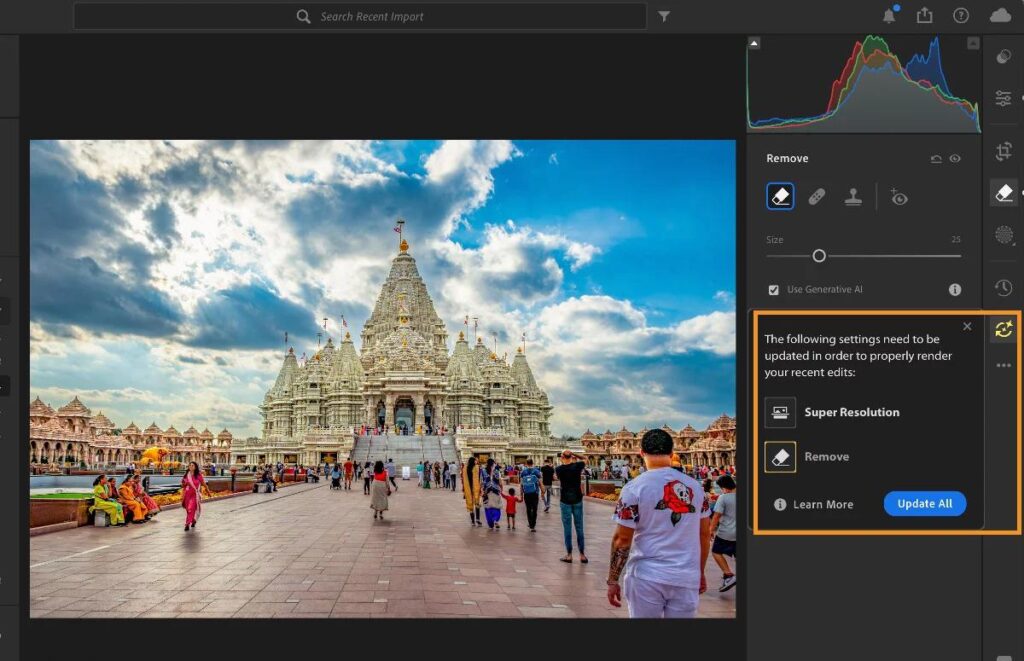
In this detailed comparison, we’ll evaluate Lightroom AI vs Luminar Neo across key areas such as AI editing features, portrait enhancement, landscape photography, RAW processing, performance, pricing, ease of use, and overall value. By the end of this guide, you’ll have a clear understanding of which AI photo editor best suits your photography style and editing workflow.
Choosing the right AI editor is just one part of a modern photography workflow. Explore our AI Photography Guide: 35 Powerful Tools, Tips & Techniques to discover how artificial intelligence is reshaping image capture, editing, enhancement, and creative photography.
Lightroom AI vs Luminar Neo at a Glance
| Feature | Adobe Lightroom AI | Luminar Neo |
|---|---|---|
| Best For | Professional RAW editing | AI-powered creative editing |
| AI Masking | ⭐⭐⭐⭐⭐ | ⭐⭐⭐⭐☆ |
| Portrait Editing | ⭐⭐⭐⭐☆ | ⭐⭐⭐⭐⭐ |
| Landscape Editing | ⭐⭐⭐⭐☆ | ⭐⭐⭐⭐⭐ |
| Sky Replacement | Basic | Excellent |
| Object Removal | Excellent | Excellent |
| Batch Editing | Excellent | Very Good |
| Beginner Friendly | Moderate | Excellent |
| Professional Workflow | Excellent | Very Good |
| Operating Systems | Windows, macOS, Mobile | Windows, macOS |
| Pricing | Subscription | Subscription or Lifetime License (varies by offer) |
Quick Verdict
- Choose Lightroom AI if you primarily edit RAW files, manage large photo libraries, and need a professional editing workflow.
- Choose Luminar Neo if you want powerful AI enhancements, portrait retouching, creative effects, and faster one-click editing.
Overview of Adobe Lightroom AI
Adobe Lightroom has long been a favorite among professional photographers thanks to its powerful RAW processing, image organization, and non-destructive editing workflow. Recent AI-powered features have made Lightroom even more capable by automating complex editing tasks while maintaining exceptional image quality.
Rather than focusing solely on creative effects, Lightroom AI is designed to improve efficiency. Features like AI Masking, Adaptive Presets, Denoise AI, Lens Blur, and Generative Remove help photographers edit large collections of images quickly without sacrificing control.
One of Lightroom’s greatest strengths is its seamless integration with Adobe Creative Cloud, allowing users to move effortlessly between Lightroom, Photoshop, and other Adobe applications.
Key AI Features
- AI Subject Masking
- AI Sky Masking
- AI Background Masking
- Adaptive Presets
- Denoise AI
- Lens Blur
- Generative Remove
- AI Object Detection
- AI Portrait Masking
- Cloud Synchronization
Pros
- Industry-leading RAW editing
- Excellent color management
- Powerful AI masking tools
- Outstanding batch editing capabilities
- Seamless Adobe ecosystem integration
- Reliable non-destructive workflow
Cons
- Subscription-based pricing
- Creative AI tools are more limited compared to Luminar Neo
- Beginners may need time to learn the interface
Best For
- Professional photographers
- Wedding photographers
- Event photographers
- Commercial photographers
- Travel photographers
- High-volume editing workflows
Overview of Luminar Neo
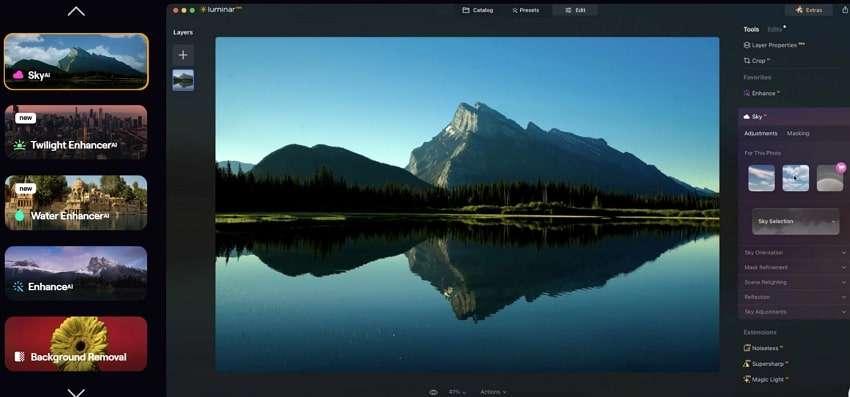
Skylum Luminar Neo was built with AI at its core, making it one of the most intuitive photo editors for users who want impressive results without spending hours on manual adjustments.
Instead of requiring extensive masking and layer work, Luminar Neo uses intelligent AI models to analyze each image and apply targeted enhancements automatically. It excels in portrait retouching, sky replacement, lighting adjustments, and creative effects, making it particularly popular among portrait, landscape, and travel photographers.
Its clean interface and one-click AI tools make it approachable for beginners while still offering enough control for enthusiasts and professionals.
Key AI Features
- Enhance AI
- Sky AI
- Relight AI
- Face AI
- Skin AI
- Body AI
- GenErase
- GenExpand
- Background Removal AI
- Portrait Bokeh AI
Pros
- Exceptional AI-powered editing
- Outstanding portrait enhancement tools
- Industry-leading sky replacement
- Beginner-friendly interface
- Fast creative workflow
- Flexible purchase options
Cons
- Photo catalog management is less advanced than Lightroom
- Some AI extensions require additional downloads
- Batch editing is not as comprehensive as Lightroom
Best For
- Portrait photographers
- Landscape photographers
- Travel photographers
- Content creators
- Hobbyists
- Beginners exploring AI editing
AI Editing Features Comparison
Artificial intelligence is the biggest selling point of both editors, but each platform approaches AI differently.
Adobe Lightroom AI
Lightroom emphasizes precision and workflow efficiency. Its AI tools are designed to automate repetitive editing tasks while preserving the photographer’s creative control.
Popular AI capabilities include:
- AI Subject Selection
- AI Sky Detection
- AI Background Masking
- AI Denoise
- Lens Blur
- Generative Remove
- Adaptive Portrait Presets
These features integrate seamlessly into Lightroom’s existing editing workflow, making them ideal for photographers processing hundreds of images.
Luminar Neo
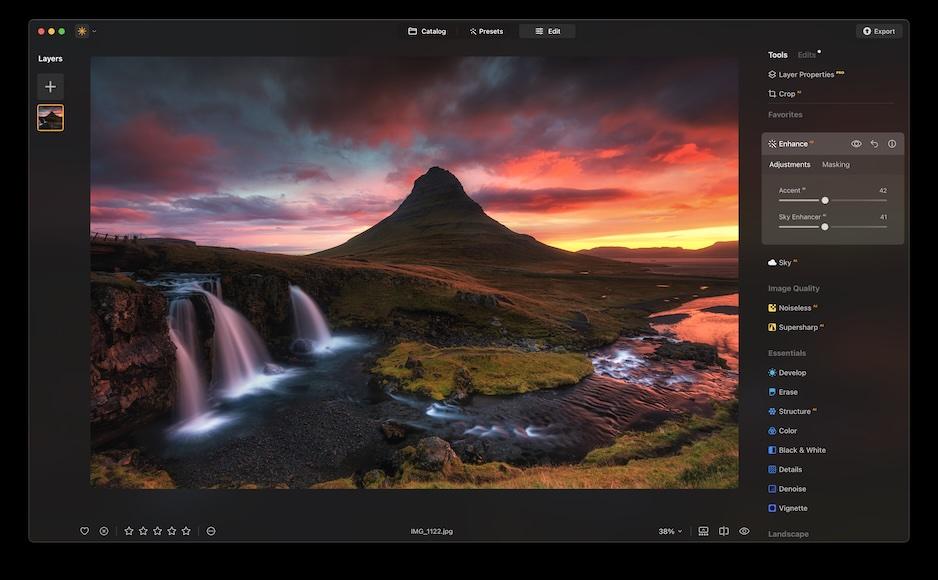
Luminar Neo focuses on creative automation. Its AI tools often deliver dramatic improvements with a single click, reducing the need for manual adjustments.
Popular AI tools include:
- Sky AI
- Enhance AI
- Face AI
- Skin AI
- Body AI
- Relight AI
- GenErase
- GenExpand
- Portrait Background Removal
Luminar Neo’s AI is particularly effective for users who want visually striking edits without extensive technical knowledge.
Winner: AI Editing Features
While both editors offer excellent AI capabilities, Luminar Neo provides a broader range of creative AI tools and one-click enhancements. Its specialized features for portraits, landscapes, and scene enhancement make it especially appealing to photographers seeking faster, more dramatic results.
Winner: 🏆 Luminar Neo
Portrait Editing Comparison
Portrait editing is one of the areas where AI has had the greatest impact, and both Lightroom AI and Luminar Neo offer powerful tools to streamline the process.
Lightroom AI
Lightroom uses AI-powered masking to detect facial features, skin, eyes, lips, eyebrows, and hair. Photographers can make precise adjustments to individual areas while preserving a natural look.
Portrait editing features include:
- AI Face Masking
- Skin Tone Adjustments
- Eye Brightening
- Teeth Whitening
- Selective Skin Smoothing
- Background Blur
These tools provide excellent control but often require more manual refinement.
Luminar Neo
Luminar Neo includes dedicated portrait AI tools designed to automate common beauty edits while maintaining realistic skin texture.
Features include:
- Face AI
- Skin AI
- Body AI
- Portrait Bokeh AI
- Eye Enhancement
- Lip Enhancement
- Automatic Facial Contouring
Most edits can be completed in just a few clicks, making Luminar Neo especially efficient for portrait and wedding photographers.
Winner: Portrait Editing
For photographers who specialize in portraits, beauty, or fashion photography, Luminar Neo delivers a more streamlined and feature-rich experience.
Winner: 🏆 Luminar Neo
Landscape Editing Comparison
Landscape photography often requires adjustments to skies, lighting, colors, contrast, and fine details. Both Lightroom AI and Luminar Neo offer powerful tools, but their editing philosophy differs significantly.
Adobe Lightroom AI
Lightroom provides professional-grade controls for landscape editing with precise adjustments that preserve image quality.
Its AI-powered features include:
- AI Sky Masking
- Adaptive Landscape Presets
- AI Denoise
- Color Grading
- Lens Corrections
- HDR Editing
- Local AI Masks
Photographers can selectively edit skies, mountains, forests, water, and foreground elements independently, making Lightroom ideal for detailed landscape work.
Luminar Neo
Luminar Neo emphasizes speed and creativity with intelligent AI enhancements that transform landscapes in seconds.
Popular landscape tools include:
- Sky AI
- Relight AI
- Atmosphere AI
- Enhance AI
- Sunrays AI
- Mist Removal
- Color Harmony
These tools automatically analyze scenes and apply balanced improvements while maintaining a natural appearance.
Winner: Landscape Editing
Luminar Neo’s specialized AI landscape tools make it the stronger option for photographers seeking quick yet visually impressive results.
Winner: 🏆 Luminar Neo
RAW Processing Comparison
RAW editing is essential for photographers who want maximum image quality and editing flexibility.
Adobe Lightroom AI
RAW processing has always been Lightroom’s greatest strength. Adobe Camera Raw delivers excellent color science, highlight recovery, shadow recovery, and lens correction support.
Advantages include:
- Outstanding dynamic range recovery
- Accurate color profiles
- Extensive camera compatibility
- Professional calibration controls
- Excellent highlight preservation
Luminar Neo
Luminar Neo supports RAW editing and produces excellent results, but its processing engine isn’t quite as refined as Adobe’s long-established workflow.
Advantages include:
- Easy-to-use RAW editing
- AI-powered automatic enhancements
- Fast editing workflow
- Good color rendering
However, professionals working with large commercial projects may notice Lightroom offers greater precision.
Winner: RAW Processing
Winner: 🏆 Adobe Lightroom AI
AI Masking Comparison
AI masking allows photographers to edit specific parts of an image automatically.
Adobe Lightroom AI
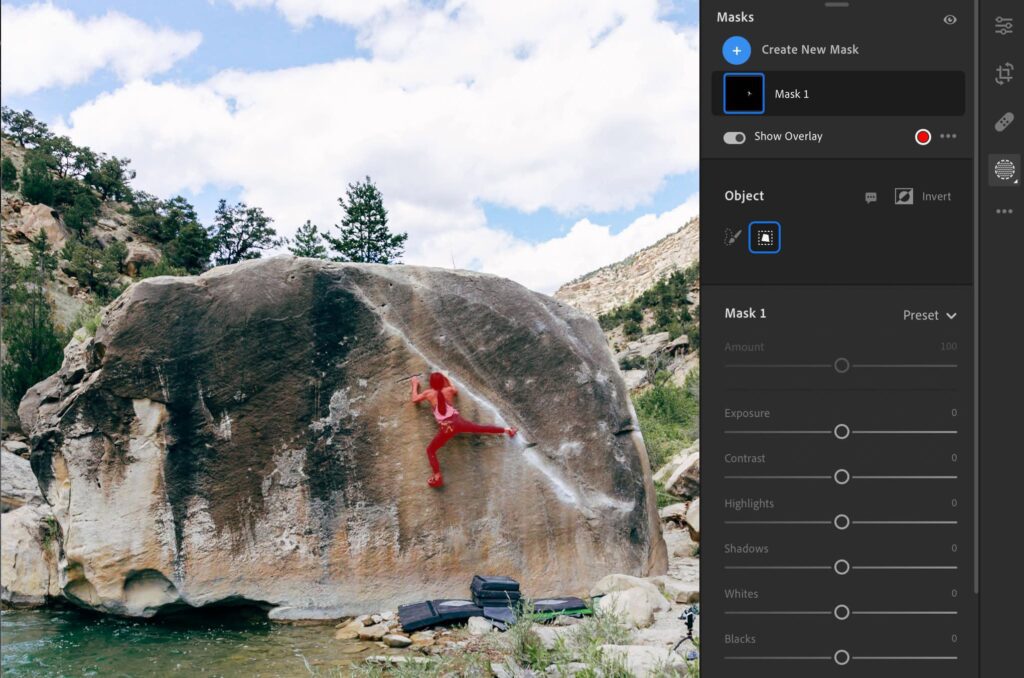
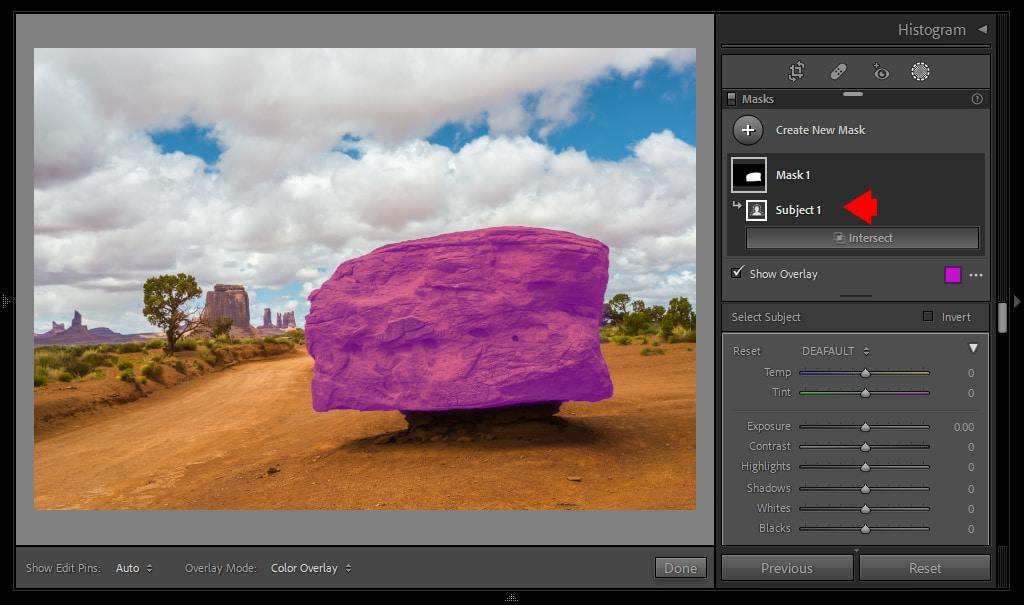
Lightroom’s masking system is one of the most advanced available today.
It can automatically detect:
- Subject
- Background
- Sky
- People
- Hair
- Facial Skin
- Eyes
- Lips
- Teeth
- Clothing
Masks can also be combined using:
- Add
- Subtract
- Intersect
This gives professionals exceptional editing flexibility.
Luminar Neo
Luminar Neo automates masking behind the scenes for many AI tools, reducing manual work.
Examples include:
- Sky AI
- Portrait AI
- Relight AI
- Background Removal
- GenErase
While convenient, it doesn’t offer the same manual masking flexibility as Lightroom.
Winner: AI Masking
Winner: 🏆 Adobe Lightroom AI
Sky Replacement Comparison
Sky replacement has become one of the most popular AI editing features.
Adobe Lightroom AI
Lightroom can isolate skies using AI masks and allows photographers to make independent adjustments.
Users can:
- Darken skies
- Increase saturation
- Add contrast
- Adjust exposure
However, Lightroom doesn’t replace skies automatically with entirely new sky images.
Luminar Neo
Luminar Neo’s Sky AI remains one of the industry’s most impressive AI tools.
It automatically:
- Detects the sky
- Replaces it with realistic alternatives
- Matches lighting
- Adjusts reflections
- Recalculates scene colors
- Blends foreground naturally
The entire process takes only a few seconds.
Winner: Sky Replacement
Winner: 🏆 Luminar Neo
Object Removal Comparison
Removing distractions is now much easier thanks to AI.
Adobe Lightroom AI
Lightroom’s Generative Remove intelligently fills removed areas using Adobe’s generative AI.
Ideal for removing:
- Tourists
- Wires
- Trash
- Signs
- Small distractions
Results are generally clean and realistic.
Luminar Neo
Luminar Neo’s GenErase also removes unwanted objects while intelligently reconstructing surrounding areas.
It performs particularly well on:
- Landscape distractions
- Portrait backgrounds
- Street photography
- Nature scenes
Winner: Object Removal
Both editors perform exceptionally well, with Adobe’s generative technology offering slightly more consistent results across complex scenes.
Winner: 🏆 Adobe Lightroom AI

AI Noise Reduction Comparison
Noise reduction is essential for low-light, wildlife, and event photography.
Adobe Lightroom AI
Adobe’s Denoise AI is considered one of the best AI noise reduction tools currently available.
It preserves:
- Fine details
- Skin texture
- Hair
- Feathers
- Fur
while effectively eliminating digital noise.
Luminar Neo
Luminar Neo also includes AI-powered noise reduction that produces clean images with minimal effort.
Although highly effective, Lightroom generally preserves slightly more fine detail in difficult images.
Winner: Noise Reduction
Winner: 🏆 Adobe Lightroom AI
Batch Editing Comparison
Professional photographers often edit hundreds or thousands of images at a time.
Adobe Lightroom AI
Lightroom excels in batch editing through:
- Copy & Paste Settings
- AI Adaptive Presets
- Sync Adjustments
- Batch Export
- Preset Management
- Smart Collections
This makes it indispensable for wedding, sports, and event photographers.
Luminar Neo
Luminar Neo supports batch editing but offers fewer automation tools compared to Lightroom.
It works well for smaller projects but isn’t as efficient for very large image libraries.
Winner: Batch Editing
Winner: 🏆 Adobe Lightroom AI
User Interface Comparison
Adobe Lightroom AI
The Lightroom interface is designed for professionals.
Advantages:
- Clean layout
- Organized editing panels
- Powerful catalog management
- Advanced controls
New users may need some time to become comfortable with its workflow.
Luminar Neo
Luminar Neo features a modern, intuitive interface focused on speed and simplicity.
Advantages:
- One-click AI tools
- Large visual previews
- Easy navigation
- Beginner-friendly workflow
Most users can begin editing almost immediately.
Winner: User Interface
For beginners and enthusiasts, Luminar Neo offers a more approachable experience.
Winner: 🏆 Luminar Neo
Performance Comparison
Adobe Lightroom AI
Lightroom performs exceptionally well on modern hardware, particularly when GPU acceleration is enabled.
Strengths include:
- Stable performance
- Efficient RAW processing
- Fast catalog browsing
- Excellent export speeds
Luminar Neo
Luminar Neo has improved significantly in recent years.
Strengths include:
- Fast AI processing
- Smooth editing experience
- Efficient creative enhancements
Some AI-intensive features may require more powerful hardware.
Winner: Performance
Both editors perform well, but Lightroom provides greater stability during demanding professional workflows.
Winner: 🏆 Adobe Lightroom AI
Cloud Integration Comparison
Adobe Lightroom AI
Adobe offers seamless cloud synchronization across:
- Windows
- macOS
- iPhone
- iPad
- Android
- Web
Users can begin editing on one device and continue on another without interruption.
Luminar Neo
Luminar Neo focuses primarily on desktop editing.
While cloud options are available through extensions and companion services, they are not as comprehensive as Adobe’s ecosystem.
Winner: Cloud Integration
Winner: 🏆 Adobe Lightroom AI
Mobile Experience Comparison
Adobe Lightroom Mobile
Adobe Lightroom Mobile includes many desktop AI features, making it one of the strongest mobile editing solutions available.
Users can:
- Edit RAW files
- Apply AI masks
- Remove distractions
- Sync edits automatically
Luminar Neo
Luminar Neo currently focuses on desktop workflows, with a more limited mobile experience.
Winner: Mobile Editing
Winner: 🏆 Adobe Lightroom AI
Plugin & Ecosystem Comparison
Adobe Lightroom AI
Lightroom integrates seamlessly with:
- Adobe Photoshop
- Adobe Camera Raw
- Numerous third-party plugins
- Creative Cloud ecosystem
This flexibility benefits professionals working across multiple applications.
Luminar Neo
Luminar Neo can function as a standalone editor and also integrates as a plugin with Lightroom and Photoshop, making it a useful addition to existing workflows.
Winner: Ecosystem
Winner: 🏆 Adobe Lightroom AI
Mid-Article Scorecard
| Category | Winner |
|---|---|
| AI Editing Features | Luminar Neo 🏆 |
| Portrait Editing | Luminar Neo 🏆 |
| Landscape Editing | Luminar Neo 🏆 |
| RAW Processing | Lightroom AI 🏆 |
| AI Masking | Lightroom AI 🏆 |
| Sky Replacement | Luminar Neo 🏆 |
| Object Removal | Lightroom AI 🏆 |
| AI Noise Reduction | Lightroom AI 🏆 |
| Batch Editing | Lightroom AI 🏆 |
| User Interface | Luminar Neo 🏆 |
| Performance | Lightroom AI 🏆 |
| Cloud Integration | Lightroom AI 🏆 |
| Mobile Editing | Lightroom AI 🏆 |
| Plugin Ecosystem | Lightroom AI 🏆 |
Current Result
At this stage, Adobe Lightroom AI leads for professional workflows, RAW processing, batch editing, cloud synchronization, and ecosystem integration. Luminar Neo stands out for creative AI features, portrait enhancement, landscape editing, and its beginner-friendly experience.
Lightroom AI vs Luminar Neo Pricing
Pricing is an important consideration, especially if you plan to use the software regularly for professional work.
Adobe Lightroom AI
Adobe Lightroom is available through an Adobe subscription. Most photographers choose a Creative Cloud Photography plan, which typically includes Lightroom, Photoshop, cloud storage, and ongoing feature updates.
Advantages
- Continuous feature updates
- Access to Photoshop
- Cloud synchronization
- Mobile applications included
- Excellent long-term ecosystem
Considerations
- Requires an ongoing subscription
- Costs can add up over several years
Luminar Neo
Skylum Luminar Neo offers more flexibility. Depending on current offers, users may be able to choose between a subscription and a perpetual (lifetime) license.
Advantages
- Flexible purchase options
- Frequent AI feature updates
- Lower long-term cost for some users
- No requirement to commit to Adobe’s ecosystem
Considerations
- Some AI extensions may require additional purchases
- Cloud features are more limited
Winner: Pricing
If you prefer flexibility and want to avoid being locked into a subscription-only workflow, Luminar Neo offers better value.
Winner: 🏆 Luminar Neo
Lightroom AI Pros & Cons
Pros
- Excellent RAW processing
- Industry-leading AI masking
- Outstanding batch editing
- Reliable non-destructive workflow
- Powerful color management
- Best-in-class catalog organization
- Cloud synchronization across devices
- Seamless Photoshop integration
Cons
- Subscription required
- Higher learning curve
- Creative AI effects are more limited than Luminar Neo
Adobe Lightroom continues to set the standard for professional photo editing with advanced AI masking, RAW processing, cloud synchronization, and seamless integration with Photoshop.
Luminar Neo Pros & Cons
Pros
- Exceptional AI portrait tools
- Industry-leading Sky AI
- Beginner-friendly interface
- Fast one-click enhancements
- Excellent landscape editing
- Creative AI features
- Flexible purchase options
Cons
- Library management isn’t as advanced
- Smaller software ecosystem
- Some AI tools require additional downloads
Which Software Is Better For…
Portrait Photographers
Portrait photographers often need fast skin retouching, face enhancement, eye improvements, and background adjustments.
Best Choice: 🏆 Luminar Neo
Its Face AI, Skin AI, Body AI, and Portrait Bokeh AI significantly reduce editing time while delivering natural-looking results.
Wedding Photographers
Wedding professionals usually process thousands of RAW files from a single event and require consistent editing across entire galleries.
Best Choice: 🏆 Adobe Lightroom AI
Its superior batch editing, catalog management, and AI masking make it ideal for high-volume workflows.
Landscape Photographers
Landscape photographers benefit from dramatic skies, balanced lighting, and atmospheric enhancements.
Best Choice: 🏆 Luminar Neo
Sky AI, Atmosphere AI, and Relight AI help create visually striking landscapes with minimal effort.
Travel Photographers
Travel photographers need a combination of speed, organization, and portability.
Best Choice: 🏆 Adobe Lightroom AI
Cloud synchronization allows photographers to edit on desktop, tablet, or smartphone while keeping projects organized.
Product Photographers
Product photography demands accurate colors, precise masking, and clean backgrounds.
Best Choice: 🏆 Adobe Lightroom AI
Its RAW processing, masking accuracy, and seamless Photoshop integration make it the stronger choice for commercial work.
Beginners
Users new to photo editing often appreciate software that delivers professional-looking results without requiring extensive editing knowledge.
Best Choice: 🏆 Luminar Neo
Its AI-driven interface and one-click enhancements make learning much easier.
Professional Photographers
Professionals typically value reliability, workflow efficiency, color consistency, and ecosystem integration.
Best Choice: 🏆 Adobe Lightroom AI
It remains one of the industry’s most trusted editing platforms.
Content Creators
Bloggers, influencers, and social media creators often prioritize speed and visually appealing edits.
Best Choice: 🏆 Luminar Neo
Creative AI tools allow users to produce eye-catching content in just a few clicks.
Final Verdict
Both Lightroom AI and Luminar Neo are outstanding AI-powered photo editors, but they excel in different areas.
Choose Adobe Lightroom AI if you:
- Edit large collections of RAW files
- Shoot weddings or commercial projects
- Need professional color management
- Want advanced AI masking
- Rely on Adobe Photoshop
- Prefer a complete photography ecosystem
Choose Luminar Neo if you:
- Want powerful AI editing with minimal effort
- Focus on portraits or landscapes
- Prefer one-click creative enhancements
- Are new to photo editing
- Want flexible purchasing options
Overall Winners
| Category | Winner |
|---|---|
| Best Overall Professional Workflow | 🏆 Adobe Lightroom AI |
| Best AI Features | 🏆 Luminar Neo |
| Best RAW Processing | 🏆 Adobe Lightroom AI |
| Best Portrait Editing | 🏆 Luminar Neo |
| Best Landscape Editing | 🏆 Luminar Neo |
| Best Batch Editing | 🏆 Adobe Lightroom AI |
| Best for Beginners | 🏆 Luminar Neo |
| Best for Professionals | 🏆 Adobe Lightroom AI |
| Best Overall Value | 🏆 Luminar Neo |
There isn’t a single winner for every photographer. If your priority is a polished, professional workflow with advanced image management, Lightroom AI is the stronger choice. If you want faster creative editing powered by AI with less manual effort, Luminar Neo offers exceptional value.
Frequently Asked Questions:
Why You Can Trust This Comparison
Choosing between Lightroom AI and Luminar Neo isn’t just about comparing feature lists—it’s about understanding how each editor fits different photography workflows. At The Candid Shoot, we create comparison guides with photographers and content creators in mind, focusing on practical use rather than marketing claims.
Our evaluations are based on factors that genuinely influence the editing experience, including AI capabilities, RAW processing quality, portrait and landscape editing performance, workflow efficiency, ease of use, pricing, and long-term value. We also review official feature documentation, product updates, and real-world workflows to ensure our comparisons remain accurate and relevant.
Instead of declaring a single “winner” for every situation, we explain where each application performs best. A wedding photographer managing thousands of RAW files has different priorities than a travel photographer or a content creator producing social media content. That’s why our recommendations are tailored to different photography styles and experience levels.
As AI photo editing continues to evolve, The Candid Shoot regularly reviews and updates its software comparisons to reflect major feature releases, workflow improvements, and industry developments. Our goal is to help photographers make informed decisions with confidence, whether they’re investing in their first AI editor or upgrading an existing workflow.
Conclusion
Choosing between Adobe Lightroom AI and Luminar Neo ultimately comes down to your photography style, editing workflow, and long-term requirements. Both applications leverage artificial intelligence to simplify photo editing, but they excel in different areas.
If your work involves editing large collections of RAW files, maintaining organized photo libraries, and delivering consistent results for clients, Adobe Lightroom AI remains one of the strongest choices available. Its advanced AI masking, industry-leading RAW processing, batch editing capabilities, and seamless integration with Photoshop make it a trusted solution for professional photographers, wedding studios, commercial creators, and high-volume editing workflows.
On the other hand, Luminar Neo stands out for photographers who want powerful AI-driven enhancements with minimal manual effort. Its intuitive interface, creative tools like Sky AI, Face AI, Skin AI, Relight AI, and GenErase allow users to transform portraits and landscapes quickly while maintaining natural-looking results. For beginners, hobbyists, travel photographers, and content creators, Luminar Neo offers an accessible and highly creative editing experience.
Rather than asking which editor is universally “better,” it’s more useful to ask which one aligns with your workflow.
- Choose Adobe Lightroom AI if you prioritize professional RAW editing, image organization, cloud synchronization, and an efficient editing pipeline.
- Choose Luminar Neo if you want intelligent one-click AI enhancements, portrait retouching, creative landscape editing, and a beginner-friendly interface.
The good news is that both platforms continue to evolve with new AI-powered features, making either one a capable investment for photographers looking to save time and improve image quality. By understanding your editing priorities, budget, and photography goals, you can confidently select the software that best supports your creative workflow.
Find the AI Photo Editor That Matches Your Workflow
Whether you prioritize Lightroom AI’s professional workflow or Luminar Neo’s creative AI capabilities, both editors can dramatically improve your editing efficiency and image quality. The right choice depends on your photography style, experience level, and long-term workflow.
To build a complete AI-powered editing toolkit, explore our AI Photography Guide, Best AI Photo Editors, Best AI Photo Editing Software, AI Photo Retouching Tools, Best AI Image Enhancer, and Best AI Background Remover. These resources will help you choose the best AI solutions for every stage of your photography workflow.
Related Articles
- AI Photography Guide: 35 Powerful Tools, Tips & Techniques
- Best AI Photo Editors
- Best AI Photo Editing Software
- AI Photo Retouching Tools
- Best AI Image Enhancer
- Best AI Background Remover
- AI Product Photography Tools
- AI Image Generator
- AI Photo Restoration Software
- Portrait Photography Guide








Leave a Reply