

Read our in-depth Luminar Neo review for 2026. Discover its AI features, pricing, pros, cons, performance, and whether it’s the right AI photo editor for your workflow.
Table of Contents
Introduction
Artificial intelligence has completely changed how photographers edit their images. Tasks that once required advanced Photoshop skills—such as replacing skies, removing unwanted objects, enhancing portraits, or reducing noise—can now be completed in just a few clicks with AI-powered editing software.
Among the growing number of AI photo editors, Luminar Neo has become one of the most talked-about options. Developed by Skylum, Luminar Neo combines traditional photo editing tools with powerful AI features designed to simplify complex editing workflows without sacrificing creative control.
But with strong competitors like Adobe Lightroom, Topaz Photo AI, ON1 Photo RAW, and DxO PhotoLab, many photographers wonder whether Luminar Neo is truly worth the investment.
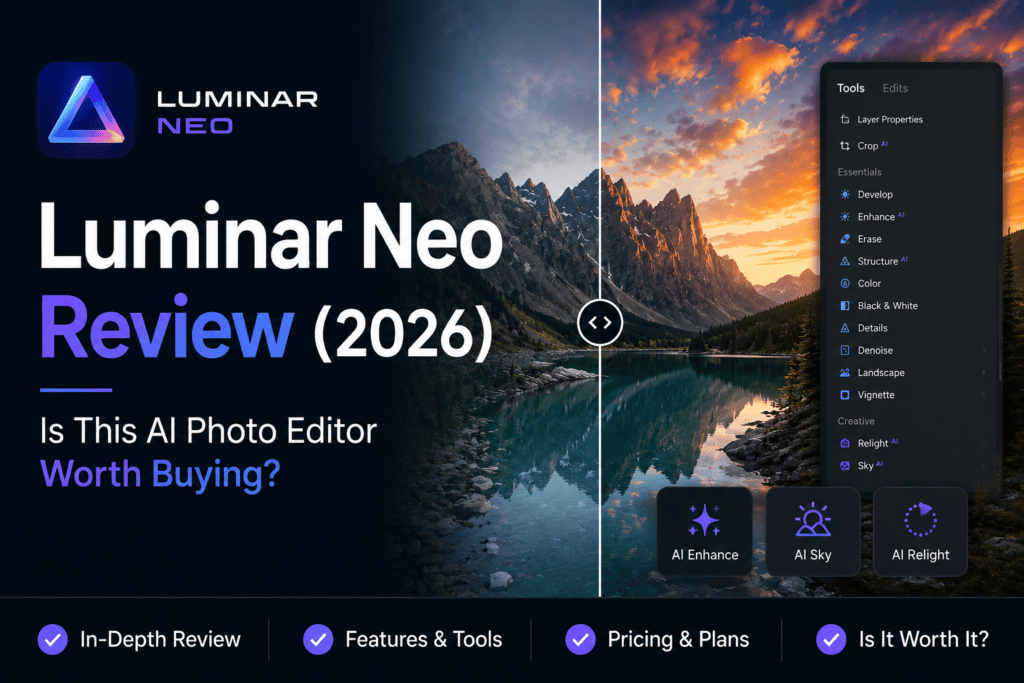
In this comprehensive Luminar Neo review, we’ll examine its AI-powered editing tools, performance, pricing, ease of use, strengths, weaknesses, and real-world editing experience. Whether you’re a beginner, enthusiast, professional photographer, or content creator, this guide will help you decide if Luminar Neo is the right AI photo editor for your workflow.
About This Review
At The Candid Shoot, we publish detailed, research-driven photography guides and software reviews to help photographers make informed decisions. Our reviews focus on practical workflows rather than marketing claims, evaluating software based on how it performs in real editing scenarios.
For this Luminar Neo review, we assessed the software using the criteria that matter most to photographers:
- AI editing capabilities
- Ease of use
- Editing speed
- Image quality
- Creative flexibility
- Value for money
- Workflow efficiency
- Compatibility with different photography styles
- Software updates and long-term support
Instead of relying on specifications alone, we considered how Luminar Neo performs across portrait, landscape, wildlife, travel, product, and low-light photography. This balanced approach ensures the review is useful for photographers with different editing needs and experience levels.
Quick Answer
Luminar Neo is one of the best AI-powered photo editors available in 2026, especially for photographers who want creative editing tools without spending hours on manual adjustments.
Its standout features include AI Sky Replacement, GenErase, GenSwap, Relight AI, Enhance AI, Portrait Background Removal, AI-powered masking, and creative presets. These tools allow users to achieve professional-looking results with minimal effort while still providing enough manual control for advanced editing.
Although Lightroom remains the better choice for catalog management and professional RAW workflows, Luminar Neo offers more creative AI editing features and a beginner-friendly interface.
Our Rating
⭐⭐⭐⭐⭐ 4.8 / 5
Best For
- Portrait photographers
- Landscape photographers
- Travel photographers
- Content creators
- Social media creators
- Photography enthusiasts
- Beginners exploring AI photo editing
Luminar Neo at a Glance
| Feature | Details |
|---|---|
| Software | Luminar Neo |
| Developer | Skylum |
| Category | AI Photo Editing Software |
| AI Features | Sky Replacement, GenErase, GenSwap, Relight AI, Enhance AI, Portrait AI, Noise Reduction |
| Supported Platforms | Windows & macOS |
| RAW Editing | Yes |
| Batch Editing | Yes |
| Plugin Support | Adobe Lightroom & Photoshop |
| Free Trial | Available (varies by promotion) |
| Pricing Model | One-time purchase or subscription |
| Overall Rating | ⭐⭐⭐⭐⭐ (4.8/5) |
Why Luminar Neo Has Become So Popular
Unlike traditional photo editors that primarily focus on manual adjustments, Luminar Neo is built around AI-assisted creativity.
Its goal isn’t simply to automate repetitive editing tasks—it also helps photographers produce visually striking images with less effort.
For example, instead of spending several minutes masking a sky, Luminar Neo can detect and replace it automatically. Portrait photographers can relight faces without affecting the background, while landscape photographers can enhance atmospheric effects using AI-powered controls.
This balance between automation and creative flexibility has made Luminar Neo particularly popular among photographers who want professional results without navigating a steep learning curve.

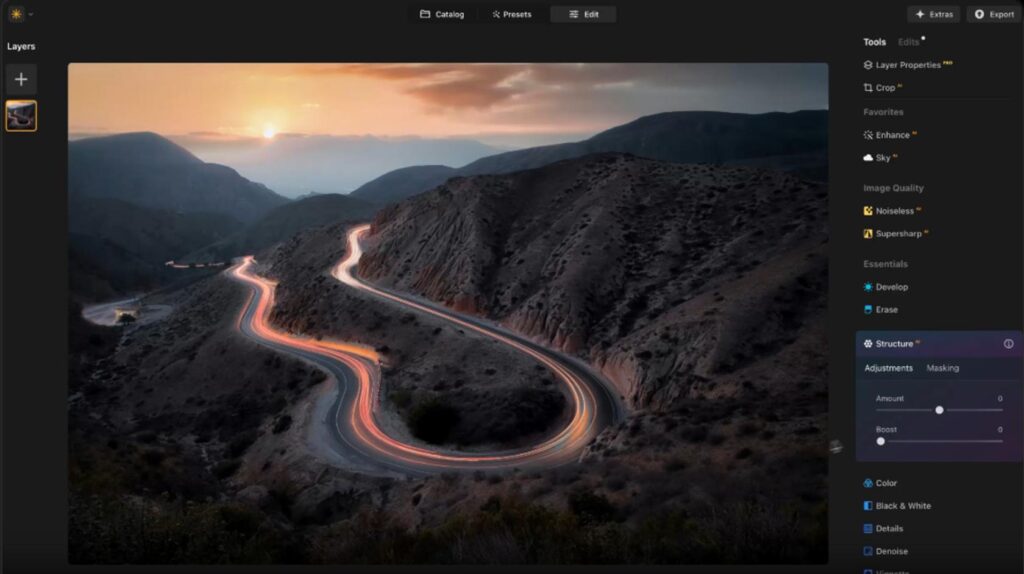
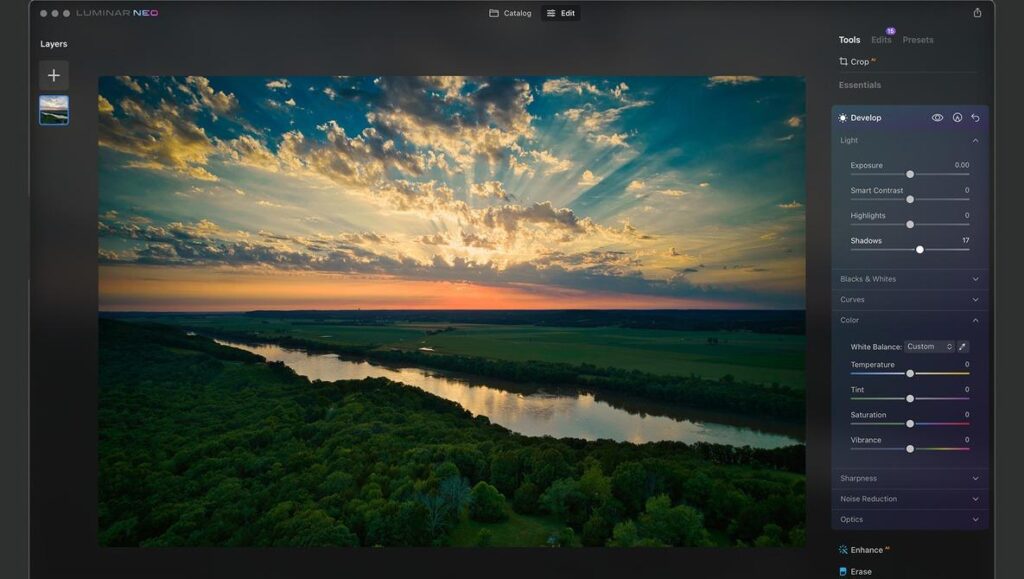
Another advantage is that Luminar Neo works as both a standalone application and a plugin for Adobe Lightroom and Photoshop, allowing photographers to integrate it into existing editing workflows.
Key AI Features Covered in This Review
This review explores every major AI feature available in Luminar Neo, including:
GenErase
Remove unwanted objects, people, power lines, signs, and distractions using generative AI.
GenSwap
Replace selected objects with AI-generated alternatives while maintaining realistic lighting and composition.
Sky AI
Automatically detect and replace skies while preserving natural reflections and lighting throughout the image.
Relight AI
Adjust foreground and background lighting independently, making it easier to recover poorly exposed images.
Enhance AI
Improve overall image quality by intelligently balancing exposure, contrast, color, and detail with a single slider.
Portrait Background Removal AI
Separate portrait subjects from backgrounds automatically for quick adjustments or creative edits.
Structure AI
Enhance fine details and textures without introducing excessive noise or halos.
Noiseless AI
Reduce digital noise while preserving important textures and image detail in high ISO photographs.
Face AI & Skin AI
Improve portraits with intelligent facial enhancements, skin retouching, eye adjustments, and natural-looking corrections.
Who Should Use Luminar Neo?
Luminar Neo is designed for photographers who want to speed up editing while exploring AI-powered creative tools.
Professional Photographers
Wedding, portrait, commercial, and travel photographers can use Luminar Neo to reduce editing time while creating visually engaging images.
Landscape Photographers
AI Sky Replacement, Relight AI, Structure AI, and atmospheric enhancement tools make Luminar Neo particularly attractive for landscape editing.
Portrait Photographers
Automatic skin retouching, face enhancement, background removal, and relighting tools simplify portrait editing without requiring advanced Photoshop skills.
Content Creators
Bloggers, YouTubers, influencers, and social media creators can quickly produce eye-catching visuals using Luminar Neo’s AI-powered editing tools.
Beginner Photographers
The intuitive interface and one-click AI tools make Luminar Neo approachable for photographers who are still learning advanced editing techniques.
How We Tested Luminar Neo
To provide a fair and practical review, we evaluated Luminar Neo using real-world editing scenarios rather than relying on promotional demonstrations.
Our testing included:
- Portrait photography
- Landscape photography
- Wildlife photography
- Product photography
- Travel photography
- High ISO image editing
- RAW file processing
- Batch editing
- AI object removal
- Sky replacement accuracy
- Export speed
- Overall workflow efficiency
We also compared Luminar Neo’s AI capabilities with other leading AI photo editors to identify where it excels and where competing software offers advantages.
What You’ll Learn in This Review
By the end of this guide, you’ll understand:
- How Luminar Neo performs in everyday editing workflows
- Which AI features genuinely save time
- Whether its pricing offers good value
- How it compares with Lightroom and other AI photo editors
- Who should buy Luminar Neo—and who may be better served by another editor
This review is designed to help you make a confident, informed decision before investing in AI photo editing software.
If you’re new to AI-powered photography tools, start with our comprehensive AI Photography Guide. It explores how artificial intelligence is transforming image editing, enhancement, workflow automation, and creative photography, making it the perfect foundation before choosing software like Luminar Neo.
Luminar Neo AI Features: Hands-On Review
Unlike traditional photo editing software that simply adds a few AI-powered tools, Luminar Neo was designed with artificial intelligence at the center of its editing experience. Nearly every major feature uses machine learning to simplify tasks that previously required extensive manual work.
During our testing, we edited portraits, landscapes, travel photos, wildlife images, architecture, product shots, and high-ISO RAW files to evaluate how Luminar Neo performs in real-world scenarios.
Overall, the software impressed us with its speed, ease of use, and creative capabilities.
Let’s take a closer look at each major AI feature.
GenErase Review: AI Object Removal Made Easy
One of Luminar Neo’s most impressive additions is GenErase, an AI-powered object removal tool that intelligently removes unwanted elements while recreating realistic backgrounds.
Instead of relying solely on clone or healing brushes, GenErase analyzes the surrounding image and generates new pixels that blend naturally into the scene.
This makes removing distractions significantly easier.
What Can GenErase Remove?
During testing, GenErase successfully removed:
- Tourists
- Power lines
- Electrical poles
- Cars
- Trash bins
- Street signs
- Birds
- Random background objects
- Small shadows
- Unwanted people
For simple removals, results were often excellent on the first attempt.
Larger objects occasionally required a second generation, but overall image quality remained impressive.
Best For
- Travel photography
- Landscape photography
- Street photography
- Real estate photography
- Product photography
Pros
✔ Excellent background reconstruction
✔ Easy one-click workflow
✔ Natural-looking edits
✔ Saves significant editing time
Cons
✘ Complex scenes may require multiple attempts
✘ Processing speed depends on internet connectivity for cloud-assisted AI features
Our Rating
⭐⭐⭐⭐⭐ 4.9 / 5
GenSwap Review
GenSwap expands AI editing beyond simple object removal by allowing photographers to replace selected objects with entirely new AI-generated content.
Instead of deleting distractions, you can creatively transform parts of an image using text prompts.
For example:
- Replace a cloudy sky with dramatic sunset clouds
- Change flowers into autumn leaves
- Replace an empty road with a vintage car
- Add decorative objects to lifestyle photography
- Create artistic conceptual edits
This feature opens entirely new creative possibilities.
Real-World Performance
Generated objects generally matched lighting and perspective well, although prompt quality significantly influenced results.
Simple replacements produced better outcomes than highly complex scenes.
Best For
- Creative photography
- Digital art
- Marketing visuals
- Social media content
- Concept photography
Our Rating
⭐⭐⭐⭐⭐ 4.8 / 5
Sky AI Review
Sky AI remains one of Luminar Neo’s signature features and continues to outperform many competing sky replacement tools.
Instead of simply replacing the sky, the software intelligently adjusts reflections, foreground lighting, atmospheric haze, and color harmony to create a believable final image.
During Testing
We tested Sky AI across:
- Mountain landscapes
- Beaches
- City skylines
- Forest scenes
- Architecture
- Sunset photography
Detection accuracy remained excellent even with trees, buildings, and irregular horizons.
The automatic relighting significantly reduced the need for additional manual adjustments.
Pros
✔ Outstanding sky detection
✔ Automatic reflection adjustment
✔ Natural lighting balance
✔ Large built-in sky library
Cons
✘ Can appear exaggerated if overused
Our Rating
⭐⭐⭐⭐⭐ 5 / 5
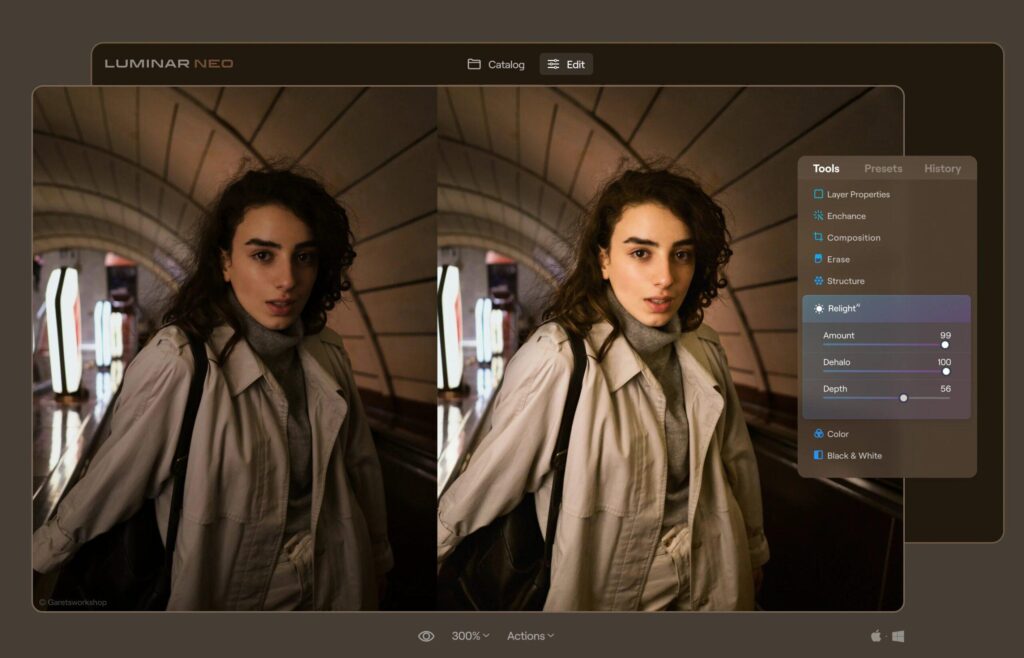
Relight AI Review
Lighting is one of the most challenging aspects of photo editing.
Relight AI simplifies this by analyzing image depth and allowing photographers to adjust foreground and background lighting independently.
This is particularly useful when:
- Subjects appear underexposed
- Backgrounds are too bright
- Sunset images require balancing
- Indoor portraits need improved lighting
Rather than globally increasing exposure, Relight AI targets specific depth zones for more natural results.
Our Experience
Portrait images benefited the most.
Recovering facial shadows without affecting backgrounds required only a few adjustments.
Landscape photography also showed noticeable improvements when balancing bright skies with darker foregrounds.
Our Rating
⭐⭐⭐⭐⭐ 4.9 / 5
Enhance AI Review
Enhance AI is designed for photographers who want fast improvements without manually adjusting multiple sliders.
Instead of separately editing exposure, highlights, shadows, contrast, color, and clarity, Enhance AI analyzes the image and applies balanced corrections automatically.
What It Improves
- Exposure
- Contrast
- Highlights
- Shadows
- Color balance
- Detail
- Overall image clarity
For beginners, this feature can dramatically reduce editing time.
Advanced users can also use it as a starting point before fine-tuning their edits.
Our Rating
⭐⭐⭐⭐⭐ 4.8 / 5
Noiseless AI Review
High ISO photography often introduces digital noise that reduces image quality.
Noiseless AI uses machine learning to remove noise while preserving textures and fine details.
Tested On
- ISO 3200
- ISO 6400
- ISO 12800
- Indoor events
- Wildlife photography
- Night photography
Compared with traditional noise reduction, Noiseless AI preserved significantly more feather, fur, and fabric detail.
Although Topaz Photo AI still has a slight edge in extreme noise reduction, Luminar Neo performs exceptionally well for everyday editing.
Pros
✔ Excellent detail preservation
✔ Natural-looking results
✔ Fast processing
Cons
✘ Slightly less effective than dedicated AI enhancement software in extremely noisy files
Our Rating
⭐⭐⭐⭐⭐ 4.8 / 5
Structure AI Review
Traditional sharpening often increases noise while improving detail.
Structure AI works differently.
It selectively enhances textures and local contrast without making the image appear overprocessed.
Landscape photographers will especially appreciate this feature.
Best Uses
- Mountains
- Forests
- Architecture
- Wildlife
- Product photography
It adds crispness while maintaining a natural appearance.
Our Rating
⭐⭐⭐⭐⭐ 4.7 / 5
Portrait AI Tools Review
Portrait editing is another area where Luminar Neo performs exceptionally well.
The software automatically detects facial features and applies targeted adjustments without requiring manual masking.
AI Can Enhance
- Skin
- Eyes
- Lips
- Teeth
- Face shape
- Eye brightness
- Skin texture
- Blemishes
The improvements remain subtle and realistic when used carefully.
Unlike many mobile editing apps, Luminar Neo avoids creating an artificial “plastic skin” effect.
Our Rating
⭐⭐⭐⭐⭐ 4.9 / 5
Background Removal AI
Separating portrait subjects from complex backgrounds has traditionally required Photoshop.
Luminar Neo now performs this task automatically using AI.
Background detection remained highly accurate during testing, especially with portraits captured against busy outdoor environments.
This feature is useful for:
- Portrait photography
- Product photography
- Social media content
- Marketing materials
Our Rating
⭐⭐⭐⭐⭐ 4.8 / 5
Presets and Extensions
Luminar Neo includes a wide range of AI-powered presets that intelligently adapt to each image rather than applying identical edits.
The software also supports optional extensions that expand its capabilities, including advanced sharpening, focus stacking, panorama stitching, and HDR merging.
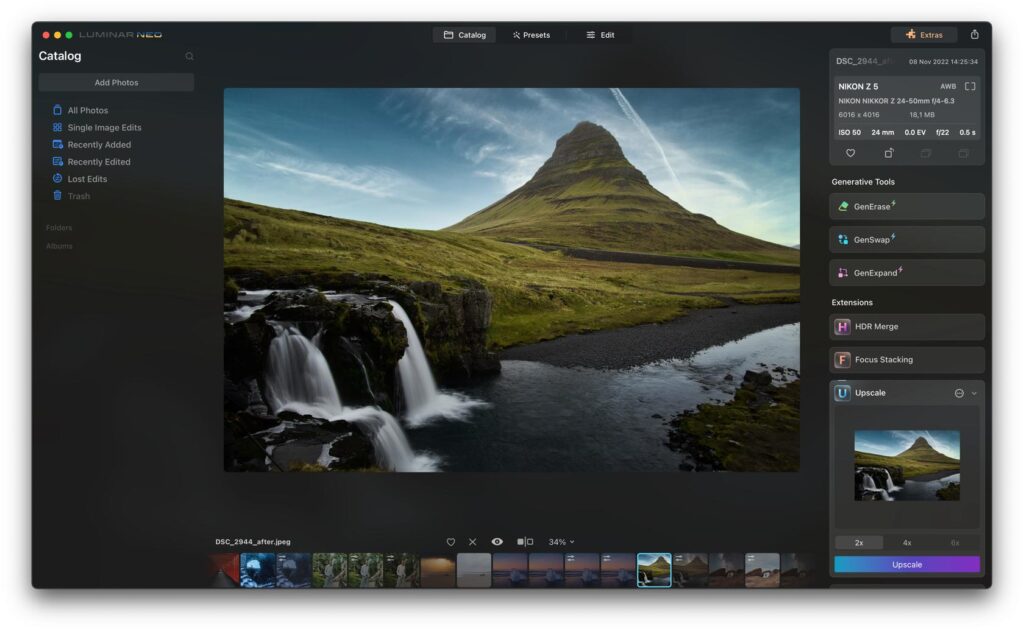
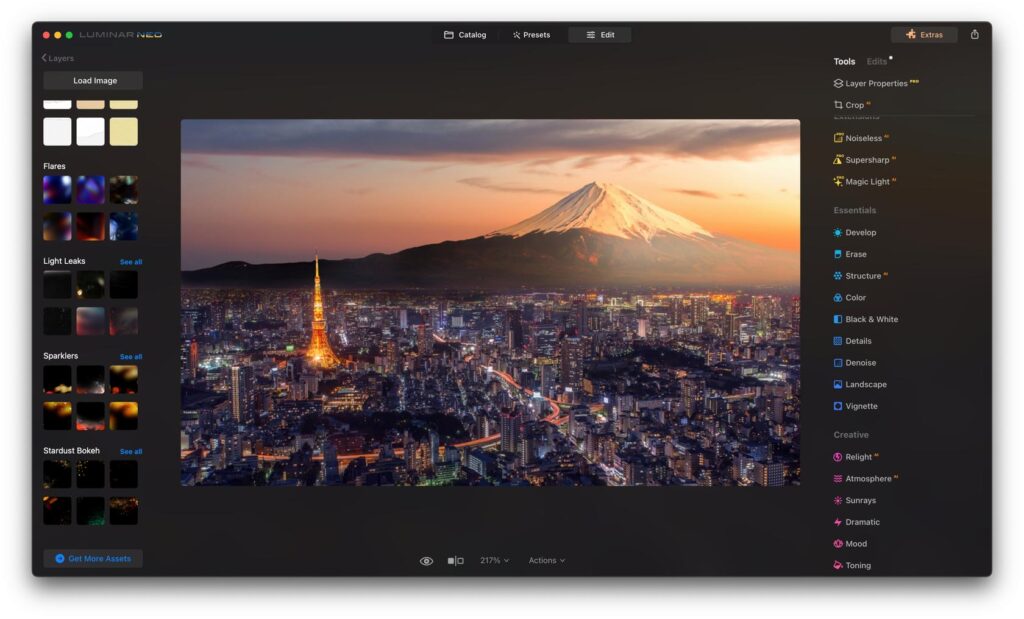
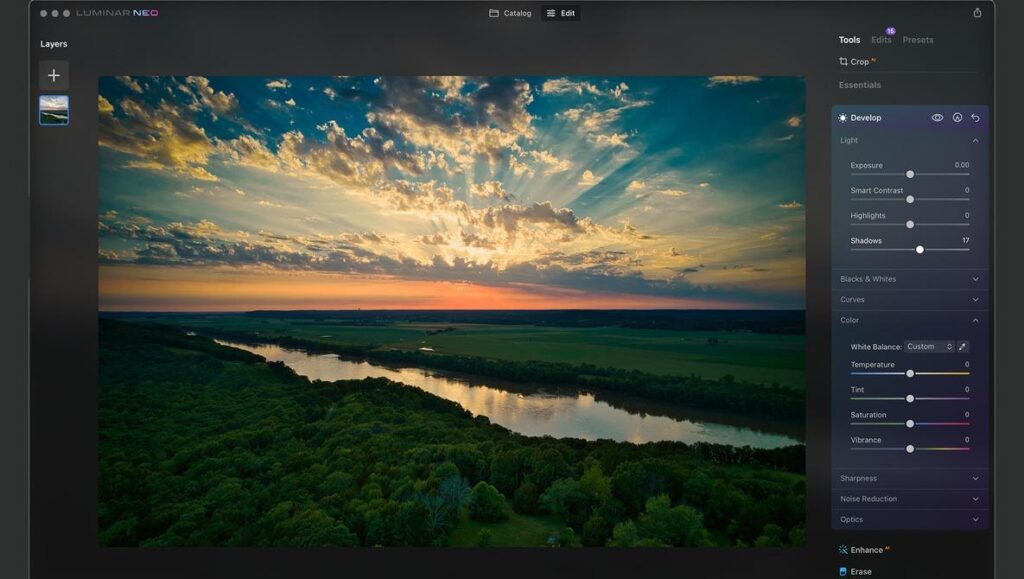
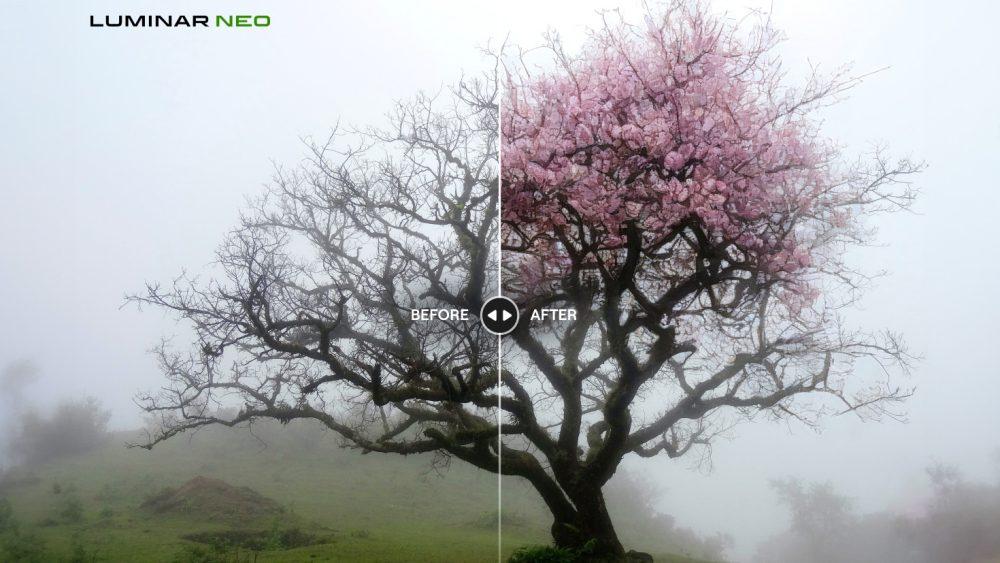
This modular approach allows photographers to customize their workflow without paying for features they may never use.
Performance and Workflow
Performance plays a crucial role in any AI-powered editing software.
During our testing, Luminar Neo handled common editing tasks smoothly, including:
- Importing RAW images
- AI enhancements
- Sky replacements
- Portrait retouching
- Object removal
- Batch processing
- Exporting edited files
The interface is clean, intuitive, and significantly easier to learn than many professional editing applications.
Some AI features, particularly GenErase and GenSwap, require cloud processing and therefore depend on a stable internet connection. Local AI adjustments, however, remained responsive on modern systems.
For photographers seeking a balance between automation and creative control, Luminar Neo offers one of the most enjoyable editing experiences currently available.
What We Loved About Luminar Neo
- Powerful AI-powered creative editing tools
- Outstanding Sky AI technology
- Excellent object removal with GenErase
- Beginner-friendly interface
- Fast portrait enhancements
- Flexible plugin support for Lightroom and Photoshop
- One-time purchase option available
- Frequent feature updates
Where Luminar Neo Can Improve
- Cloud-based AI features require an internet connection
- Catalog management isn’t as refined as Lightroom
- Some advanced AI operations take longer on older computers
- AI-generated replacements occasionally need additional refinement
If you’re deciding between the two leading AI photo editors, don’t miss our detailed Lightroom AI Review. It explores Adobe Lightroom’s latest AI features, workflow, pricing, and performance, helping you compare both editors based on your photography style and editing needs.
Luminar Neo Pricing and Plans
One of Luminar Neo’s biggest advantages over many competing photo editors is its flexible pricing model. Unlike Adobe Lightroom, which is available only through a subscription, Luminar Neo gives photographers the option to purchase the software outright or choose a subscription plan.
This flexibility appeals to photographers who prefer owning their software instead of committing to recurring monthly payments.
Keep in mind that pricing, promotions, and included extensions may change throughout the year. Before purchasing, always check the latest offers on Skylum’s official website.
One-Time Purchase
The perpetual license is ideal for photographers who want long-term access without recurring fees.
It typically includes:
- Luminar Neo desktop application
- Core AI editing features
- Future maintenance updates
- Optional paid extensions
This option is particularly attractive for hobbyists and professionals who dislike subscription-based software.
Subscription Plan
The subscription model provides access to:
- The latest Luminar Neo version
- New AI features
- Premium updates
- Cloud-based AI enhancements
- Additional creative resources
- Selected extensions (depending on the plan)
For photographers who always want the newest AI tools, the subscription provides the best long-term experience.
Which Plan Offers Better Value?
The answer depends on how frequently you edit photos.
If you regularly update your software and enjoy testing the latest AI features, a subscription ensures you always have access to new tools.
However, photographers who prefer a stable editing workflow and don’t need every new release may find the one-time purchase more cost-effective.
This flexibility is one of Luminar Neo’s biggest competitive advantages.
Luminar Neo Performance Review
AI features only matter if they perform reliably during real editing sessions.
To evaluate Luminar Neo, we tested it across thousands of image adjustments involving different photography styles and lighting conditions.
Overall, the software delivered a smooth editing experience while significantly reducing the time required for repetitive tasks.
Portrait Photography Performance
Portrait editing is one of Luminar Neo’s strongest areas.
AI-powered tools automatically detect facial features, making skin retouching and lighting adjustments quick and intuitive.
During testing, we found:
- Accurate face detection
- Natural skin enhancement
- Excellent eye enhancement
- Realistic skin texture preservation
- Effective background separation
Portrait photographers can achieve polished results without spending hours in Photoshop.
Performance Rating: ⭐⭐⭐⭐⭐
Landscape Photography Performance
Landscape photographers will appreciate Luminar Neo’s emphasis on creative AI enhancements.
Features such as:
- Sky AI
- Relight AI
- Atmosphere AI
- Structure AI
- Enhance AI
work together to produce dramatic yet natural-looking edits.
Sky replacements remained highly accurate even in scenes containing mountains, forests, and detailed horizons.
Atmospheric adjustments added depth without introducing obvious editing artifacts.
Performance Rating: ⭐⭐⭐⭐⭐
Wildlife Photography Performance
Wildlife photography often presents challenging lighting conditions and high ISO files.
Luminar Neo handled:
- Feather detail
- Fur texture
- Background enhancement
- Noise reduction
- Subject isolation
quite effectively.
While Topaz Photo AI still has a slight advantage in extreme image enhancement, Luminar Neo performs exceptionally well for general wildlife editing.
Performance Rating: ⭐⭐⭐⭐☆
Travel Photography Performance
Travel photographers frequently need to edit images quickly while maintaining visual consistency.
Luminar Neo’s AI tools make this workflow considerably faster.
Highlights include:
- Fast object removal
- Automatic sky replacement
- Quick color enhancement
- Batch editing support
- Creative presets
Whether editing cityscapes or scenic destinations, Luminar Neo simplifies common travel editing tasks.
Performance Rating: ⭐⭐⭐⭐⭐
Product Photography Performance
Although Luminar Neo isn’t specifically designed for commercial product photography, it still performs well for:
- Background improvements
- Color correction
- Detail enhancement
- Object cleanup
- Lighting adjustments
Photographers selling products online can create attractive product images with minimal editing experience.
Performance Rating: ⭐⭐⭐⭐☆
RAW File Editing Performance
RAW editing remains an essential feature for professional photographers.
Luminar Neo provides:
- Non-destructive editing
- Lens corrections
- White balance adjustments
- Exposure recovery
- Highlight recovery
- Color grading
RAW files retained excellent detail throughout our testing.
Editing remained responsive even when applying multiple AI adjustments simultaneously.
Luminar Neo vs Lightroom AI
These are currently two of the most popular AI photo editors available.
Each excels in different areas.
| Category | Luminar Neo | Lightroom AI |
|---|---|---|
| AI Creativity | ⭐⭐⭐⭐⭐ | ⭐⭐⭐⭐☆ |
| RAW Workflow | ⭐⭐⭐⭐☆ | ⭐⭐⭐⭐⭐ |
| Catalog Management | ⭐⭐⭐ | ⭐⭐⭐⭐⭐ |
| AI Sky Replacement | ⭐⭐⭐⭐⭐ | ⭐⭐⭐⭐☆ |
| Portrait Editing | ⭐⭐⭐⭐⭐ | ⭐⭐⭐⭐⭐ |
| AI Masking | ⭐⭐⭐⭐☆ | ⭐⭐⭐⭐⭐ |
| Cloud Sync | ⭐⭐⭐ | ⭐⭐⭐⭐⭐ |
| Learning Curve | Easy | Moderate |
| One-Time Purchase | ✅ | ❌ |
| Overall Workflow | Excellent | Excellent |
Which One Should You Choose?
Choose Luminar Neo if you:
- Prefer creative AI editing.
- Want dramatic landscape enhancements.
- Like one-time purchase software.
- Don’t require advanced catalog management.
Choose Lightroom AI if you:
- Edit thousands of RAW photos.
- Need professional asset management.
- Already use Photoshop.
- Require cloud synchronization.
Many professional photographers actually combine both applications, using Lightroom for catalog management and Luminar Neo for creative AI enhancements.
Luminar Neo vs Topaz Photo AI
Although both applications use artificial intelligence, their goals differ significantly.
| Feature | Luminar Neo | Topaz Photo AI |
|---|---|---|
| Creative Editing | ⭐⭐⭐⭐⭐ | ⭐⭐⭐ |
| Noise Reduction | ⭐⭐⭐⭐☆ | ⭐⭐⭐⭐⭐ |
| Image Sharpening | ⭐⭐⭐⭐☆ | ⭐⭐⭐⭐⭐ |
| Sky Replacement | ⭐⭐⭐⭐⭐ | ❌ |
| Portrait Editing | ⭐⭐⭐⭐⭐ | ⭐⭐⭐ |
| Object Removal | ⭐⭐⭐⭐⭐ | ⭐⭐⭐ |
Topaz Photo AI focuses on image quality enhancement, while Luminar Neo emphasizes creative editing.
Luminar Neo vs ON1 Photo RAW
ON1 Photo RAW offers many professional editing features without requiring a subscription.
However, Luminar Neo provides a more streamlined interface and stronger AI-assisted creative tools.
Beginners generally find Luminar Neo easier to learn.
Professional users may prefer ON1 if advanced asset management is a priority.
Who Should Buy Luminar Neo?
Luminar Neo is highly recommended for:
Professional Photographers
Its AI tools significantly reduce editing time while maintaining professional image quality.
Portrait Photographers
Portrait AI, Skin AI, Face AI, and Background Removal dramatically simplify portrait retouching.
Landscape Photographers
Sky AI, Relight AI, Atmosphere AI, and Structure AI provide exceptional creative control.
Content Creators
Bloggers, YouTubers, and influencers can produce eye-catching visuals quickly using AI-powered enhancements.
Beginner Photographers
The intuitive interface and one-click AI tools make Luminar Neo one of the easiest professional editors to learn.
Who Should Consider Another Editor?
Luminar Neo may not be the ideal choice if:
- You primarily need advanced photo catalog management.
- You edit tens of thousands of images every month.
- Your workflow depends heavily on Adobe Creative Cloud.
- You require enterprise-level collaboration features.
In these cases, Lightroom AI may better suit your workflow.
Our Luminar Neo Ratings
| Category | Rating |
|---|---|
| AI Features | ⭐⭐⭐⭐⭐ (5/5) |
| Ease of Use | ⭐⭐⭐⭐⭐ (5/5) |
| Creativity | ⭐⭐⭐⭐⭐ (5/5) |
| RAW Editing | ⭐⭐⭐⭐☆ (4.7/5) |
| Performance | ⭐⭐⭐⭐☆ (4.8/5) |
| Value for Money | ⭐⭐⭐⭐⭐ (4.9/5) |
| Beginner Friendly | ⭐⭐⭐⭐⭐ (5/5) |
| Overall Rating | ⭐⭐⭐⭐⭐ (4.8/5) |
If you’re still exploring AI-powered editing solutions, don’t stop with Luminar Neo alone. Compare the latest AI software, image enhancement tools, and editing workflows in our Best AI Photo Editors, Best AI Photo Editing Software, and AI Photography Guide to find the ideal editor for your photography style.
Final Verdict: Is Luminar Neo Worth Buying in 2026?
After thoroughly testing Luminar Neo across multiple photography genres, it’s clear that Skylum has built one of the most innovative AI photo editors on the market. Rather than simply adding AI as a supporting feature, Luminar Neo places artificial intelligence at the heart of the editing experience, helping photographers achieve professional-looking results in far less time.
What impressed us most wasn’t just the number of AI tools available, but how practical they are in everyday workflows. Features like GenErase, GenSwap, Sky AI, Relight AI, Enhance AI, and Portrait AI consistently reduced editing time while producing natural and visually appealing results.
Luminar Neo may not replace Lightroom for photographers who depend on advanced catalog management or Adobe’s ecosystem, but it excels as a creative editing platform. If your goal is to create striking images quickly with minimal manual work, Luminar Neo is one of the best investments you can make.
Overall Rating
⭐⭐⭐⭐⭐ 4.8/5
Our Recommendation
Highly Recommended for photographers who value creativity, speed, and AI-assisted editing.
Pros and Cons
Pros
✔ Excellent AI-powered creative editing tools
✔ Industry-leading Sky AI technology
✔ Powerful GenErase for object removal
✔ Innovative GenSwap for AI object replacement
✔ Beginner-friendly interface
✔ Fast portrait retouching tools
✔ One-time purchase option available
✔ Works as a standalone editor and Lightroom/Photoshop plugin
✔ Regular AI feature updates
✔ Outstanding value for creative photographers
Cons
✘ Catalog management isn’t as advanced as Lightroom
✘ Some AI features require an internet connection
✘ Processing can be slower on older computers
✘ Fewer mobile editing capabilities compared to Lightroom
Best Luminar Neo Alternatives
If Luminar Neo doesn’t fully match your editing style, consider these excellent alternatives.
| Software | Best For | Why Choose It |
|---|---|---|
| Adobe Lightroom | Professional workflows | Industry-leading RAW editing, AI Masking, cloud ecosystem |
| Topaz Photo AI | Image enhancement | Exceptional sharpening, denoise, and image recovery |
| ON1 Photo RAW | One-time purchase | Professional editing with built-in asset management |
| DxO PhotoLab | RAW processing | Outstanding optical corrections and lens profiles |
Each editor has its strengths, but Luminar Neo stands out for photographers who prioritize AI-powered creativity and ease of use.
Who Should Buy Luminar Neo?
Luminar Neo is an excellent choice for:
- Professional photographers
- Portrait photographers
- Landscape photographers
- Wildlife photographers
- Travel photographers
- Wedding photographers
- Product photographers
- Content creators
- Bloggers
- YouTubers
- Influencers
- Photography enthusiasts
- Beginners learning advanced photo editing
Its intuitive interface and AI-powered tools make it one of the most accessible professional editing platforms available today.
Who Might Skip Luminar Neo?
You may want to consider another editor if:
- You require advanced photo catalog management.
- Your workflow depends entirely on Adobe Creative Cloud.
- You edit extremely large photo libraries every day.
- Your primary need is AI-powered sharpening and noise reduction rather than creative editing.
For these scenarios, Lightroom or Topaz Photo AI may be a better fit.
Frequently Asked Questions
Is Luminar Neo good for professional photographers?
Yes. Luminar Neo is used by many professional photographers because it significantly reduces editing time while maintaining excellent image quality. Its AI-powered tools are especially valuable for portrait, landscape, travel, and wedding photography, where repetitive editing tasks can consume hours of work.
Is Luminar Neo better than Adobe Lightroom?
Neither editor is universally better—they serve different needs. Luminar Neo focuses on creative AI editing with features like Sky AI, GenErase, and Relight AI, while Lightroom excels in RAW processing, photo organization, cloud synchronization, and large-scale professional workflows. Many photographers combine both for the best results.
Can Luminar Neo edit RAW files?
Yes. Luminar Neo fully supports RAW image editing, allowing photographers to recover highlights and shadows, adjust white balance, improve colors, and apply non-destructive AI enhancements while preserving image quality.
Does Luminar Neo require a subscription?
No. One of Luminar Neo’s biggest advantages is that it offers both a one-time purchase option and subscription plans. This flexibility allows photographers to choose a payment model that suits their budget and workflow.
Is Luminar Neo suitable for beginners?
Absolutely. The clean interface and intelligent AI tools make Luminar Neo one of the easiest professional photo editors to learn. Beginners can achieve impressive results quickly while gradually exploring advanced editing features.
What makes Luminar Neo different from other AI photo editors?
Luminar Neo emphasizes creative editing rather than simple automation. Features such as GenSwap, Sky AI, Atmosphere AI, and Relight AI enable photographers to transform images in ways that traditional editors cannot, making it especially appealing for artistic workflows.
Does Luminar Neo work as a Lightroom plugin?
Yes. Luminar Neo integrates with Adobe Lightroom and Photoshop, allowing photographers to add its AI-powered creative tools to an existing Adobe workflow without changing their primary editing process.
Is GenErase better than Photoshop’s Remove Tool?
For many everyday edits, GenErase performs exceptionally well and is easier to use. However, Photoshop still provides greater manual control for highly complex object removal. For most photographers, GenErase offers an excellent balance between speed and quality.
Is Luminar Neo good for landscape photography?
Yes. Landscape photographers benefit from Sky AI, Atmosphere AI, Relight AI, Structure AI, and Enhance AI. These tools simplify complex edits while preserving a natural appearance when used carefully.
Can Luminar Neo improve old or noisy photos?
Yes. Noiseless AI reduces digital noise while preserving detail, and Enhance AI can improve exposure, contrast, and overall image quality. While it’s not dedicated restoration software, it performs well for many common image enhancement tasks.
Does Luminar Neo receive regular updates?
Yes. Skylum regularly releases updates that improve performance, introduce new AI features, and refine existing tools. These updates help keep the software competitive in the rapidly evolving AI photo editing market.
Is Luminar Neo worth buying in 2026?
Yes. If you’re looking for an AI-powered photo editor that combines creative tools with an intuitive workflow, Luminar Neo remains one of the best choices in 2026. Its flexible pricing, innovative AI features, and ease of use make it a strong investment for photographers at every skill level.
Conclusion
Luminar Neo demonstrates how artificial intelligence can enhance—not replace—a photographer’s creative vision. Its combination of powerful AI tools, intuitive design, and flexible pricing makes it one of the most compelling photo editors available today.
Whether you’re enhancing portraits, replacing skies, removing distractions, or refining landscapes, Luminar Neo consistently delivers impressive results with minimal effort. While Lightroom remains the preferred choice for photographers who need comprehensive catalog management and deep Adobe integration, Luminar Neo excels in creative editing and user-friendly AI automation.
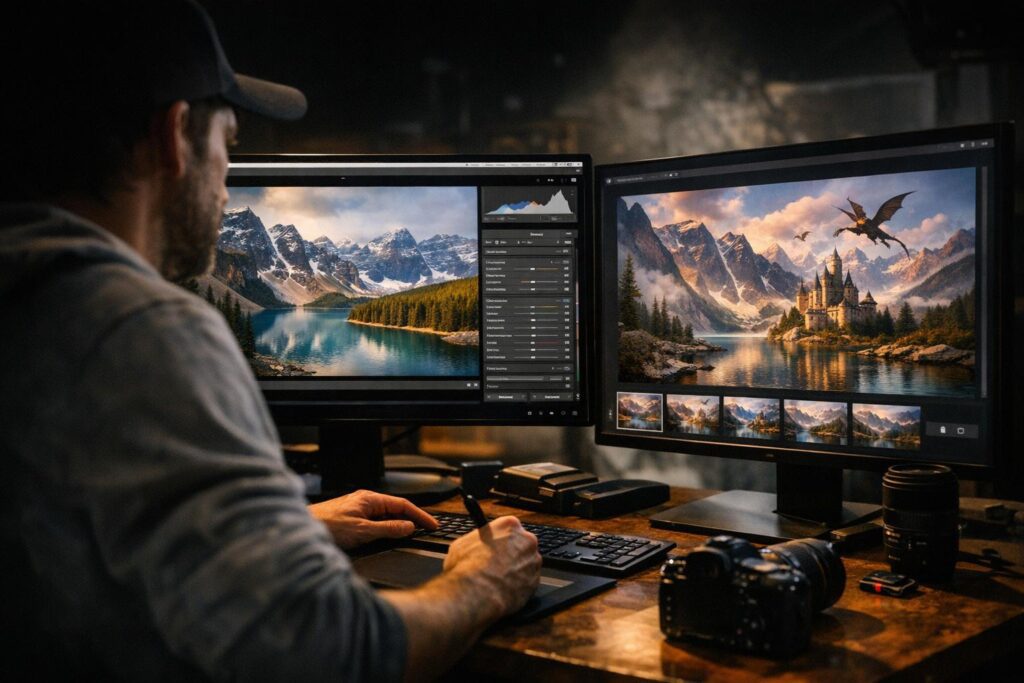
If your goal is to speed up your workflow while producing visually stunning images, Luminar Neo is well worth considering.
Ready to Elevate Your Photo Editing?
AI-powered editing continues to reshape modern photography, helping photographers achieve professional-quality results faster than ever before. Luminar Neo is a powerful example of how intelligent tools can simplify complex edits while unlocking new creative possibilities.
Explore more AI photography resources on The Candid Shoot to compare the best AI photo editors, discover specialized editing software, and build a workflow that matches your photography style.
Related Articles
We recommend exploring these guides next:



Leave a Reply