
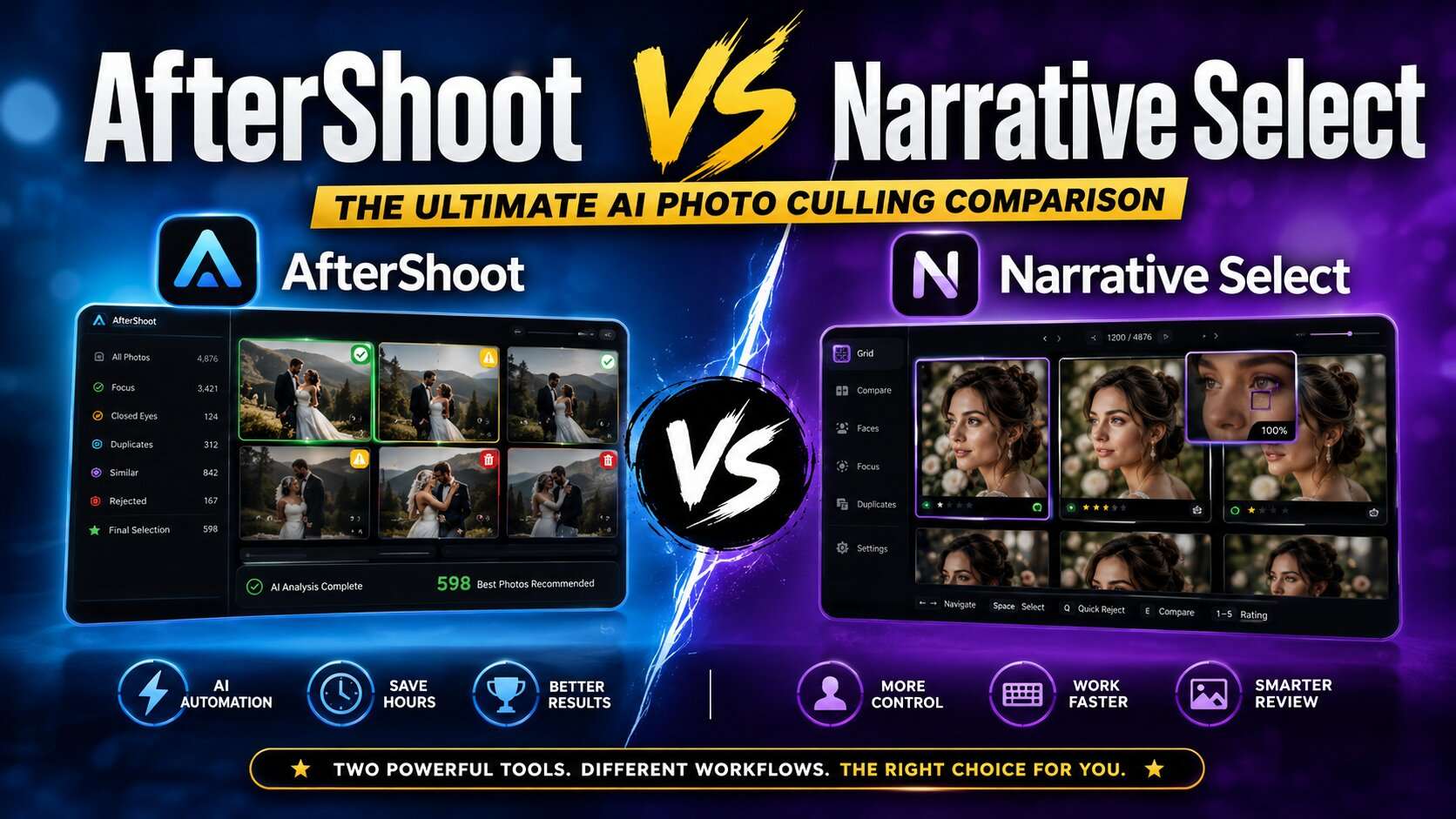
Compare AfterShoot vs Narrative Select for AI photo culling. Explore features, pricing, speed, accuracy, workflow, pros, cons, and discover which tool is best for photographers in 2026.
Table of Contents
Introduction
Sorting through thousands of photos after a wedding, event, portrait session, or commercial shoot can take hours. Professional photographers often spend more time selecting the best images than they do taking the photographs themselves.
AI photo culling software aims to solve this problem by automatically identifying sharp images, detecting closed eyes and duplicates, grouping similar photos, and helping photographers review large image collections more efficiently.
Two of the most popular solutions are AfterShoot and Narrative Select. Both are designed to speed up photo selection, but they take different approaches to workflow, artificial intelligence, performance, and user experience.
Choosing the right software isn’t simply about which one is faster. Factors such as accuracy, offline processing, Lightroom integration, learning capabilities, pricing, and overall workflow can significantly affect your editing efficiency.
In this detailed AfterShoot vs Narrative Select comparison, we’ll examine each platform’s features, strengths, limitations, pricing, and ideal use cases so you can decide which AI photo culling tool best fits your photography business.
Quick Answer
If your priority is fully automated AI photo culling with customizable preferences and a streamlined workflow, AfterShoot is generally the stronger choice. If you prefer rapid manual review supported by AI insights, facial analysis, and keyboard-driven speed, Narrative Select offers an excellent experience for photographers who want to remain closely involved in the selection process. The best option depends on your workflow, editing style, and the level of automation you want.
Why Compare AfterShoot and Narrative Select?
Both tools help photographers reduce the time spent reviewing images, but they are built with different philosophies.
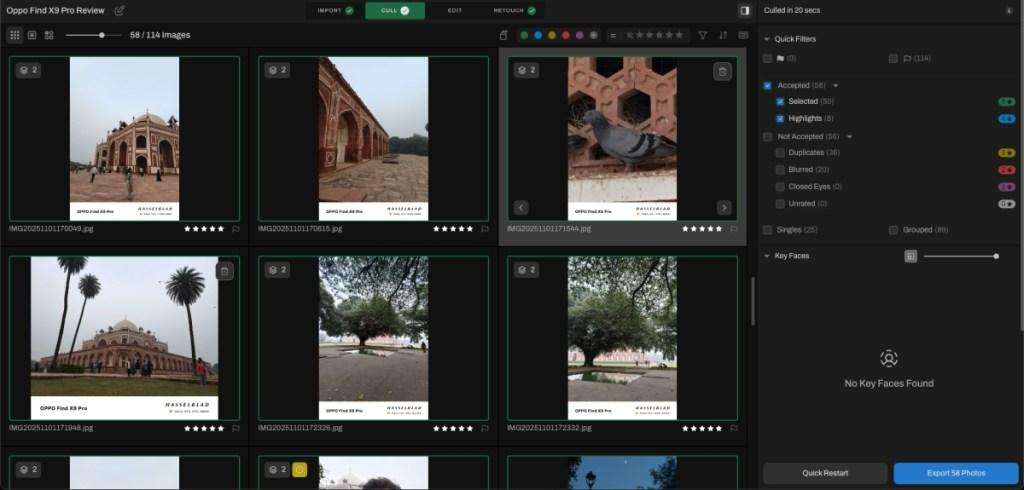
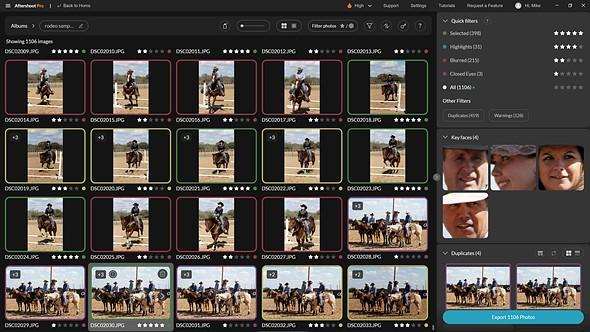
AfterShoot focuses on AI-powered automation. It analyzes your images, detects duplicates, flags technical issues, and suggests the strongest photographs with minimal manual input.
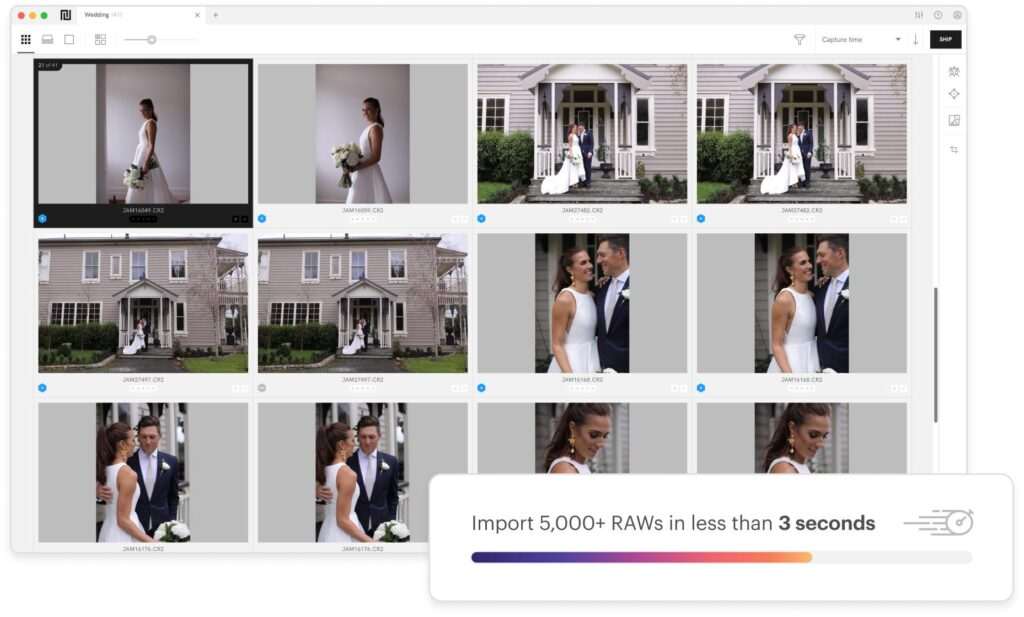
Narrative Select, on the other hand, is designed to help photographers review images more efficiently. Instead of making most of the decisions automatically, it provides intelligent visual information—such as face zooms and sharpness indicators—to help photographers make faster choices themselves.
Understanding these differences is important because the “best” tool depends on how much control you want during the culling process.
At a Glance Comparison
| Feature | AfterShoot | Narrative Select |
|---|---|---|
| Primary Purpose | AI-powered automated photo culling | AI-assisted photo review |
| Best For | High-volume automated workflows | Fast manual image selection |
| AI Culling | ✅ Advanced | ✅ Assisted |
| Face Analysis | ✅ | ✅ |
| Closed Eye Detection | ✅ | ✅ |
| Blur Detection | ✅ | ✅ |
| Duplicate Detection | ✅ | ✅ |
| Lightroom Workflow | Excellent | Excellent |
| Offline Processing | Available | Available |
| Learning Preferences | Personalized AI | Limited personalization |
| Best Users | Wedding & event photographers | Photographers who prefer manual control |
What Is AfterShoot?
AfterShoot is an AI-powered photo culling and editing assistant designed to reduce the time photographers spend reviewing large collections of images.
The software analyzes photographs using machine learning to identify:
- Sharp images
- Blurry photos
- Closed eyes
- Duplicate frames
- Similar expressions
- Technical quality
- Facial details
Photographers can then review AI selections instead of manually checking every image.
AfterShoot also offers AI editing features in addition to photo culling, making it a broader workflow solution for many professionals.
Key Features of AfterShoot
- AI-powered automatic photo culling
- Duplicate image detection
- Blur detection
- Closed-eye detection
- Personalized AI learning
- Batch image review
- AI editing capabilities
- Lightroom workflow support
- Local processing options
- Continuous feature updates
Its focus is on reducing repetitive work while allowing photographers to make final creative decisions.
What Is Narrative Select?
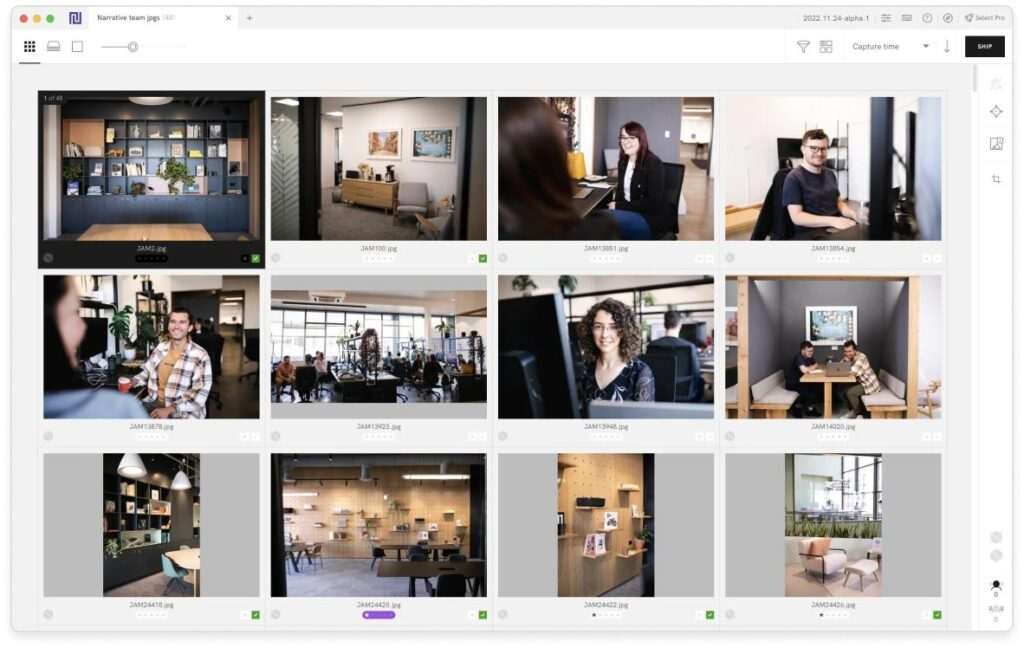
Narrative Select is an AI-assisted image review application that helps photographers inspect photographs more efficiently without fully automating the selection process.
Instead of selecting images on your behalf, Narrative Select provides detailed visual insights to speed up human decision-making.
Examples include:
- Face zoom previews
- Sharpness indicators
- Expression comparison
- Duplicate grouping
- Keyboard-first navigation
- Fast image loading
This workflow appeals to photographers who prefer reviewing every image while using AI to accelerate the process.
Key Features of Narrative Select
- Fast image loading
- Face preview panels
- Sharpness visualization
- Duplicate grouping
- Keyboard shortcuts
- AI-assisted review
- Lightroom integration
- Local processing
- Efficient navigation
- Optimized review workflow
Rather than replacing photographer judgment, Narrative Select is designed to enhance it.
Similarities Between AfterShoot and Narrative Select
Although their workflows differ, both applications share several important capabilities.
Both tools offer:
- AI-powered image analysis
- Blur detection
- Closed-eye detection
- Duplicate identification
- Lightroom compatibility
- Offline/local processing support
- Faster culling compared to manual review
- Support for high-volume photography workflows
Both are especially popular among wedding, portrait, and event photographers who regularly manage thousands of images.
Major Differences
The primary difference lies in how AI is used.
AfterShoot
- AI makes initial image selections.
- Greater workflow automation.
- Personalized AI can adapt to editing preferences.
- Suitable for photographers who want to minimize manual culling.
Narrative Select
- Photographer remains in control of every selection.
- AI provides visual assistance rather than automatic choices.
- Optimized for speed and manual review.
- Ideal for photographers who prefer evaluating each image themselves.
Neither approach is inherently better; the right choice depends on your preferred workflow.
Who Should Choose AfterShoot?
AfterShoot is well suited for:
- Wedding photographers
- Event photographers
- Sports photographers
- School photographers
- High-volume studios
- Photographers managing thousands of RAW files per session
Its automation can significantly reduce the time required for repetitive image selection.
Who Should Choose Narrative Select?
Narrative Select is a strong option for:
- Portrait photographers
- Commercial photographers
- Editorial photographers
- Fine art photographers
- Professionals who prefer reviewing every frame
It balances AI assistance with hands-on creative control.
Real-World Workflow Example
Imagine a wedding photographer returning with 4,000 RAW images after a full-day event.
With AfterShoot, the photographer imports the files, lets the AI analyze the collection, and begins reviewing a curated set of recommended images, making adjustments where needed.
With Narrative Select, the photographer reviews every image but benefits from instant face zooms, sharpness indicators, duplicate grouping, and rapid navigation to make faster decisions.
Both workflows save time, but they prioritize different levels of automation and user involvement.
Benefits of AI Photo Culling
Whether you choose AfterShoot or Narrative Select, AI-assisted culling offers several advantages.
Save Time
Reduce hours of manual image review.
Improve Consistency
Use objective technical analysis alongside your creative judgment.
Reduce Fatigue
Reviewing thousands of similar photographs becomes less mentally demanding.
Accelerate Delivery
Faster culling means quicker editing and earlier client delivery.
Scale Your Business
Efficient workflows help photographers handle more projects without sacrificing quality.
Related Articles:
- AI Photography Guide
- AI Photo Culling Software
- Best AI Tools for Photographers
- AI Workflow Automation for Photography Businesses
- AI Studio Management Software for Photographers
- ChatGPT for Photographers
- Adobe Firefly for Photographers
- AI Client Gallery Platforms
- AI Album Design Software
- AI Keywording Software for Photographers
Professional Insight: AI photo culling software should accelerate—not replace—your creative judgment. While tools like AfterShoot and Narrative Select can identify technically strong images, the final selection should still reflect your storytelling style, client preferences, and artistic vision. Evaluating both technical quality and emotional impact helps deliver galleries that stand out professionally.
AI Photo Culling Comparison
The primary purpose of both AfterShoot and Narrative Select is to reduce the time photographers spend selecting the best images from large photo collections. While they achieve the same goal, they use AI in different ways.
AfterShoot emphasizes automation. It analyzes the entire photo set, identifies technically strong images, detects duplicates and closed eyes, and recommends the best photographs based on AI evaluation.
Narrative Select focuses on accelerating manual decision-making. Instead of automatically choosing photos, it provides photographers with intelligent visual information that helps them make faster and more informed selections.
For photographers who prefer automation, AfterShoot may feel more efficient. Those who enjoy reviewing every frame themselves may appreciate Narrative Select’s workflow.
AI Culling Accuracy
Accurate photo selection is one of the most important aspects of any AI culling software.
Both applications evaluate factors such as:
- Sharpness
- Facial expressions
- Closed eyes
- Blur
- Duplicate images
- Similar compositions
- Technical image quality
AfterShoot
AfterShoot automatically recommends images based on AI analysis. Over time, some workflows can benefit from personalized preferences that help the software better match a photographer’s selection style.
Best for:
- Large wedding galleries
- Events
- Sports
- School photography
Narrative Select
Narrative Select presents AI insights while allowing photographers to make every final decision manually.
This approach works well for photographers who want to maintain complete creative control.
Best for:
- Portrait photography
- Editorial work
- Commercial projects
- Fine art photography
Face Detection & Expression Analysis
One of the most useful AI capabilities is facial analysis.
Both tools help photographers compare expressions without repeatedly zooming into each photograph.
AfterShoot
AI evaluates:
- Closed eyes
- Smiles
- Facial sharpness
- Similar expressions
- Duplicate poses
This reduces the time spent manually checking hundreds of nearly identical images.
Narrative Select
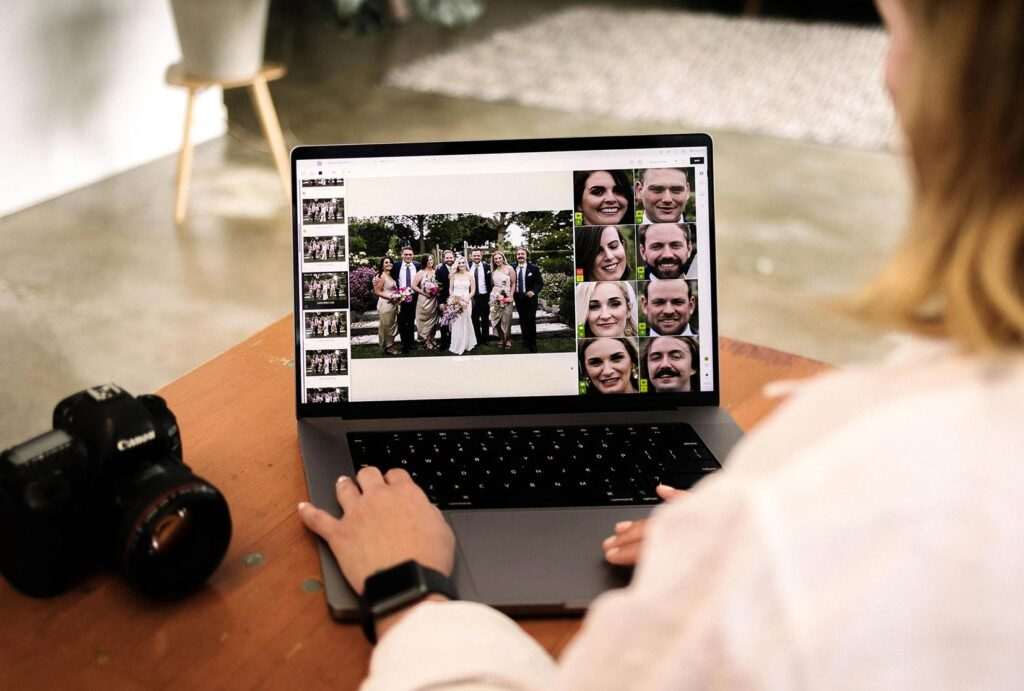
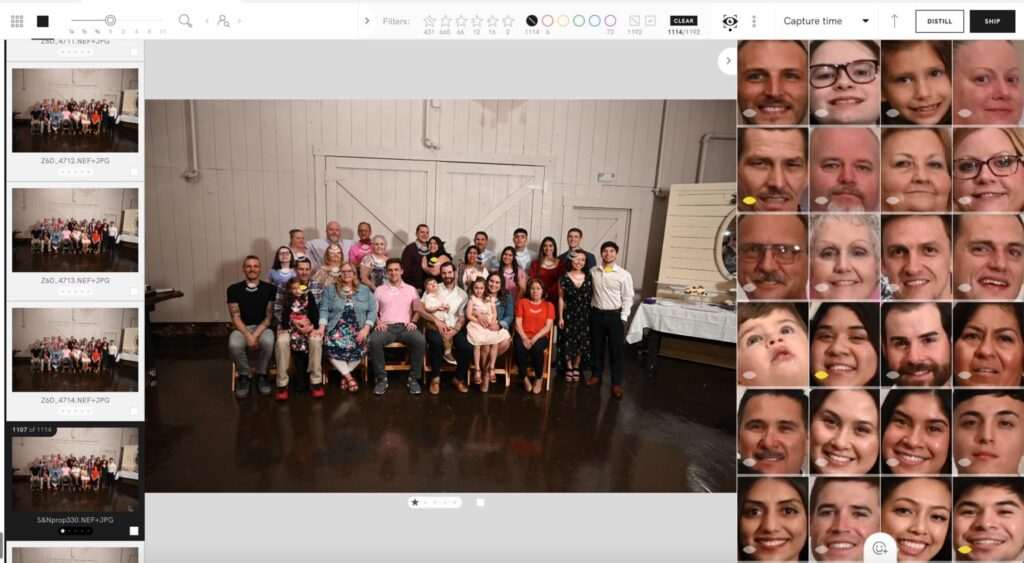
Narrative Select is especially known for its face preview system.
It displays enlarged face thumbnails, making it easier to compare:
- Eye contact
- Facial expressions
- Smiles
- Blink detection
- Focus accuracy
For portrait and wedding photographers, this can significantly speed up image review while keeping them in control.
Blur Detection
Motion blur and missed focus can ruin otherwise excellent photographs.
Both platforms analyze image sharpness to identify technically weaker frames.
AfterShoot
Automatically flags blurry images and deprioritizes them during AI culling.
Narrative Select
Displays sharpness information that photographers can review before deciding whether to keep or reject an image.
Closed-Eye Detection
Blink detection is particularly valuable for wedding photographers and family photographers where group portraits often include multiple people.
AfterShoot
Automatically detects closed eyes and considers them during AI recommendations.
Narrative Select
Highlights facial details, allowing photographers to identify blinking subjects more quickly.
Duplicate & Similar Photo Detection
High-speed burst shooting often creates dozens of nearly identical photographs.
Both applications help reduce unnecessary review time.
AfterShoot
Groups similar images and recommends the strongest photographs based on technical evaluation.
Narrative Select
Clusters visually similar images together so photographers can quickly compare and select their preferred frame.
Speed Comparison
Performance matters when working with thousands of RAW files.
AfterShoot
Designed to process large image collections automatically.
Typical workflow:
Import →
AI Analysis →
Recommended Images →
Review →
Export
This minimizes manual effort during culling.
Narrative Select
Optimized for fast browsing and responsive image review.
Typical workflow:
Import →
Instant Image Loading →
Manual Selection →
Export
The software prioritizes responsiveness, allowing photographers to move quickly through large galleries.
Workflow Integration
A smooth workflow can save hours over the course of a busy season.
Adobe Lightroom Integration
Both AfterShoot and Narrative Select integrate well with Adobe Lightroom.
Photographers can:
- Import RAW images
- Cull photographs
- Transfer selections
- Continue editing in Lightroom
This allows photographers to keep their existing editing workflow largely unchanged.
Capture One Compatibility
Many commercial photographers rely on Capture One.
Support and workflow options may vary between software versions, so it’s a good idea to confirm the latest compatibility with the official documentation before committing to a workflow.
Offline Processing
Privacy is important when working with client images.
Both applications support workflows that process images locally rather than requiring every photo to be uploaded to the cloud.
Local processing offers several advantages:
- Faster access to images
- Reduced upload time
- Greater privacy
- Better control over sensitive client files
Always review each application’s latest documentation to understand how specific features handle local or cloud-based processing.
User Interface Comparison
Ease of use affects long-term productivity.
AfterShoot
Designed around automation.
The interface focuses on:
- AI recommendations
- Simple review process
- Fast approvals
- Minimal manual interaction
This makes it approachable for photographers who want AI to handle much of the repetitive work.
Narrative Select
Built around speed and manual review.
The interface emphasizes:
- Keyboard shortcuts
- Fast navigation
- Face previews
- Technical image information
- Efficient comparison tools
Photographers who enjoy keyboard-driven workflows often appreciate this design.
Learning Curve
AfterShoot
Most photographers can begin using AfterShoot quickly because the AI handles much of the decision-making.
The workflow is straightforward:
Import →
Analyze →
Review →
Export
Narrative Select
Although easy to learn, photographers typically spend more time becoming familiar with the keyboard shortcuts and review interface.
Once mastered, the workflow can be extremely efficient.
AI Personalization
One area where workflows differ is personalization.
AfterShoot
Supports AI features that can align recommendations more closely with a photographer’s preferences over time, helping tailor automated selections to individual workflows.
Narrative Select
Focuses on providing decision-support tools rather than learning a photographer’s selection style.
Its philosophy is to enhance, not replace, human judgment.
Collaboration & Team Workflows
For studios with multiple photographers or editors, consistency is important.
AfterShoot
Useful for:
- Wedding studios
- Event photography teams
- High-volume businesses
- Large batch workflows
Its automation can help standardize the initial culling process.
Narrative Select
Works well for:
- Solo photographers
- Boutique portrait studios
- Commercial teams
- Editorial workflows
The manual review process allows each photographer to maintain their own artistic preferences.
Real-World Workflow Example
Imagine a destination wedding photographer returning with 5,500 RAW files.
Using AfterShoot
- Import the images.
- Allow AI to analyze the gallery.
- Review recommended selections.
- Fine-tune the final picks.
- Export to Lightroom for editing.
This approach minimizes repetitive review work.
Using Narrative Select
- Import the gallery.
- Browse images using fast previews.
- Compare face zooms and sharpness indicators.
- Choose the preferred frame from each sequence.
- Export the selected images to Lightroom.
This workflow keeps the photographer involved in every selection while reducing the time spent evaluating technical details.
Advantages of AfterShoot
- Greater workflow automation
- AI-assisted image recommendations
- Personalized selection capabilities
- Efficient for very large galleries
- Strong option for high-volume photographers
Advantages of Narrative Select
- Extremely fast image browsing
- Excellent face preview tools
- Responsive manual review
- Keyboard-first workflow
- Strong creative control
Feature Comparison Table
| Feature | AfterShoot | Narrative Select |
|---|---|---|
| Automated AI Culling | ⭐⭐⭐⭐⭐ | ⭐⭐⭐☆☆ |
| Manual Review Speed | ⭐⭐⭐⭐☆ | ⭐⭐⭐⭐⭐ |
| Face Preview | ⭐⭐⭐⭐☆ | ⭐⭐⭐⭐⭐ |
| Blur Detection | ⭐⭐⭐⭐⭐ | ⭐⭐⭐⭐☆ |
| Closed-Eye Detection | ⭐⭐⭐⭐⭐ | ⭐⭐⭐⭐☆ |
| Duplicate Detection | ⭐⭐⭐⭐⭐ | ⭐⭐⭐⭐☆ |
| Lightroom Integration | ⭐⭐⭐⭐⭐ | ⭐⭐⭐⭐⭐ |
| Local Processing | ⭐⭐⭐⭐⭐ | ⭐⭐⭐⭐⭐ |
| Ease of Use | ⭐⭐⭐⭐⭐ | ⭐⭐⭐⭐☆ |
| Best for High-Volume Work | ⭐⭐⭐⭐⭐ | ⭐⭐⭐⭐☆ |
Professional Tip: The best AI culling software depends on your workflow rather than a single feature. If you routinely photograph high-volume weddings or events, automation may provide the biggest time savings. If your work relies on subtle expression changes and careful image selection, a review-focused workflow can offer greater creative control. Testing both applications with the same gallery is the most reliable way to determine which fits your editing style.
Pricing Comparison
Pricing is an important factor when choosing AI photo culling software, especially for photographers processing thousands of images every month.
Both AfterShoot and Narrative Select offer subscription-based plans, but they target slightly different workflows and user needs. Features, pricing, and plan limits may change over time, so it’s always worth checking the official websites before purchasing.
| Feature | AfterShoot | Narrative Select |
|---|---|---|
| Free Trial | Available | Available |
| Monthly Subscription | Available | Available |
| Annual Billing | Available | Available |
| AI Culling | Included | Included |
| AI Editing | Available | Not Primary Focus |
| Lightroom Workflow | Supported | Supported |
| Updates | Included | Included |
Winner: Tie — Both offer flexible pricing, and the better value depends on whether you prioritize automation (AfterShoot) or manual review efficiency (Narrative Select).
Performance Comparison
Both applications are designed for photographers working with large RAW photo collections.
AfterShoot
Performance focuses on reducing manual work through automation.
Typical workflow:
- Import gallery
- AI analyzes every image
- Recommended selections generated
- Photographer reviews final choices
- Export to Lightroom
This approach minimizes repetitive decision-making.
Narrative Select
Performance focuses on rapid image browsing.
Typical workflow:
- Import gallery
- Instant image previews
- Face comparison
- Manual selection
- Export to Lightroom
Instead of replacing photographer decisions, it helps photographers make them much faster.
Speed Comparison
Speed depends on hardware, gallery size, RAW file format, and workflow.
AfterShoot
Strengths:
- Automated analysis
- Batch processing
- Large gallery optimization
- Less manual clicking
Excellent for photographers handling several thousand images after every assignment.
Narrative Select
Strengths:
- Extremely responsive interface
- Fast image loading
- Quick keyboard navigation
- Minimal waiting during review
Ideal for photographers who enjoy staying involved throughout the selection process.
Accuracy Comparison
Both tools perform well, but they define “accuracy” differently.
AfterShoot
AI evaluates:
- Sharpness
- Expressions
- Closed eyes
- Duplicate frames
- Blur
- Technical quality
Its recommendations aim to reduce the number of images photographers need to inspect manually.
Narrative Select
Rather than automatically choosing images, it presents visual information that helps photographers judge:
- Facial expressions
- Eye contact
- Sharpness
- Similar frames
- Technical quality
This preserves complete creative control.
User Experience
AfterShoot
Designed for simplicity.
Advantages include:
- Clean interface
- Guided workflow
- Automated recommendations
- Easy onboarding
Suitable for photographers new to AI software.
Narrative Select
Designed for speed.
Highlights include:
- Keyboard-first navigation
- Face preview panels
- Technical indicators
- Fast gallery browsing
Experienced photographers often appreciate its efficiency.
AI Learning & Personalization
One key difference is how each platform approaches AI.
AfterShoot
Supports AI personalization features that can adapt recommendations to a photographer’s preferred image selection style over time.
This may improve workflow consistency for photographers who regularly shoot similar assignments.
Narrative Select
Uses AI to provide information rather than automate artistic decisions.
Its philosophy is to support photographers instead of learning their creative preferences.
Workflow Flexibility
AfterShoot
Works particularly well for:
- Wedding photographers
- Event photographers
- Sports photography
- School photography
- Large studios
- Multi-photographer businesses
Narrative Select
Excellent for:
- Portrait photographers
- Commercial photographers
- Editorial photographers
- Fashion photography
- Fine art photography
Pros and Cons
AfterShoot Pros
- Powerful AI automation
- Saves significant culling time
- Personalized AI recommendations
- Excellent Lightroom workflow
- Suitable for high-volume photography
- Beginner-friendly interface
- Supports AI editing workflows
AfterShoot Cons
- Some photographers may prefer reviewing every image manually
- AI recommendations should still be reviewed before final delivery
- Advanced workflows may require time to fine-tune preferences
Narrative Select Pros
- Extremely fast review interface
- Outstanding face comparison tools
- Excellent keyboard shortcuts
- Strong creative control
- Responsive image browsing
- Smooth Lightroom workflow
Narrative Select Cons
- Requires more manual involvement
- Less automated than AI-first culling tools
- Benefits are greatest for photographers who enjoy reviewing every frame
Best for Different Photography Niches
Wedding Photography
Winner: AfterShoot
Wedding photographers often return with thousands of images. Automated AI culling can substantially reduce post-production time while maintaining consistency.
Portrait Photography
Winner: Narrative Select
Portrait sessions often involve subtle differences in expression and eye contact. Narrative Select’s review-focused workflow makes comparing similar frames easier.
Event Photography
Winner: AfterShoot
Large event galleries benefit from automated selection and duplicate detection.
Commercial Photography
Winner: Narrative Select
Commercial photographers usually review every image carefully, making manual AI-assisted workflows a natural fit.
Sports Photography
Winner: AfterShoot
Continuous burst shooting generates many similar images, where AI automation provides significant efficiency gains.
Fine Art Photography
Winner: Narrative Select
Creative projects often require deliberate image selection that benefits from photographer-led review.
AfterShoot vs Narrative Select vs FilterPixel
| Feature | AfterShoot | Narrative Select | FilterPixel |
|---|---|---|---|
| Automated AI Culling | ⭐⭐⭐⭐⭐ | ⭐⭐⭐☆☆ | ⭐⭐⭐⭐⭐ |
| Face Preview | ⭐⭐⭐⭐☆ | ⭐⭐⭐⭐⭐ | ⭐⭐⭐⭐☆ |
| Blur Detection | ⭐⭐⭐⭐⭐ | ⭐⭐⭐⭐☆ | ⭐⭐⭐⭐⭐ |
| Closed-Eye Detection | ⭐⭐⭐⭐⭐ | ⭐⭐⭐⭐☆ | ⭐⭐⭐⭐⭐ |
| AI Personalization | ⭐⭐⭐⭐⭐ | ⭐⭐⭐☆☆ | ⭐⭐⭐⭐☆ |
| Manual Review Speed | ⭐⭐⭐⭐☆ | ⭐⭐⭐⭐⭐ | ⭐⭐⭐⭐☆ |
| Lightroom Workflow | ⭐⭐⭐⭐⭐ | ⭐⭐⭐⭐⭐ | ⭐⭐⭐⭐⭐ |
| Ease of Use | ⭐⭐⭐⭐⭐ | ⭐⭐⭐⭐☆ | ⭐⭐⭐⭐☆ |
Summary
- AfterShoot: Best for photographers seeking automation.
- Narrative Select: Best for photographers who want hands-on control.
- FilterPixel: Strong alternative with AI automation and workflow features.
Overall Ratings
| Category | AfterShoot | Narrative Select |
|---|---|---|
| Ease of Use | ⭐⭐⭐⭐⭐ | ⭐⭐⭐⭐☆ |
| AI Automation | ⭐⭐⭐⭐⭐ | ⭐⭐⭐☆☆ |
| Manual Review | ⭐⭐⭐⭐☆ | ⭐⭐⭐⭐⭐ |
| Speed | ⭐⭐⭐⭐⭐ | ⭐⭐⭐⭐⭐ |
| Accuracy | ⭐⭐⭐⭐⭐ | ⭐⭐⭐⭐☆ |
| Lightroom Integration | ⭐⭐⭐⭐⭐ | ⭐⭐⭐⭐⭐ |
| Productivity | ⭐⭐⭐⭐⭐ | ⭐⭐⭐⭐☆ |
| Overall Rating | 4.9/5 | 4.8/5 |
Which Software Should You Choose?
Choose AfterShoot if you:
- Photograph weddings or events regularly.
- Process thousands of RAW files.
- Want AI to automate repetitive culling.
- Prefer a streamlined workflow.
- Value personalized AI recommendations.
Choose Narrative Select if you:
- Enjoy reviewing every image yourself.
- Photograph portraits or commercial work.
- Want AI to speed up—not replace—your decisions.
- Prefer keyboard-driven workflows.
- Need fast face comparison tools.
Real-World Example
A wedding photographer returning with 6,000 RAW images may save substantial time using AfterShoot’s automated recommendations before editing in Lightroom.
A portrait photographer delivering 150 carefully selected images from a branding session may prefer Narrative Select because it allows close inspection of facial expressions and subtle differences between similar photographs.
Neither workflow is universally better—they simply support different editing styles.
Professional Insight: No AI culling software consistently selects images exactly as every photographer would. The best approach is to test both AfterShoot and Narrative Select using the same real-world gallery from your own workflow. Comparing speed, accuracy, and overall editing experience with familiar images provides a more meaningful evaluation than relying solely on feature lists or benchmark claims.
Which Is Better: AfterShoot or Narrative Select?
Choosing between AfterShoot and Narrative Select ultimately comes down to how you prefer to cull your photos.
If your goal is to automate repetitive work, reduce post-production time, and process thousands of RAW files with minimal manual effort, AfterShoot is the stronger choice. Its AI-powered culling engine is designed to analyze entire galleries, detect technical issues, and recommend the best images, making it particularly valuable for high-volume photographers.
If you prefer to stay involved in every creative decision while still benefiting from AI-assisted tools like face previews, sharpness indicators, and fast image navigation, Narrative Select offers a highly refined review experience. Rather than replacing your judgment, it enhances it.
Neither application is objectively better for every photographer. The right choice depends on your shooting style, workflow, and the balance you want between automation and creative control.
Who Should Choose AfterShoot?
AfterShoot is an excellent option for:
- Wedding photographers
- Event photographers
- Sports photographers
- School photographers
- High-volume portrait studios
- Multi-photographer businesses
- Photographers delivering large galleries quickly
Its automation-first approach can significantly reduce repetitive culling tasks.
Who Should Choose Narrative Select?
Narrative Select is ideal for:
- Portrait photographers
- Commercial photographers
- Editorial photographers
- Fashion photographers
- Fine art photographers
- Solo professionals
- Creators who prefer reviewing every frame
Its AI-assisted review tools help speed up selection without taking control away from the photographer.
Our Recommendation
Choose AfterShoot if you want:
✅ Maximum automation
✅ Faster gallery delivery
✅ AI-generated image selections
✅ Personalized AI recommendations
✅ Less repetitive manual work
Choose Narrative Select if you want:
✅ Complete creative control
✅ Faster manual review
✅ Outstanding face comparison tools
✅ Keyboard-driven workflow
✅ AI-assisted—not AI-controlled—culling
Final Comparison
| Category | Winner |
|---|---|
| AI Automation | AfterShoot |
| Manual Review | Narrative Select |
| Wedding Photography | AfterShoot |
| Portrait Photography | Narrative Select |
| High-Volume Workflows | AfterShoot |
| Face Comparison | Narrative Select |
| Ease of Learning | AfterShoot |
| Workflow Speed | Tie |
| Lightroom Integration | Tie |
| Overall Productivity | AfterShoot |
Frequently Asked Questions
What is the main difference between AfterShoot and Narrative Select?
AfterShoot focuses on AI-powered automated photo culling, while Narrative Select emphasizes AI-assisted manual review. AfterShoot recommends the best images automatically, whereas Narrative Select provides visual tools that help photographers make faster decisions themselves.
Which software is better for wedding photographers?
For photographers who regularly return with thousands of images from weddings or events, AfterShoot’s automated culling workflow can significantly reduce post-processing time.
Is Narrative Select better for portrait photography?
Many portrait photographers appreciate Narrative Select because it allows them to compare subtle facial expressions, eye contact, and sharpness while maintaining complete control over the final image selection.
Can both applications work with Adobe Lightroom?
Yes. Both AfterShoot and Narrative Select integrate well with Adobe Lightroom, allowing photographers to continue editing after completing the culling process.
Do these tools support offline workflows?
Both applications support local processing for key workflow features. However, available capabilities may vary depending on the version and feature set, so check the latest official documentation for current details.
Does AfterShoot include AI editing?
AfterShoot offers AI-powered editing capabilities in addition to AI culling, making it a broader workflow solution than software focused primarily on image selection.
Can AI replace manual photo culling?
AI can dramatically reduce the time required to review large galleries, but final image selection still benefits from human creativity, storytelling, and client expectations. Most photographers use AI as an assistant rather than a replacement for professional judgment.
Which tool is easier for beginners?
Both applications are beginner-friendly. AfterShoot offers a more automated workflow that many new users find approachable, while Narrative Select rewards photographers who enjoy reviewing each image and learning keyboard-driven shortcuts.
Why Trust The Candid Shoot?
At The Candid Shoot, we publish photography software reviews that prioritize real-world workflows over marketing claims. Every comparison is based on official product documentation, publicly available feature information, practical photography experience, workflow considerations, and long-term value for photographers.
Rather than recommending a single tool for everyone, we evaluate software based on:
- Ease of use
- AI capabilities
- Workflow efficiency
- Editing integration
- Learning curve
- Business value
- Reliability
- Suitability for different photography niches
Our goal is to help photographers choose tools that genuinely improve productivity while preserving creative control.
How We Evaluated These Tools
This comparison was created using a consistent evaluation framework.
We considered:
- AI culling capabilities
- Image selection workflow
- Face detection and preview tools
- Blur and closed-eye detection
- Duplicate grouping
- Lightroom integration
- Workflow automation
- Performance with large RAW galleries
- User experience
- Value for photographers
Because both applications continue to evolve, photographers should verify the latest features, pricing, and compatibility through the official websites before making a purchase.
References & Official Resources
For the latest feature updates, pricing, and technical documentation, refer to the official resources:
- AfterShoot Official Website
- Narrative Official Website
- Adobe Lightroom
- Capture One
- Adobe Creative Cloud Documentation
Consulting official documentation ensures you have the most accurate information about compatibility, supported features, and subscription options.
Final Verdict
Both AfterShoot and Narrative Select are excellent AI photo culling solutions, but they serve different types of photographers.
If your business depends on processing thousands of images quickly, AfterShoot offers a powerful combination of automation, AI-assisted selection, and workflow efficiency that can significantly reduce editing time.
If your photography relies on carefully evaluating subtle expressions, composition, and storytelling, Narrative Select provides intelligent review tools while leaving every creative decision in your hands.
Many professional photographers will find that the best software is the one that matches their existing workflow rather than the one with the longest feature list. Taking advantage of each application’s trial period and testing them with a recent gallery is one of the most effective ways to determine which solution best fits your editing process.
Related Articles
Continue exploring AI tools that improve photography workflows:
- AI Photography Guide
- AI Photo Culling Software
- Best AI Tools for Photographers
- AI Workflow Automation for Photography Businesses
- AI Studio Management Software for Photographers
- AI Client Gallery Platforms
- AI Album Design Software
- Adobe Firefly for Photographers
- ChatGPT for Photographers
- AI Keywording Software for Photographers
- AI Image Generator Tools




Leave a Reply