

Discover the best AI studio management software for photographers. Compare AI-powered tools for client management, bookings, invoices, scheduling, contracts, galleries, and workflow automation.
Table of Contents
Introduction
Running a successful photography business involves much more than capturing great images. From responding to inquiries and scheduling sessions to sending contracts, collecting payments, delivering galleries, and following up with clients, photographers often spend as much time managing their business as they do behind the camera.
As client expectations continue to grow, manual studio management can quickly become overwhelming. Missed emails, double bookings, delayed invoices, and scattered client information not only reduce productivity but can also impact the overall client experience.
This is where AI studio management software for photographers makes a significant difference. Modern platforms combine customer relationship management (CRM), booking systems, invoicing, workflow automation, scheduling, and communication tools with artificial intelligence to automate repetitive administrative tasks.
Whether you’re a wedding photographer managing dozens of clients, a portrait photographer scheduling daily sessions, or a commercial photographer coordinating multiple projects, AI-powered studio management software helps streamline your workflow so you can spend more time creating and less time handling paperwork.
In this guide, we’ll compare the best AI studio management software for photographers, exploring their features, pricing, automation capabilities, integrations, and ideal use cases to help you choose the right solution for your photography business.
If you’re exploring how artificial intelligence is transforming photography workflows, be sure to read our AI Photography Guide, where we cover AI-powered editing, image organization, client management, workflow automation, and business tools for photographers.
Quick Answer
If you’re looking for the best AI studio management software for photographers, Studio Ninja stands out as the top overall choice thanks to its excellent balance of client management, workflow automation, online bookings, invoicing, contracts, and business organization. HoneyBook is ideal for photographers seeking advanced client communication and automation, while Sprout Studio, Pixifi, Táve, Light Blue, and Dubsado each offer specialized features for different photography workflows and business sizes.
What You’ll Learn
In this guide, you’ll discover:
- What AI studio management software is.
- How AI helps photographers automate business operations.
- The best AI-powered studio management platforms in 2026.
- Which software is best for weddings, portraits, events, and commercial photography.
- How to choose software that fits your workflow and budget.
- The benefits of integrating AI into your photography business.
Quick Comparison Table
| Software | Best For | AI Automation | CRM | Online Booking | Invoicing |
|---|---|---|---|---|---|
| Studio Ninja | Overall photography business management | ✅ | ✅ | ✅ | ✅ |
| HoneyBook | Client communication & automation | ✅ | ✅ | ✅ | ✅ |
| Sprout Studio | Professional photographers | ✅ | ✅ | ✅ | ✅ |
| Pixifi | Workflow automation | ✅ | ✅ | ✅ | ✅ |
| Táve | High-volume studios | ✅ | ✅ | Optional | ✅ |
| Light Blue | Portrait & wedding photographers | Limited | ✅ | ✅ | ✅ |
| Dubsado | Custom business workflows | ✅ | ✅ | ✅ | ✅ |
Pricing & Free Trial Comparison
Although pricing changes over time, most photography studio management platforms offer free trials so you can evaluate their features before committing to a subscription.
| Software | Free Trial | Pricing Model |
|---|---|---|
| Studio Ninja | ✅ Yes | Monthly / Annual Subscription |
| HoneyBook | ✅ Yes | Monthly / Annual Subscription |
| Sprout Studio | ✅ Yes | Monthly / Annual Subscription |
| Pixifi | ✅ Yes | Subscription Plans |
| Táve | ✅ Trial Available | Subscription Plans |
| Light Blue | ✅ Trial Available | Monthly / Annual Subscription |
| Dubsado | ✅ Trial Available | Subscription Plans |
Tip: Compare features, workflow automation, integrations, and long-term value instead of choosing software based solely on price.
Why AI Studio Management Matters
Photography businesses involve much more than taking photographs. Every project includes multiple administrative steps that can consume valuable time.
Typical workflow:
- Responding to inquiries
- Scheduling consultations
- Managing bookings
- Sending contracts
- Collecting deposits
- Tracking payments
- Planning shoots
- Delivering galleries
- Following up with clients
Without automation, these repetitive tasks increase the risk of missed deadlines, inconsistent communication, and administrative errors.
AI studio management software helps automate much of this process by organizing client information, sending reminders, managing workflows, and reducing repetitive manual work.
For photographers handling dozens of clients simultaneously, these time savings can have a meaningful impact on productivity and the overall client experience.
Who Should Use AI Studio Management Software?
AI studio management software is beneficial for photographers at every stage of their business. Whether you’re a solo professional or managing a growing studio, automation can simplify repetitive administrative tasks and improve client communication.
Wedding Photographers
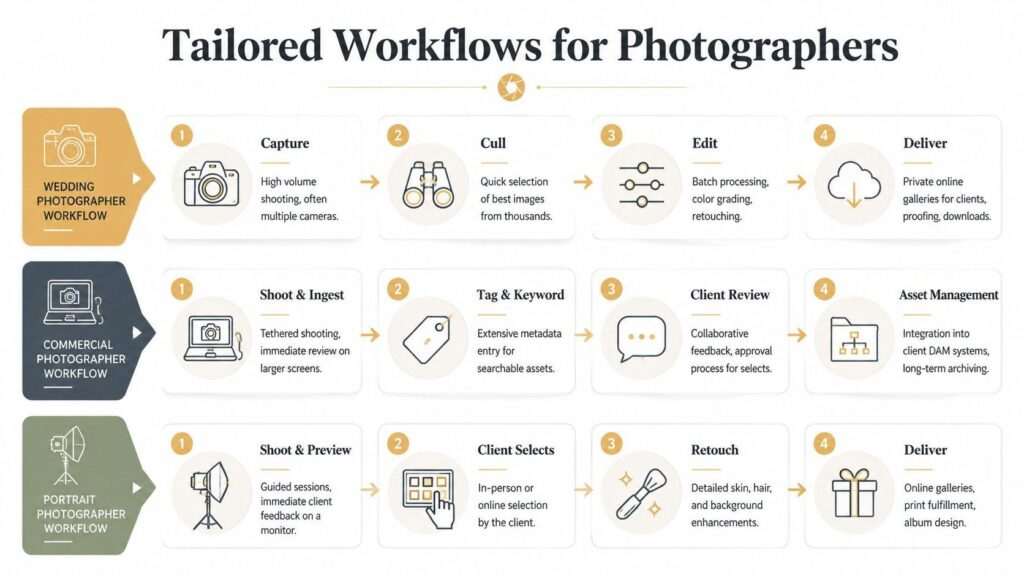
Wedding photographers often manage multiple clients simultaneously, each with contracts, payment schedules, questionnaires, timelines, and gallery deliveries. AI automation helps organize these workflows while reducing manual follow-ups.
Portrait Photographers
Portrait photographers can automate appointment scheduling, reminders, invoices, and client communication, making it easier to manage repeat customers and seasonal sessions.
Event Photographers
Corporate events, school functions, sports tournaments, and private celebrations often involve tight schedules and multiple deliverables. Studio management software helps photographers stay organized throughout every stage of the project.
Commercial Photographers
Commercial photography projects typically involve proposals, approvals, invoices, production schedules, and multiple stakeholders. AI-powered workflow management keeps every task organized in one centralized system.
Photography Studios
Studios managing several photographers or support staff benefit from shared calendars, centralized client records, workflow automation, and business reporting that improves collaboration and efficiency.
Who Should Use AI Studio Management Software?
These platforms are valuable for photographers across many specialties, including:
Wedding Photographers
Manage inquiries, contracts, payment schedules, timelines, questionnaires, and gallery delivery for multiple weddings simultaneously.
Portrait Photographers
Organize client sessions, automate appointment reminders, collect payments, and maintain client histories for repeat bookings.
Event Photographers
Coordinate schedules, invoices, contracts, and communication across corporate events, conferences, schools, and private functions.
Commercial Photographers
Track multiple projects, proposals, approvals, deadlines, invoices, and deliverables while keeping client communication organized.
Photography Studios
Centralize calendars, staff schedules, customer information, financial records, and project workflows in a single system.
Read More Articles:
- AI Photo Culling Software
- AI Keywording Software for Photographers
- AI Facial Recognition Software for Photo Libraries
- AI Image Enhancement Tools
- Best AI Tools for Photographers
Practical Workflow: A wedding photographer may manage dozens of active clients at once. AI studio management software can automate inquiry responses, appointment scheduling, contract delivery, invoice reminders, and follow-up emails, reducing administrative work while helping ensure a consistent client experience.
What Is AI Studio Management Software for Photographers?
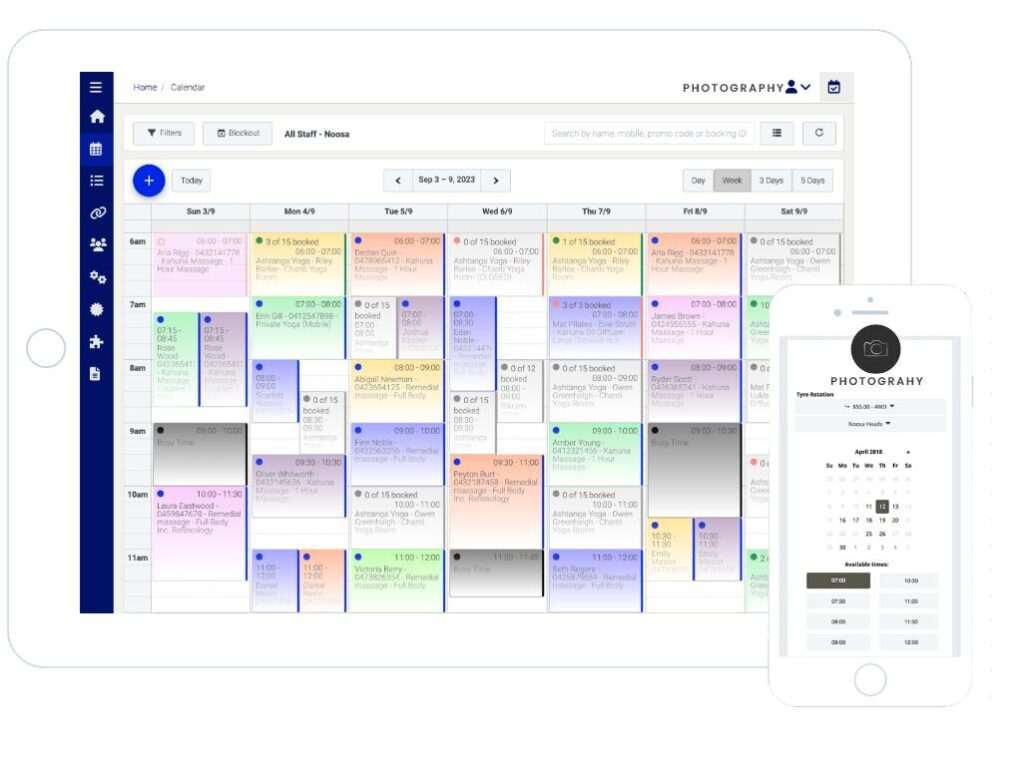
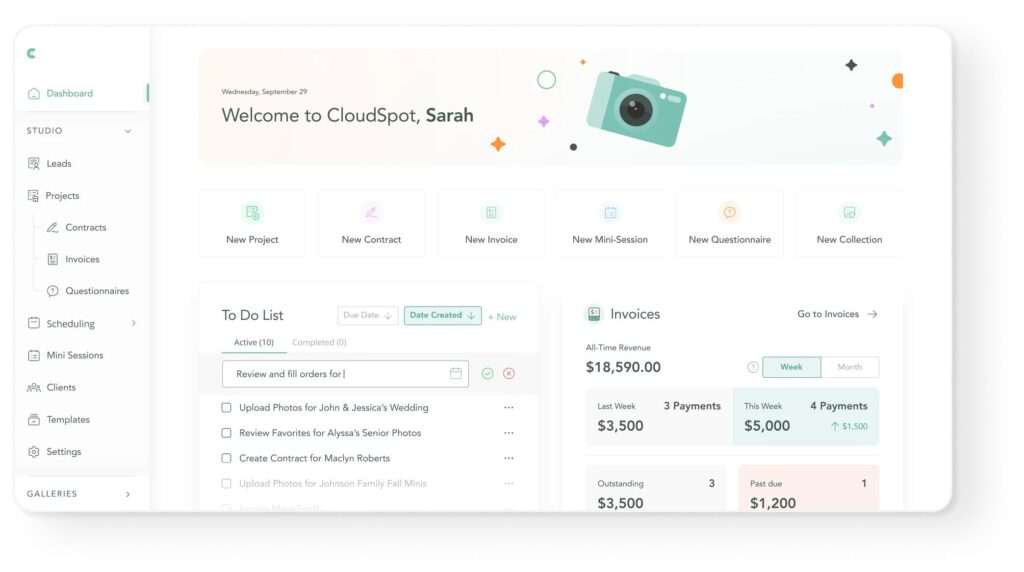
AI studio management software is an all-in-one business management platform that helps photographers automate administrative tasks, organize client information, and streamline day-to-day operations using artificial intelligence. Instead of juggling multiple apps for scheduling, contracts, invoicing, emails, and project tracking, photographers can manage their entire business from a single centralized dashboard.
Traditional studio management software already simplifies many business processes, but AI takes automation a step further. Modern platforms can automatically respond to inquiries, recommend appointment times, send payment reminders, organize client records, generate workflows, and even assist with email writing and business insights.
For photographers running busy studios, AI reduces repetitive tasks, minimizes manual errors, and allows more time to focus on creativity and client relationships.
How AI Studio Management Software Works
Although features vary between platforms, most AI-powered studio management software follows a similar workflow.
Step 1: Capture Client Inquiries
Everything begins when a potential client contacts your business through your website, social media, email, or an online booking form.
The software automatically stores essential information, including:
- Client name
- Contact details
- Event type
- Preferred dates
- Budget (if provided)
- Notes and special requests
Instead of manually entering every inquiry, AI organizes the information into your CRM automatically.
Step 2: Organize Client Information
Once the inquiry is saved, the software creates a client profile containing all related communication and project details.
Depending on the platform, this may include:
- Email conversations
- Contracts
- Invoices
- Questionnaires
- Gallery links
- Payment history
- Upcoming appointments
Having everything in one place makes it easier to manage multiple projects without switching between different tools.
Step 3: Automate Scheduling
Scheduling is one of the most time-consuming tasks for photographers.
AI studio management software can simplify this by:
- Displaying real-time availability
- Suggesting suitable appointment slots
- Preventing double bookings
- Sending booking confirmations
- Delivering automatic reminders
This reduces back-and-forth communication while improving the booking experience for clients.
Step 4: Send Contracts and Invoices
Many platforms automate business documents immediately after a booking is confirmed.
Common automations include:
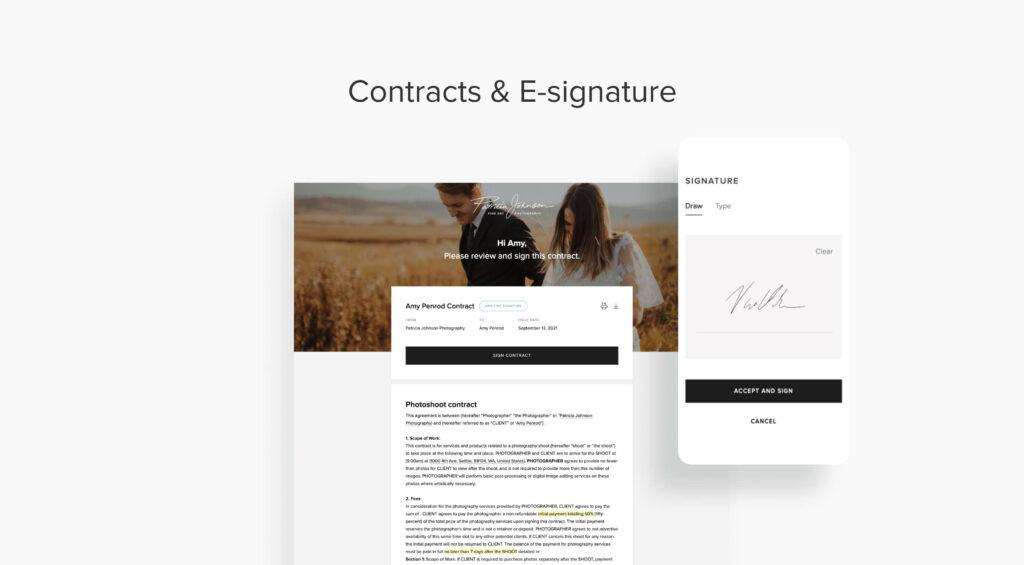
- Sending contracts for digital signatures
- Issuing invoices
- Requesting deposits
- Tracking payment status
- Sending payment reminders before due dates
This helps photographers maintain a consistent and professional client experience while reducing administrative work.
Step 5: Automate Client Communication
Modern AI tools can automate many routine communications, such as:
- Welcome emails
- Booking confirmations
- Session preparation guides
- Reminder emails
- Thank-you messages
- Follow-up emails requesting reviews
Some platforms also provide AI-assisted writing suggestions to help personalize communication while maintaining a professional tone.
Step 6: Manage the Entire Photography Workflow
Once the shoot is complete, the software continues assisting with post-session tasks.
Typical workflow stages include:
- Editing reminders
- Gallery delivery tracking
- Invoice completion
- Client feedback requests
- Referral follow-ups
- Repeat booking reminders
Instead of manually tracking every step, photographers can rely on automated workflows to keep projects moving.
Why Photographers Need AI Studio Management Software
Running a photography business involves far more than taking pictures. Administrative tasks often consume hours every week, especially for photographers managing multiple clients at the same time.
AI studio management software helps reduce that workload by automating repetitive business operations while improving organization and communication.
1. Save Time on Administrative Work
Tasks like scheduling appointments, sending contracts, and following up with clients can quickly become repetitive.
AI automates much of this work, giving photographers more time to focus on shooting, editing, and growing their business.
2. Improve Client Communication
Fast, professional communication creates a better client experience.
Automated confirmations, reminders, and follow-ups help ensure clients always know what to expect throughout the booking process.
3. Reduce Missed Bookings
Manual calendars increase the risk of scheduling conflicts.
AI-powered booking systems synchronize availability, helping prevent double bookings while simplifying appointment management.
4. Stay Organized
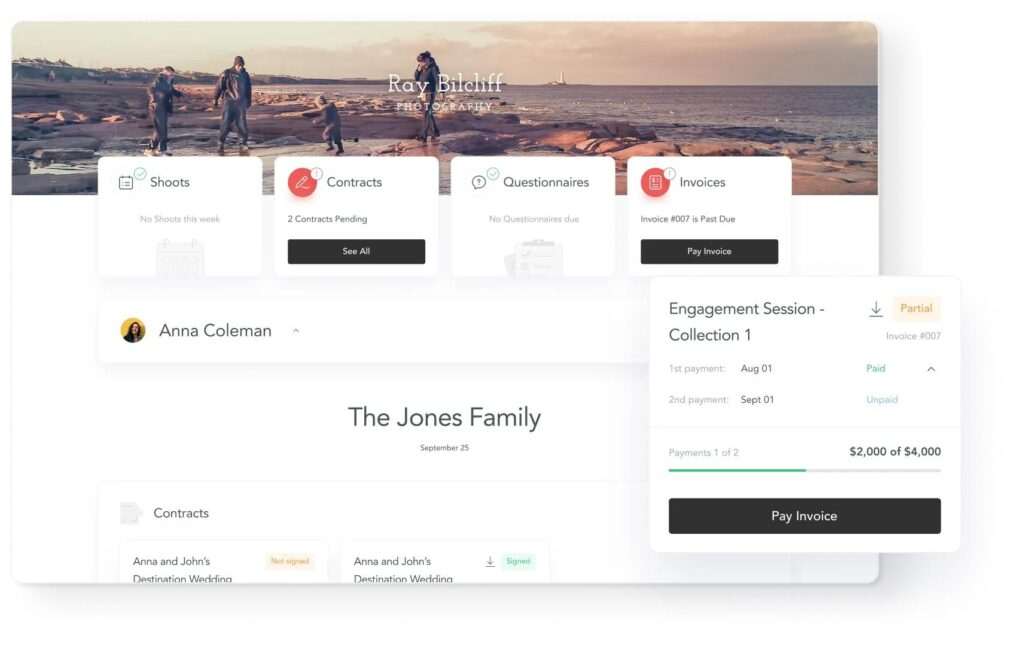
Instead of storing client information across emails, spreadsheets, and folders, AI studio management software keeps everything in one searchable dashboard.
This makes it easier to retrieve contracts, invoices, questionnaires, and project notes whenever needed.
5. Increase Business Efficiency
Automated workflows reduce repetitive manual tasks while improving consistency.
Whether managing five clients or fifty, photographers can maintain organized processes without significantly increasing administrative time.
6. Improve Financial Tracking
Many platforms automatically monitor:
- Outstanding invoices
- Deposits
- Payment schedules
- Revenue reports
- Business performance
This gives photographers better visibility into their finances without relying on separate accounting tools.
7. Scale Your Photography Business
As your client base grows, manual administration becomes increasingly difficult.
AI automation allows photographers to handle more bookings without sacrificing organization or customer service.
Key Features to Look For
When comparing AI studio management software, prioritize features that match your workflow.
Look for:
- AI-powered CRM
- Online booking system
- Calendar synchronization
- Workflow automation
- Contract management
- Digital signatures
- Invoice generation
- Payment reminders
- Client questionnaires
- Email automation
- Gallery delivery tracking
- Reporting and analytics
- Mobile access
- Third-party integrations
The best software should simplify your daily operations rather than add unnecessary complexity.
Real-World Workflow Example
Imagine a wedding photographer receiving a new inquiry through their website.
Instead of manually replying, scheduling a meeting, creating a contract, and sending an invoice, the software can automate much of the process:
- The inquiry is saved in the CRM.
- An automatic response acknowledges the request.
- Available consultation times are offered.
- Once booked, a contract is generated and sent for signature.
- An invoice for the booking deposit is created.
- Payment reminders are sent automatically if needed.
- Before the wedding, questionnaires and timeline reminders are delivered.
- After the event, the gallery is shared and a follow-up email requests feedback or a review.
While photographers still oversee important decisions and personalize communication where appropriate, automation can significantly reduce repetitive administrative work.
Read More Articles:
- AI Photography Guide
- AI Keywording Software for Photographers
- AI Photo Culling Software
- AI Facial Recognition Software for Photo Libraries
- AI Image Enhancement Tools
- Best AI Tools for Photographers
Practical Insight: AI studio management software is most effective when used to automate repetitive administrative tasks, while photographers continue to review important communications and maintain personal relationships with clients. This balance helps improve efficiency without replacing the personalized service many clients value.
Best AI Studio Management Software for Photographers
The best AI studio management software helps photographers automate business operations, improve client communication, organize projects, and reduce repetitive administrative work. While no platform can replace the personal relationships that photographers build with their clients, the right software can streamline many time-consuming tasks, allowing you to focus more on photography and less on paperwork.
Below are the best AI-powered studio management platforms for photographers in 2026.
1. Studio Ninja – Best Overall AI Studio Management Software
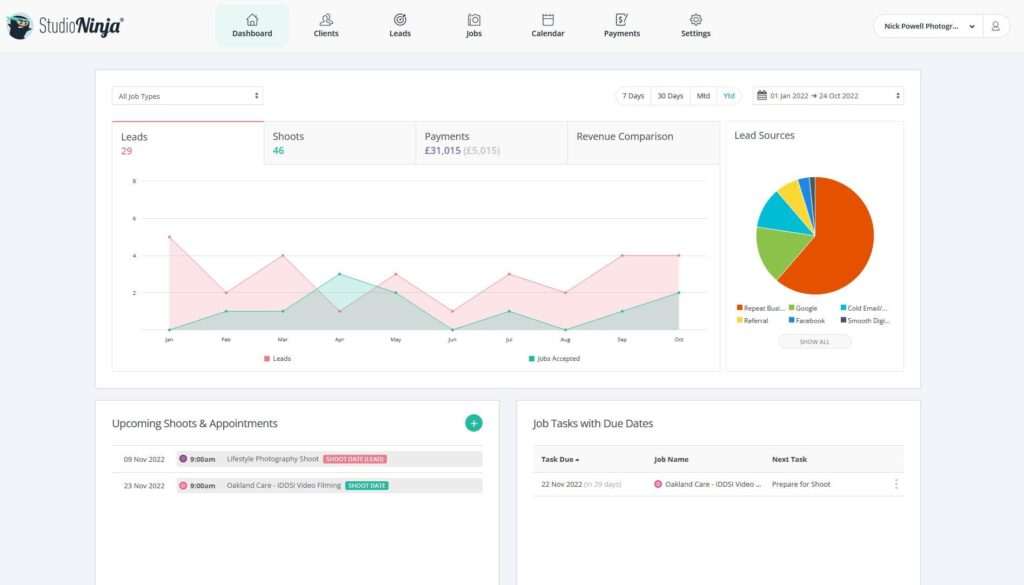
Studio Ninja has become one of the most popular business management platforms designed specifically for photographers. It combines client relationship management (CRM), workflow automation, online bookings, contracts, invoicing, questionnaires, and payment tracking into one easy-to-use platform.
Its automation features help photographers manage the entire client journey—from the first inquiry to final gallery delivery—without requiring multiple third-party tools.
Key Features
- AI-assisted workflow automation
- Photography CRM
- Online booking management
- Automated contracts
- Invoice generation
- Payment reminders
- Questionnaires
- Calendar synchronization
- Client portal
- Mobile application
Pros
- Designed specifically for photographers
- Easy to learn
- Excellent workflow automation
- Strong client management features
- Supports business growth
Cons
- Subscription required
- Limited customization compared to some competitors
Best For: Wedding, portrait, event, and commercial photographers seeking an all-in-one studio management solution.
2. HoneyBook – Best for Client Communication
HoneyBook is widely recognized for helping creative professionals manage clients, projects, and payments from one platform. Its automation capabilities simplify communication by sending proposals, contracts, invoices, reminders, and follow-up emails throughout the booking process.
It also includes AI-assisted writing features for certain workflows, helping users draft professional client communications more efficiently.
Key Features
- AI-assisted communication
- CRM
- Online proposals
- Digital contracts
- Online payments
- Workflow automation
- Scheduling
- Reporting dashboard
Pros
- Professional client experience
- Excellent communication tools
- Modern interface
- Strong automation
Cons
- Higher pricing for some users
- Better suited to solo businesses and small teams
Best For: Photographers prioritizing client communication and streamlined booking workflows.
3. Sprout Studio – Best All-in-One Photography Business Platform
Sprout Studio combines business management, gallery delivery, invoicing, scheduling, marketing, and client management into one comprehensive platform built specifically for photographers.
Its customizable workflows allow photographers to automate routine business processes while keeping projects organized from inquiry through final delivery.
Key Features
- CRM
- Online galleries
- Contracts
- Invoicing
- Scheduling
- Workflow automation
- Marketing tools
- Client questionnaires
Pros
- Comprehensive feature set
- Photography-focused
- Professional gallery delivery
- Excellent workflow customization
Cons
- Learning curve for beginners
- Subscription pricing
Best For: Professional photographers wanting a single platform for business management and client delivery.
4. Pixifi – Best for Workflow Automation
Pixifi focuses on automating photography business workflows while helping photographers manage clients, projects, schedules, and finances.
Its automation engine allows users to build detailed workflows that trigger emails, reminders, invoices, and task lists automatically.
Key Features
- Workflow automation
- CRM
- Scheduling
- Contracts
- Invoicing
- Financial tracking
- Task management
- Team collaboration
Pros
- Highly customizable
- Strong automation
- Suitable for growing businesses
- Good project tracking
Cons
- Interface can feel complex
- Requires setup time
Best For: Busy photography studios with multiple ongoing projects.
5. Táve – Best for High-Volume Photography Studios
Táve has long been trusted by established photography businesses that require extensive workflow customization and advanced client management.
Its highly flexible automation tools allow photographers to build personalized workflows for weddings, commercial projects, schools, and corporate events.
Key Features
- Advanced CRM
- Workflow automation
- Contracts
- Invoicing
- Client questionnaires
- Team management
- Business reporting
Pros
- Extremely customizable
- Excellent for large businesses
- Powerful reporting
- Mature platform
Cons
- Steeper learning curve
- Interface feels less modern than newer competitors
Best For: High-volume studios and experienced photography businesses.
6. Light Blue – Best for Portrait & Wedding Photographers
Light Blue is designed specifically for portrait and wedding photographers who need efficient client management without unnecessary complexity.
It combines booking management, scheduling, invoicing, customer records, and workflow organization in a straightforward interface that supports photographers throughout the client journey.
Key Features
- Photography CRM
- Scheduling
- Invoicing
- Calendar management
- Client database
- Workflow organization
- Mobile access
Pros
- Easy to use
- Photography-specific
- Good customer support
- Reliable business management
Cons
- Fewer AI-driven features than newer platforms
- Limited marketing automation
Best For: Wedding and portrait photographers looking for simplicity and reliability.
7. Dubsado – Best Custom Workflow Automation
Dubsado is known for its flexible automation and customization options, making it popular among photographers and other creative professionals.
Users can create personalized workflows that automatically send contracts, invoices, questionnaires, reminders, and follow-up emails while tracking every client interaction.
Key Features
- Workflow automation
- CRM
- Contracts
- Invoicing
- Scheduling
- Questionnaires
- Email templates
- Payment processing
Pros
- Highly customizable
- Excellent automation
- Flexible workflows
- Supports multiple creative businesses
Cons
- Setup requires time
- Beginners may find customization overwhelming
Best For: Photographers who want complete control over business automation.
Software Comparison Table
| Software | AI Automation | CRM | Contracts | Invoicing | Online Booking | Best For |
|---|---|---|---|---|---|---|
| Studio Ninja | ⭐⭐⭐⭐⭐ | ✅ | ✅ | ✅ | ✅ | Overall best |
| HoneyBook | ⭐⭐⭐⭐⭐ | ✅ | ✅ | ✅ | ✅ | Client communication |
| Sprout Studio | ⭐⭐⭐⭐☆ | ✅ | ✅ | ✅ | ✅ | All-in-one workflow |
| Pixifi | ⭐⭐⭐⭐⭐ | ✅ | ✅ | ✅ | ✅ | Workflow automation |
| Táve | ⭐⭐⭐⭐☆ | ✅ | ✅ | ✅ | Optional | Large studios |
| Light Blue | ⭐⭐⭐☆☆ | ✅ | ✅ | ✅ | ✅ | Wedding & portrait |
| Dubsado | ⭐⭐⭐⭐⭐ | ✅ | ✅ | ✅ | ✅ | Custom workflows |
Which Software Is Best?
Your ideal platform depends on the size and needs of your photography business.
- Best Overall: Studio Ninja
- Best for Client Communication: HoneyBook
- Best All-in-One Platform: Sprout Studio
- Best Workflow Automation: Pixifi
- Best for Large Studios: Táve
- Best for Wedding & Portrait Photographers: Light Blue
- Best Custom Automation: Dubsado
Each solution offers a different balance of automation, client management, scheduling, and workflow tools, so it’s worth considering which features align most closely with your business operations.
AI Studio Management Software vs Traditional Business Management
Many photographers begin their business using spreadsheets, email folders, paper contracts, and separate apps for scheduling, invoicing, and client communication. While this approach may work for a small number of clients, it often becomes difficult to manage as bookings increase.
AI studio management software brings these tasks together into a single platform while automating repetitive processes that would otherwise require significant manual effort.
Comparison Table
| Feature | AI Studio Management Software | Traditional Management |
|---|---|---|
| Client Management | Automated CRM | Manual spreadsheets |
| Booking Management | Online scheduling | Phone or email |
| Contracts | Digital with e-signatures | Printed or manually emailed |
| Invoicing | Automatic | Manual creation |
| Payment Reminders | Automated | Manual follow-up |
| Workflow Tracking | Automated | Manual checklists |
| Time Required | Low | High |
| Business Scalability | Excellent | Limited |
Which Approach Is Better?
For photographers managing multiple bookings each month, AI studio management software can improve efficiency by reducing repetitive administrative work. Automated reminders, centralized client information, and integrated scheduling help keep projects organized without replacing the personal interaction that clients value.
Traditional methods may still be suitable for occasional photography work or very small businesses, but automation becomes increasingly beneficial as your workload grows.
How to Choose the Best AI Studio Management Software
Every photography business operates differently, so the ideal platform depends on your workflow, budget, and long-term goals.
1. Choose Software Built for Photographers
General CRM platforms can manage contacts, but photography-specific software often includes tools designed for photographers, such as:
- Session questionnaires
- Model releases
- Gallery delivery
- Photography contracts
- Booking calendars
- Package management
These features reduce the need for additional software.
2. Evaluate Workflow Automation
Look for automation that genuinely saves time.
Useful features include:
- Automatic inquiry responses
- Appointment confirmations
- Reminder emails
- Contract generation
- Invoice creation
- Payment reminders
- Follow-up emails
The goal is to automate routine administrative tasks while keeping important decisions in your control.
3. Consider Ease of Use
A feature-rich platform isn’t always the best choice if it’s difficult to learn.
Look for software with:
- Simple navigation
- Clear dashboards
- Mobile access
- Helpful onboarding resources
- Responsive customer support
An intuitive interface helps your team adopt the software more quickly.
4. Review Client Communication Features
Professional communication is an important part of the client experience.
Look for tools that support:
- Email templates
- Automated reminders
- Client portals
- Online questionnaires
- Proposal delivery
- Appointment scheduling
These features help maintain consistent communication throughout each project.
5. Check Integrations
Your software should fit into your existing workflow.
Useful integrations may include:
- Google Calendar
- Microsoft Outlook
- Stripe
- PayPal
- Zoom
- Adobe Lightroom
- Online gallery platforms
- Accounting software
Integrations reduce duplicate work and improve efficiency.
6. Compare Pricing
Photography management software typically offers:
- Monthly subscriptions
- Annual plans
- Free trials
- Different pricing tiers based on business size
Rather than choosing the cheapest option, consider the value of the time saved through automation.
Common Mistakes to Avoid
Even with AI automation, photographers should avoid these common mistakes:
- Automating every client interaction without personal review.
- Using multiple disconnected systems that duplicate information.
- Ignoring software updates and new features.
- Failing to back up important contracts and client records.
- Choosing software based only on price instead of workflow compatibility.
- Not reviewing automated emails before enabling them.
AI works best when it supports your business processes rather than replacing thoughtful client communication.
Limitations of AI Studio Management Software
While AI can significantly improve business efficiency, it’s important to understand its limitations.
- AI cannot replace the personal relationships photographers build with clients.
- Automated emails should be reviewed before sending, especially for important conversations.
- Initial setup of workflows, templates, and automations requires time and planning.
- Some AI-powered features depend on third-party integrations or cloud services.
- Business decisions, pricing, and creative direction still require human judgment.
The most effective approach is to use AI as a productivity tool that supports your workflow while maintaining a personalized client experience.
Frequently Asked Questions
What is AI studio management software?
AI studio management software helps photographers manage bookings, clients, contracts, invoices, scheduling, and workflow automation from a centralized platform while using artificial intelligence to simplify repetitive administrative tasks.
Which AI studio management software is best for photographers?
Studio Ninja is one of the strongest all-around options because it combines CRM, bookings, contracts, invoicing, and workflow automation in software built specifically for photographers. Other excellent choices include HoneyBook, Sprout Studio, Pixifi, Táve, Light Blue, and Dubsado.
Can AI replace photography studio managers?
No. AI can automate routine administrative tasks, but photographers and studio managers still make creative, business, and client relationship decisions. AI is best viewed as a productivity tool rather than a replacement for human expertise.
Is AI studio management software suitable for small photography businesses?
Yes. Many platforms are designed for solo photographers and small studios, offering scalable features that can grow alongside the business.
Does studio management software integrate with Lightroom?
Some platforms integrate directly with Adobe Lightroom or work alongside Lightroom through workflow integrations. Compatibility varies by provider, so verify current integration options before choosing a platform.
Can AI automate client communication?
Many platforms automate appointment confirmations, reminders, invoices, questionnaires, and follow-up emails. Some also provide AI-assisted writing features, though photographers should review important client communications before sending them.
Is cloud-based software secure?
Reputable providers typically use security measures such as encrypted connections and secure authentication. Photographers handling sensitive client information should review each provider’s privacy and security documentation before adopting a platform.
Is AI studio management software worth it for photographers?
For photographers managing multiple clients, AI studio management software can save significant administrative time by automating bookings, contracts, invoices, reminders, and workflow tracking. The value depends on your business size and how much of your workflow you want to automate.
Can I switch from my current photography CRM?
Yes. Most studio management platforms provide tools or documentation to help import client information from other systems. Before migrating, back up your existing data and verify what information can be transferred to the new platform.
Practical Workflow Example
Imagine a wedding photographer receiving a new inquiry through their website.
Instead of manually replying to every message, the studio management software automatically records the inquiry, sends a confirmation email, offers available consultation times, and creates a client profile. Once the booking is confirmed, the system generates a contract, issues an invoice for the booking deposit, schedules reminder emails, and tracks payment status.
After the wedding, the software can help manage gallery delivery, send follow-up emails requesting feedback, and remind the photographer to reconnect with the client for future anniversary or family sessions.
By automating repetitive administrative tasks while keeping photographers in control of important decisions, AI studio management software helps create a more efficient workflow without sacrificing personalized client service.
Final Verdict
Managing a successful photography business involves much more than taking great photographs. Bookings, contracts, invoices, scheduling, client communication, and project tracking all require time and organization. AI studio management software helps reduce the administrative workload by automating repetitive processes while keeping important business information in one place.
Among the platforms reviewed, Studio Ninja stands out as the best overall choice for photographers because of its photography-focused workflow, automation capabilities, and ease of use. HoneyBook excels in client communication, Sprout Studio offers a comprehensive all-in-one solution, Pixifi provides powerful workflow automation, while Táve, Light Blue, and Dubsado each serve different business needs and levels of customization.
The best software is ultimately the one that fits your workflow, budget, and business goals. By choosing a platform that automates routine administrative tasks while supporting personalized client service, photographers can spend more time behind the camera and less time managing paperwork.
Why Trust The Candid Shoot?
At The Candid Shoot, we research AI-powered photography tools, workflow solutions, and business software with a focus on practical value for photographers. Our recommendations are based on official product documentation, publicly available feature comparisons, pricing information, integration options, and real-world photography workflows rather than sponsored placements.
We evaluate how software performs across common photography business tasks—including client management, bookings, contracts, invoicing, scheduling, and workflow automation—to help photographers choose tools that align with their specific needs. Our content is reviewed and updated periodically to reflect new features and industry developments.
How We Evaluated These AI Studio Management Platforms
To compare these platforms fairly, we evaluated each one using consistent criteria:
- Workflow automation capabilities
- Photography-specific features
- Client relationship management (CRM)
- Booking and scheduling tools
- Contract and invoice management
- Ease of use
- Integration with popular business tools
- Pricing and long-term value
- Scalability for growing photography businesses
- Overall suitability for different photography specialties
References & Official Resources
For additional information, Check out official websites of the software discussed:
- Studio Ninja
- HoneyBook
- Sprout Studio
- Pixifi
- Táve
- Light Blue
- Dubsado
- Adobe Lightroom (workflow integrations where applicable)





Leave a Reply