

Discover the best AI keywording software for photographers to automatically tag, organize, and search thousands of images. Compare features, pricing, and Lightroom compatibility.
Table of Contents
Introduction
Photographers often spend more time organizing their images than actually taking them. Whether you’re managing wedding galleries, wildlife collections, travel albums, or stock photography portfolios, finding the right photo among thousands can quickly become frustrating. Manually adding keywords to every image is time-consuming and often inconsistent.
That’s where AI keywording software for photographers comes in. Using artificial intelligence, these tools automatically analyze your photos, identify people, objects, locations, colors, and scenes, then generate accurate keywords and metadata in seconds. This not only saves hours of manual work but also makes searching, organizing, and delivering images much easier.
In this guide, you’ll discover the best AI keywording software for photographers, compare their features, pricing, Lightroom compatibility, and learn how to choose the right tool for your photography workflow.
If you’re exploring how artificial intelligence is transforming modern photography, don’t miss our complete AI Photography Guide, where we cover AI editing, culling, image enhancement, keywording, and workflow automation.
Quick Answer
If you’re looking for the best AI keywording software for photographers, Excire Foto is one of the most powerful standalone solutions for automatically tagging and organizing large photo libraries. For photographers already using Adobe Lightroom Classic, its built-in AI search and keywording features provide excellent organization without leaving the Adobe ecosystem. Other great options include Aftershoot, Peakto, Imagen, and PhotoPrism, each offering unique AI-powered workflows for faster photo management.
What You’ll Learn
By the end of this guide, you’ll know:
- What AI keywording software is and how it works
- Why photographers are switching to AI-powered keywording
- The best AI keywording tools available in 2026
- Which software works best with Lightroom and other editing tools
- How AI keywording compares to manual tagging
- How to choose the right solution for your photography business
Comparison Table
| Software | Best For | AI Keywording | Lightroom Support | Free Version |
|---|---|---|---|---|
| Excire Foto | Professional photo organization | ✅ | Optional Plugin | Trial |
| Excire Search | Lightroom users | ✅ | ✅ Native Plugin | Trial |
| Adobe Lightroom Classic | Adobe ecosystem | ✅ | ✅ Built-in | No |
| Aftershoot | Culling + keywording workflow | ✅ | ✅ | Trial |
| Peakto | Multi-catalog management | ✅ | Works with Lightroom | Trial |
| Imagen | AI editing workflow | Limited | ✅ | No |
| PhotoPrism | Self-hosted photo library | ✅ | Import Compatible | Free |
What Is AI Keywording Software for Photographers?
AI keywording software is a smart photo management tool that automatically analyzes your images and generates relevant keywords, tags, and metadata using artificial intelligence. Instead of manually describing every photo, the software identifies elements within an image—such as people, objects, animals, landscapes, colors, activities, and even emotions—and assigns searchable keywords in seconds.
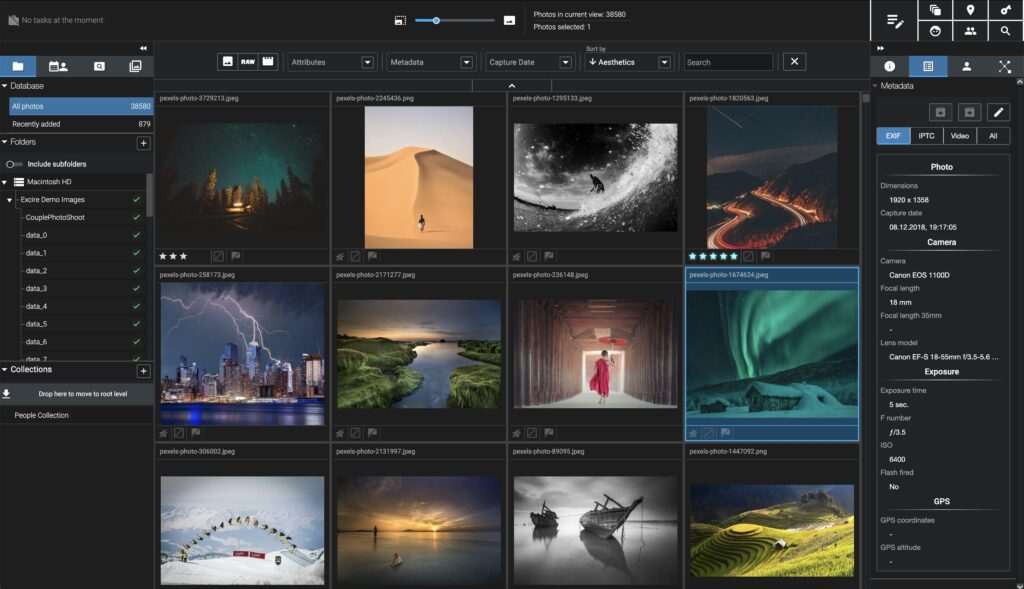
For photographers with thousands or even millions of photos, AI keywording dramatically reduces the time spent organizing image libraries while making it easier to locate specific photos whenever needed.
Unlike traditional keywording, which relies entirely on manual input, modern AI systems use computer vision and machine learning to recognize image content with impressive accuracy. Many tools can also write metadata directly into industry-standard IPTC fields, ensuring your keywords remain compatible with popular editing and cataloging software.
Common Elements AI Can Detect
Most AI keywording software can automatically identify:
- People and facial features (where supported)
- Animals and wildlife
- Vehicles and buildings
- Nature, landscapes, and weather
- Indoor and outdoor scenes
- Sports and activities
- Clothing, accessories, and colors
- Food and beverages
- Architecture and landmarks
- Everyday objects and products
Some advanced platforms even recognize photography-specific details, helping photographers filter images based on shooting scenarios or visual characteristics.
Why Photographers Need AI Keywording Software
As image collections grow, finding a specific photograph becomes increasingly difficult. A wedding photographer may shoot 3,000 to 6,000 images in a single event, while wildlife, sports, and travel photographers can accumulate hundreds of thousands of photos over the years.
Without proper keywords, valuable images often remain buried inside large catalogs.
AI keywording software solves this challenge by automatically organizing your photo library, making every image searchable within seconds.
Key Benefits of AI Keywording
1. Save Hours of Manual Work
Adding keywords manually to thousands of images can take days. AI completes the same task in minutes, allowing photographers to spend more time shooting, editing, or working with clients.
2. Find Photos Instantly
Need every image containing sunsets, mountains, golden retrievers, or red cars? AI-generated keywords make searching your library quick and accurate, even years after the photos were taken.
3. Improve Lightroom Organization
Many AI keywording tools integrate with Adobe Lightroom Classic, automatically enriching catalogs with searchable metadata. This makes filtering and managing large collections significantly easier.
4. Better Stock Photography Metadata
For photographers selling on stock platforms, accurate keywords improve image discoverability. AI can generate comprehensive keyword suggestions that reduce repetitive work while maintaining consistency across large portfolios.
5. Organize Massive Photo Libraries
Whether you manage wedding galleries, commercial shoots, travel archives, or wildlife collections, AI keywording helps maintain a clean, searchable, and well-organized catalog.
6. Reduce Human Error
Manual keywording often results in inconsistent spelling, missing tags, or duplicate keywords. AI applies standardized metadata across your library, improving search accuracy and long-term organization.

How AI Keywording Works
Although every platform uses its own technology, the workflow is generally straightforward:
- Import your photos into the AI keywording software.
- The AI scans each image using computer vision models.
- Objects, people, locations, colors, and scenes are automatically recognized.
- Relevant keywords and metadata are generated.
- You can review, edit, or remove suggested keywords if needed.
- The final metadata is saved to your catalog or written directly into the image’s IPTC/XMP fields.
This automated process transforms hours of repetitive cataloging into just a few clicks while giving photographers a more searchable and efficient image library.
Read Further:
- AI Photography
- AI Photo Culling Software
- Lightroom AI vs Photoshop AI
- AI Image Generator Tools
- Best AI Tools for Photographers
Best AI Keywording Software for Photographers
Choosing the right AI keywording software depends on your workflow, photo library size, editing software, and budget. Some tools focus entirely on intelligent photo organization, while others combine keywording with AI culling, editing, or digital asset management.
Below are the best AI keywording tools photographers should consider in 2026.
1. Excire Foto – Best Overall AI Keywording Software
Excire Foto is one of the most advanced AI-powered photo management applications designed specifically for photographers. Unlike cloud-based services, it runs locally on your computer, allowing you to organize your images without uploading them to external servers.
Using advanced computer vision, Excire Foto automatically analyzes your photos and generates searchable keywords based on people, objects, scenes, colors, and photographic content. It also offers intelligent searches by example, facial recognition (where available), aesthetic scoring, and duplicate detection.
Key Features
- Automatic AI keyword generation
- Intelligent image recognition
- Facial recognition support
- Search by example image
- Offline processing for enhanced privacy
- Duplicate image detection
- Fast searching across large photo libraries
- Compatible with Windows and macOS
Pros
- Excellent keyword accuracy
- Works completely offline
- No subscription required
- Built specifically for photographers
- Handles very large photo collections efficiently
Cons
- Paid software
- Editing features are limited
- Separate from Lightroom unless using companion tools
Best For: Professional photographers, event photographers, wildlife photographers, and anyone managing extensive image libraries.
2. Excire Search – Best Lightroom Keywording Plugin
If Adobe Lightroom Classic is already part of your workflow, Excire Search offers one of the best AI-powered keywording experiences available.
Instead of replacing Lightroom, it integrates directly into your existing catalog, automatically recognizing image content and making searches much faster. You can locate photos simply by describing what you’re looking for, such as “sunset over mountains,” “dog running,” or “red sports car.”
The plugin also helps identify visually similar images, making it particularly useful for photographers with large Lightroom catalogs.
Key Features
- Native Lightroom Classic integration
- AI visual search
- Automatic keyword suggestions
- Similar image search
- Facial recognition support
- Fast catalog indexing
Pros
- Seamless Lightroom workflow
- Easy installation
- Excellent search performance
- Saves hours of manual organization
Cons
- Requires Lightroom Classic
- Subscription or license purchase
- Limited outside Adobe’s ecosystem
Best For: Adobe Lightroom photographers who want smarter catalog management.

3. Adobe Lightroom Classic – Best Built-In AI Organization
Adobe Lightroom Classic has steadily improved its AI-powered organizational capabilities through Adobe Sensei. While it isn’t dedicated keywording software, its AI can automatically recognize people, objects, landscapes, animals, architecture, and many common scenes.
The People View feature groups faces automatically, while AI-powered search helps photographers locate images without manually tagging every photo.
Combined with metadata filtering and Collections, Lightroom remains one of the most powerful organizational tools for photographers already invested in the Adobe ecosystem.
Key Features
- Adobe Sensei AI recognition
- Smart facial recognition
- AI-powered search
- Metadata filtering
- Smart Collections
- Cloud synchronization
Pros
- Included with Lightroom subscription
- Excellent editing and organization
- Continuous AI improvements
- Industry-standard workflow
Cons
- Monthly subscription required
- Keyword suggestions are less detailed than dedicated AI tools
- Cloud features depend on Adobe services
Best For: Lightroom users who want integrated AI without additional software.
4. Aftershoot – Best AI Workflow for Wedding Photographers
Aftershoot is widely known for AI photo culling, but it also assists photographers by automatically analyzing images and improving overall workflow efficiency. While keywording isn’t its primary feature, it complements image organization by helping photographers quickly identify keepers and manage large event galleries.
Wedding and event photographers processing thousands of photos after every shoot can dramatically reduce their editing time with Aftershoot’s AI-powered automation.
Key Features
- AI-assisted image analysis
- Intelligent culling
- Blur and duplicate detection
- Workflow optimization
- Lightroom integration
- Batch processing
Pros
- Massive time savings
- Excellent for event photographers
- Easy Lightroom workflow
- Fast processing
Cons
- Keywording features are less comprehensive
- Subscription pricing
- Focuses more on culling than metadata
Best For: Wedding, event, and sports photographers handling high-volume shoots.
5. Peakto – Best AI Photo Library Manager
Peakto combines AI search, digital asset management, and cross-application organization into a single platform. Instead of managing only one catalog, it connects multiple libraries from Lightroom, Capture One, Apple Photos, and other software.
Its AI search engine understands natural language, making it easy to locate photos without remembering exact filenames or folders.
Key Features
- Cross-catalog management
- AI semantic search
- Natural language photo search
- Metadata organization
- Supports multiple editing applications
- Smart collections
Pros
- Excellent for multi-platform workflows
- Powerful AI search
- Centralized image management
- Professional interface
Cons
- macOS focused
- Learning curve for beginners
- Premium pricing
Best For: Professional photographers managing multiple editing applications and extensive archives.
6. Imagen – Best AI Companion for Editing Workflows
Imagen is primarily known for AI photo editing, but it also streamlines image organization by integrating seamlessly into professional editing workflows. While its keywording capabilities are more limited than dedicated cataloging software, it helps photographers process and manage large batches efficiently.
For photographers already using Imagen for editing, it serves as a useful productivity companion alongside dedicated keywording tools.
Key Features
- AI-powered editing
- Batch workflow automation
- Lightroom integration
- Profile-based editing
- Fast processing
- Cloud synchronization
Pros
- Excellent editing automation
- Saves editing time
- Easy Lightroom integration
- Professional-quality results
Cons
- Limited dedicated keywording
- Subscription required
- Cloud-based workflow
Best For: Professional photographers seeking AI-assisted editing with streamlined workflow management.
7. PhotoPrism – Best Free AI Keywording Software
PhotoPrism is an open-source photo management platform that uses artificial intelligence to automatically classify, organize, and search image collections. It supports object recognition, facial recognition, geolocation, and metadata indexing while allowing users to host everything on their own server.
Because it’s self-hosted, PhotoPrism gives photographers full control over their image library and privacy.
Key Features
- Open-source software
- AI object recognition
- Facial recognition
- Automatic metadata indexing
- Self-hosted image management
- Powerful search filters
Pros
- Free to use
- Excellent privacy
- Highly customizable
- Active open-source community
Cons
- Requires technical setup
- No official customer support
- Better suited for advanced users
Best For: Photographers who prefer free, self-hosted AI photo management solutions.
Read More:
- AI Photo Culling Software
- AI Image Generator Tools
- AI Photography Guide
- Lightroom AI vs Photoshop
- Best AI Photo Editing Software
AI Keywording vs Manual Keywording
For years, photographers relied on manually adding keywords to every image. While manual keywording offers complete control, it becomes increasingly impractical as photo libraries grow. Modern AI keywording software automates much of this process, helping photographers organize thousands of images in a fraction of the time.
The right approach often depends on the size of your photo collection and your workflow. Many professionals now combine AI-generated keywords with a quick manual review to ensure maximum accuracy.
| Feature | AI Keywording | Manual Keywording |
|---|---|---|
| Speed | ⭐⭐⭐⭐⭐ Extremely fast | ⭐ Slow |
| Accuracy | High for common objects and scenes | Depends on the user |
| Consistency | Excellent | Can vary over time |
| Large Photo Libraries | Ideal | Time-consuming |
| Cost | Some tools require payment | No software cost |
| Custom Keywords | Requires review | Full control |
| Learning Curve | Easy | Simple but repetitive |
Which One Is Better?
For photographers managing hundreds or thousands of images every month, AI keywording is the clear winner in terms of productivity. However, AI isn’t perfect. It may occasionally miss niche subjects, specific client names, or highly specialized photography terms.
A practical workflow is to let AI generate the initial keywords, then spend a few minutes refining them. This hybrid approach combines the speed of automation with the precision of manual editing.

How to Choose the Right AI Keywording Software
Not every photographer needs the same features. Before choosing a tool, consider how you manage your images, the software you already use, and whether you prefer local or cloud-based processing.
Here are the key factors to evaluate:
1. Compatibility with Your Editing Software
If your workflow revolves around Adobe Lightroom Classic, choose software that integrates directly with Lightroom. This eliminates the need to export, re-import, or maintain multiple catalogs.
If you use Capture One, Apple Photos, or other editors, ensure the keywording tool supports your preferred platform.
2. AI Recognition Accuracy
The best AI software should accurately recognize:
- People
- Animals
- Buildings
- Landscapes
- Products
- Vehicles
- Colors
- Activities
- Everyday objects
More accurate recognition means fewer corrections and a more searchable image library.
3. Metadata Support
Professional photographers should look for software that supports industry-standard metadata formats, including:
- IPTC keywords
- XMP metadata
- EXIF information
- Captions
- Ratings
- Labels
This ensures your keywords remain compatible across editing software and stock photography platforms.
4. Privacy and Security
Some AI tools process images locally on your computer, while others upload them to cloud servers.
If you regularly photograph weddings, corporate events, or private client sessions, local processing offers greater control over sensitive images.
5. Library Size
Different tools are designed for different workloads.
- Casual photographers may manage a few thousand images.
- Enthusiasts often store tens of thousands.
- Professionals may have hundreds of thousands—or even millions—of photos.
Choose software that remains fast as your collection grows.
6. Budget
Pricing models vary widely.
You may find:
- One-time lifetime licenses
- Monthly subscriptions
- Annual plans
- Free open-source alternatives
Consider long-term costs, especially if photography is your primary business.
Common Mistakes to Avoid
Even with AI-powered tools, photographers can make mistakes that reduce the effectiveness of their photo organization.
Avoid these common issues:
- Relying entirely on AI without reviewing keywords.
- Ignoring IPTC metadata compatibility.
- Using multiple keywording systems that create duplicate tags.
- Forgetting to back up your photo catalog.
- Skipping software updates that improve AI recognition.
- Using inconsistent naming conventions across projects.
Taking a few minutes to review AI-generated metadata can greatly improve search accuracy later.
Frequently Asked Questions
What is AI keywording software?
AI keywording software uses artificial intelligence to analyze photos and automatically generate relevant keywords, tags, and metadata based on the image content.
Is AI keywording accurate?
Most modern AI keywording tools are highly accurate at identifying common objects, people, animals, landscapes, and scenes. However, reviewing the generated keywords is still recommended for professional work.
Does Adobe Lightroom automatically add keywords?
Adobe Lightroom uses Adobe Sensei to recognize people and image content, making searching easier. However, dedicated AI keywording software typically offers more detailed keyword generation and metadata management.
Which AI keywording software is best for professionals?
Excire Foto is widely regarded as one of the best dedicated AI keywording solutions for professional photographers because of its advanced image recognition, fast searching, and offline processing.
Can AI keywording help stock photographers?
Yes. AI-generated keywords can significantly reduce the time required to prepare images for stock photography websites while improving consistency across large portfolios.
Does AI keywording work offline?
Some software, including Excire Foto, processes images locally without requiring internet access. Others rely on cloud-based AI services.
Is free AI keywording software available?
Yes. Open-source platforms like PhotoPrism provide AI-powered image organization and keywording without subscription fees, although they may require more technical setup.
Final Verdict
AI keywording software has transformed the way photographers organize and manage their image libraries. Instead of spending countless hours manually tagging photos, photographers can now use artificial intelligence to automatically identify scenes, objects, people, and other visual elements in just a few minutes.
Among the tools covered in this guide, Excire Foto stands out as the best overall choice for photographers seeking a dedicated AI keywording solution with excellent accuracy and offline processing. If you’re already working in Adobe Lightroom Classic, Excire Search and Lightroom’s built-in AI features integrate seamlessly into existing workflows. For those who prioritize cost and control, PhotoPrism offers a capable open-source alternative.
Ultimately, the best AI keywording software is the one that fits your workflow, scales with your growing photo library, and saves you time without compromising organization. By combining AI-generated keywords with a quick manual review, photographers can build searchable, well-organized catalogs that remain efficient for years to come.
Why Trust The Candid Shoot?
At The Candid Shoot, we regularly research AI-powered photography tools and workflow solutions that help photographers save time while maintaining professional-quality results. Our recommendations are based on evaluating real-world features, usability, software compatibility, privacy considerations, and value for photographers at different experience levels.
Rather than focusing only on marketing claims, we compare tools based on how they improve everyday photography workflows—from organizing large image libraries to simplifying editing and catalog management. As AI continues to evolve, we keep our content updated to reflect new features and industry developments, helping photographers make informed decisions with confidence.
Related Articles:
- AI Photography Guide
- AI Photo Editing Software
- AI Photo Culling Software
- AI Image Generator Tools
- AI Background Removal Tools
- Lightroom AI vs Photoshop
- Best AI Tools for Photographers





Leave a Reply