
Learn how Adobe Firefly for photographers with generative AI, object removal, image expansion, text effects, and workflow improvements. Compare features, pricing, pros, cons, and practical use cases in this complete 2026 guide.
Introduction

Artificial intelligence is rapidly transforming photo editing, allowing photographers to complete complex editing tasks in minutes instead of hours. One of the biggest developments in this space is Adobe Firefly, Adobe’s family of generative AI models designed to work across Creative Cloud applications like Photoshop, Lightroom, Adobe Express, and Illustrator.
Unlike standalone AI image generators, Adobe Firefly focuses on enhancing creative workflows rather than replacing them. It enables photographers to remove distracting objects, expand image backgrounds, generate realistic content, replace skies, create marketing graphics, and experiment with creative concepts using simple text prompts—all while staying inside Adobe’s professional ecosystem.
For wedding photographers, portrait photographers, product photographers, real estate photographers, and content creators, Firefly can speed up repetitive editing tasks while preserving creative control. Instead of spending hours manually masking, cloning, or extending backgrounds, photographers can use AI-assisted tools to produce high-quality results more efficiently.
However, Firefly is not intended to replace professional editing skills or the artistic judgment that photographers bring to every image. The best results come from combining AI-powered assistance with careful review, ethical editing practices, and creative expertise.
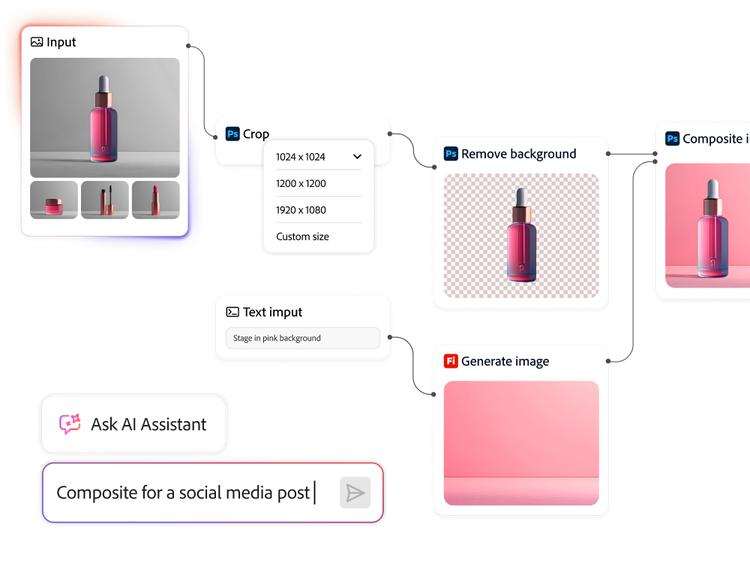
In this guide, we’ll explain how Adobe Firefly for photographers works, explore its most useful features, compare it with other AI editing tools, discuss pricing, highlight practical workflows, and help you decide whether it deserves a place in your photography business.
To explore the broader role of artificial intelligence in modern photography—including editing, workflow automation, proofing, and business tools—read our comprehensive AI Photography Guide.
Quick Answer
If you’re already using Adobe Photoshop or the Adobe Creative Cloud ecosystem, Adobe Firefly is one of the most practical AI tools available for photographers. Its Generative Fill, Generative Expand, object removal, background replacement, and AI-assisted creative features can significantly speed up editing while maintaining professional-quality results. Although it doesn’t replace traditional retouching or editing expertise, it serves as a powerful productivity tool for modern photography workflows.
What Is Adobe Firefly?
Adobe Firefly is Adobe’s generative AI platform that powers intelligent creative features across several Adobe applications.
Instead of functioning as a standalone photo editor, Firefly works behind many AI-powered tools inside:
- Adobe Photoshop
- Adobe Lightroom (selected AI features and ecosystem integration)
- Adobe Express
- Adobe Illustrator
- Adobe Premiere Pro (selected generative features)
- Other Adobe Creative Cloud applications
Firefly is designed to help creators generate, modify, extend, and enhance visual content using natural language prompts and AI-assisted editing.
For photographers, the most valuable capabilities include:
- Generative Fill
- Generative Expand
- Object removal
- Background replacement
- AI-assisted masking
- Creative concept generation
- Text effects for marketing materials
- Image extension beyond original boundaries
These tools help reduce repetitive editing while giving photographers more time to focus on creative storytelling and client work.
Why Photographers Should Care About Adobe Firefly
Modern photography businesses involve much more than capturing images. Editing, client revisions, social media content, marketing materials, and commercial projects all require significant time.
Adobe Firefly helps simplify many repetitive tasks by assisting with:
- Removing distractions from photographs.
- Extending backgrounds for different aspect ratios.
- Creating space for text in marketing images.
- Replacing unwanted elements.
- Producing creative mockups.
- Preparing images for advertising campaigns.
- Building promotional graphics for websites and social media.
By reducing manual editing time, photographers can focus more on creativity, client communication, and growing their business.
Adobe Firefly at a Glance
| Feature | Adobe Firefly |
|---|---|
| AI Image Editing | ✅ |
| Generative Fill | ✅ |
| Generative Expand | ✅ |
| Object Removal | ✅ |
| Background Replacement | ✅ |
| AI Image Generation | ✅ |
| Photoshop Integration | ✅ |
| Creative Cloud Integration | ✅ |
| Commercial Usage Support | Yes (subject to Adobe’s licensing terms) |
| Best For | Professional photographers & creators |
Key AI Features for Photographers
Adobe Firefly offers several tools that are especially useful in photography workflows.
Generative Fill
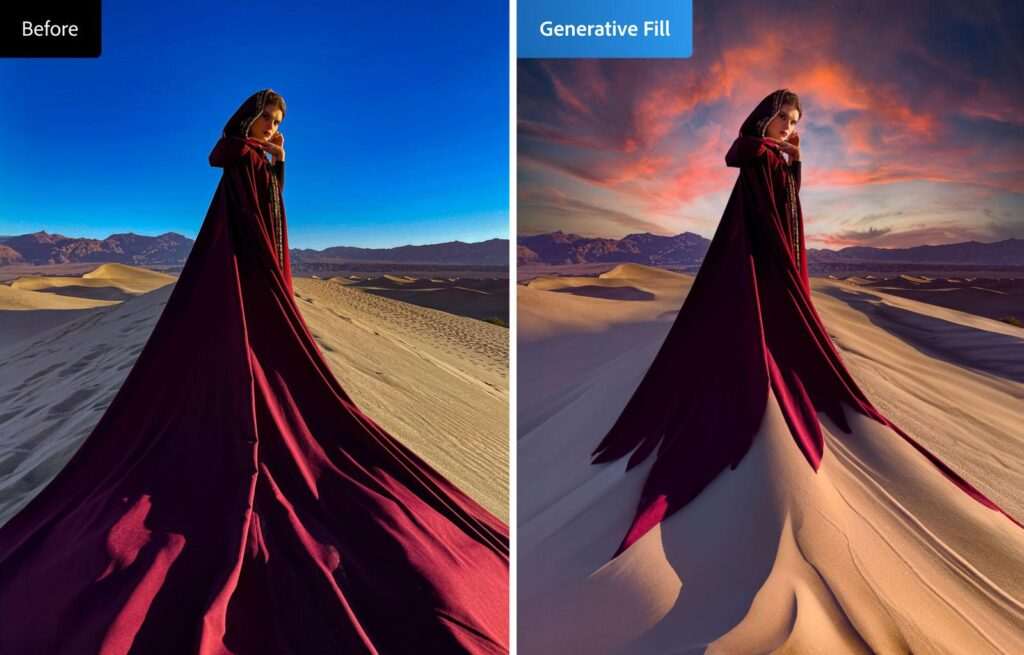
Generative Fill allows photographers to add, replace, or remove image content using simple text prompts.
Typical use cases include:
- Removing distracting objects.
- Filling empty areas.
- Replacing backgrounds.
- Adding environmental elements.
- Cleaning up compositions.
Generative Expand
Generative Expand intelligently extends an image beyond its original borders.
This feature is particularly useful when:
- Converting horizontal photos into vertical formats.
- Preparing images for social media.
- Creating banner images.
- Designing website headers.
- Adjusting compositions without cropping important subjects.
Object Removal
Instead of manually cloning unwanted objects, photographers can use Firefly’s AI-powered removal tools to eliminate:
- Tourists
- Power lines
- Trash bins
- Vehicles
- Background distractions
- Temporary objects
The AI fills the removed area with contextually appropriate content, reducing manual cleanup time.
Background Replacement
Firefly can help photographers replace or modify backgrounds for:
- Product photography
- Portraits
- Commercial images
- Marketing campaigns
- Social media graphics
Background changes should always be reviewed carefully to ensure realistic lighting, perspective, and consistency.
AI Image Generation
Firefly also allows users to generate original visual content from text prompts.
For photographers, this capability is often most useful for:
- Mood boards
- Concept art
- Storyboarding
- Marketing graphics
- Composite planning
- Creative inspiration
Rather than replacing photography, these generated visuals can support planning and client presentations.
Text Effects
Firefly includes AI-powered text styling that helps photographers create:
- Promotional banners
- Website graphics
- Social media posts
- Portfolio headers
- Event advertisements
These tools are especially valuable for photographers managing their own marketing materials.
Benefits of Adobe Firefly
Using Firefly can improve productivity in several ways.
Save Editing Time
AI-assisted tools automate repetitive editing tasks, reducing the need for extensive manual selections and cloning.
Improve Creative Flexibility
Generative features allow photographers to explore multiple concepts quickly before deciding on a final edit.
Expand Marketing Opportunities
Photographers can use Firefly to create promotional graphics, website visuals, advertisements, and social media assets without relying on separate design software.
Stay Inside the Adobe Ecosystem
Because Firefly integrates with Adobe Creative Cloud, photographers can continue using familiar workflows while gaining AI-powered capabilities.
Support Commercial Workflows
Product photographers, real estate photographers, portrait photographers, and commercial studios can use Firefly to prepare polished marketing assets more efficiently.
Who Should Use Adobe Firefly?
Firefly benefits photographers across many specialties.
Wedding Photographers
Remove distractions, expand backgrounds for album layouts, and create promotional content.
Portrait Photographers
Enhance portraits, clean backgrounds, and prepare images for multiple aspect ratios.
Product Photographers
Replace backgrounds, generate marketing visuals, and prepare e-commerce assets.
Real Estate Photographers
Remove temporary objects, enhance property images, and produce advertising materials.
Commercial Photographers
Create campaign concepts, mockups, and presentation graphics while accelerating post-production workflows.
Common Use Cases
Professional photographers commonly use Adobe Firefly for:
- Removing unwanted objects.
- Extending image backgrounds.
- Preparing social media crops.
- Creating advertising graphics.
- Designing website banners.
- Producing client presentations.
- Building mood boards.
- Developing marketing concepts.
- Supporting composite artwork.
These applications make Firefly a valuable productivity tool rather than a replacement for professional editing skills.
Related Articles:
- AI Image Generator Tools
- AI Background Removal Tools
- Lightroom AI vs Photoshop AI
- AI Workflow Automation for Photography Businesses
- Best AI Tools for Photographers
- AI Album Design Software
- AI Photo Culling Software
- AI Keywording Software for Photographers
Expert Insight: Adobe Firefly is most effective when used as an AI assistant—not an automatic replacement for professional editing. Experienced photographers can use its generative tools to speed up repetitive tasks such as object removal and background expansion while maintaining full control over composition, lighting, color accuracy, and ethical editing decisions.
How Adobe Firefly Works
Adobe Firefly is a family of generative AI models that powers intelligent editing features across Adobe Creative Cloud. Rather than functioning as a standalone photo editor, Firefly works behind AI-powered tools in applications like Photoshop, Adobe Express, Illustrator, and selected Creative Cloud workflows.
For photographers, the biggest advantage is that AI features are integrated directly into familiar Adobe applications, eliminating the need to switch between multiple editing platforms.
Instead of manually masking, cloning, extending backgrounds, or creating composite elements, photographers can describe what they want using text prompts or use AI-assisted tools that automatically analyze the image.
The result is a faster editing workflow while keeping the photographer in complete control of the final image.
How Adobe Firefly Fits Into a Photography Workflow
Most photographers follow a workflow similar to this:
- Import RAW photographs into Adobe Lightroom.
- Cull and organize the best images.
- Perform color correction and basic adjustments.
- Open selected images in Photoshop.
- Use Adobe Firefly for AI-assisted editing.
- Finish manual retouching.
- Export final photographs.
- Deliver to clients or prepare marketing materials.
Firefly doesn’t replace Lightroom or Photoshop—it enhances them by reducing repetitive editing work.
Major Adobe Firefly Features for Photographers
1. Generative Fill
Generative Fill is one of Adobe Firefly’s most powerful tools.
It allows photographers to:
- Remove unwanted objects
- Replace distractions
- Add missing elements
- Extend backgrounds
- Modify compositions
- Fill empty spaces
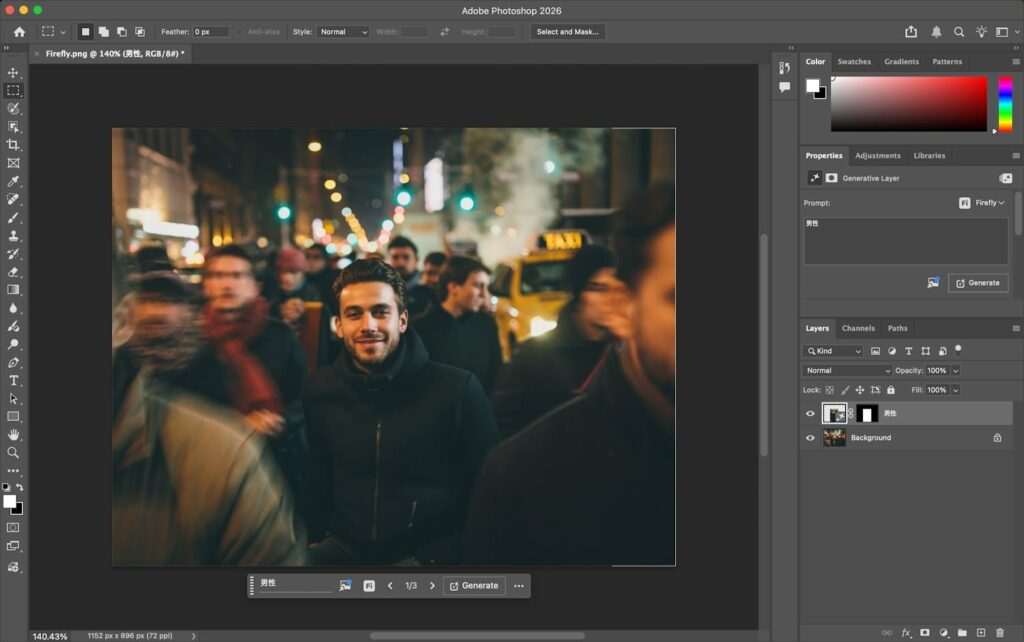
Instead of manually cloning areas, photographers simply select an area and describe what they want.
Example Uses
- Remove tourists from landscapes
- Remove unwanted wedding guests
- Clean product backgrounds
- Replace damaged areas
- Add natural scenery
- Extend studio backgrounds
This feature is especially valuable when creating polished commercial images.
2. Generative Expand
Sometimes photographers need extra space around a photograph.
For example:
- Instagram Portrait
- Website banner
- Facebook cover
- YouTube thumbnail
- Album layout
- Magazine cover
Instead of cropping the image, Generative Expand creates realistic extensions beyond the original photo.
Common uses include:
- Creating additional sky
- Expanding landscapes
- Extending studio backdrops
- Increasing negative space for text
- Creating horizontal marketing banners
This saves significant editing time compared to manual compositing.
3. AI Object Removal
Removing unwanted objects has traditionally required careful cloning and healing.
Firefly simplifies this process by intelligently replacing selected areas with context-aware content.
Examples include removing:
- Trash bins
- Electrical wires
- Exit signs
- Tourists
- Microphones
- Camera equipment
- Shadows
- Reflections
- Background distractions
Although results are often impressive, photographers should always inspect AI-generated areas closely to ensure natural textures, perspective, and lighting.

4. Background Replacement
Background replacement is useful for:
- Product photography
- Headshots
- Commercial advertising
- Social media campaigns
- Creative composites
Firefly can generate entirely new backgrounds or help replace distracting environments.
Examples include:
Original Background
↓
Office Wall
↓
Studio Background
↓
Luxury Interior
↓
Nature Scene
↓
Minimal White Background
The final image should always be reviewed for realistic shadows, lighting direction, and edge quality.
5. AI Image Generation
Adobe Firefly can generate entirely new visuals from text prompts.
For photographers, this feature works best for:
- Mood boards
- Concept development
- Storyboarding
- Marketing graphics
- Advertising concepts
- Creative inspiration
Rather than replacing original photography, these generated visuals help photographers communicate ideas during planning stages.
6. Text Effects
Firefly also includes AI-powered typography tools.
Photographers can quickly create:
- Website headers
- Promotional graphics
- Event banners
- Photography advertisements
- Portfolio titles
- Social media designs
This reduces the need to use separate graphic design software for simple marketing assets.
7. AI Style Transfer & Creative Effects
Adobe continues expanding Firefly’s creative capabilities, allowing users to experiment with artistic styles and AI-assisted visual effects.
These tools can support:
- Fine art concepts
- Creative client presentations
- Editorial mockups
- Marketing visuals
- Personal projects
For client work, photographers should use stylistic effects thoughtfully to ensure the final images align with project goals and expectations.
8. AI-Assisted Selection & Masking
One of the biggest productivity improvements comes from AI-assisted selections.
Firefly can help identify:
- People
- Clothing
- Sky
- Background
- Hair
- Facial features
- Objects
This speeds up local adjustments while reducing the need for manual masking.
Adobe Firefly Integration With Photoshop
Photoshop receives many of Firefly’s most advanced features.
Photographers can use Firefly inside Photoshop for:
- Generative Fill
- Generative Expand
- Object removal
- Layer editing
- Smart selections
- Composite creation
- Background replacement
- AI-assisted masking
Because Photoshop remains the industry standard for advanced retouching, Firefly integrates naturally into existing editing workflows.
Adobe Firefly Integration With Lightroom
Lightroom focuses primarily on photo management and image development rather than full generative editing.
A common workflow is:
- Organize photographs
- Rate images
- Apply color correction
- Reduce noise
- Sharpen images
- Export selected photos to Photoshop
- Use Firefly for advanced AI editing
- Return the finished image to Lightroom for catalog management
This combination gives photographers the strengths of both applications.
Adobe Firefly for Different Photography Niches
Wedding Photography
Useful for:
- Removing distractions
- Expanding album layouts
- Cleaning backgrounds
- Marketing materials
Portrait Photography
Ideal for:
- Background cleanup
- Skin retouching support
- Creative composites
- Social media crops
Product Photography
Excellent for:
- Background replacement
- Object cleanup
- Marketing visuals
- E-commerce content
Real Estate Photography
Useful for:
- Removing temporary objects
- Improving compositions
- Creating promotional images
- Preparing listing graphics
Commercial Photography
Supports:
- Advertising concepts
- Creative mockups
- Composite imagery
- Campaign visuals
Real-World Workflow Example
Imagine a wedding photographer delivering images for a luxury venue.
Several otherwise beautiful photographs contain distracting exit signs, parked vehicles, and guests standing at the edge of the frame.
Instead of manually cloning each distraction, the photographer opens the selected images in Photoshop and uses Adobe Firefly’s Generative Fill to remove unwanted objects. Next, Generative Expand adds additional sky to create a wide banner for the couple’s wedding website.
The photographer reviews each AI-generated area, refines the edits manually where needed, and exports the final photographs.
The result is a polished collection that preserves the original story while significantly reducing repetitive editing time.
Advantages of Adobe Firefly
Saves Time
Automates repetitive editing tasks that would otherwise require extensive manual work.
Improves Productivity
Allows photographers to spend more time on creative decisions and client communication.
Integrates With Existing Adobe Workflows
No need to learn an entirely new editing ecosystem.
Supports Marketing
Create promotional graphics, banners, and advertising materials alongside client photography.
Maintains Creative Control
Photographers remain responsible for final composition, color grading, and ethical editing decisions.
Limitations to Consider
Although Firefly is powerful, it has some limitations.
- AI-generated content may occasionally require manual refinement.
- Complex scenes can produce inconsistent results.
- Text prompt quality affects generated outputs.
- Some advanced features depend on Creative Cloud subscriptions and generative credit availability.
- Ethical considerations remain important when modifying documentary or journalistic images.
Understanding these limitations helps photographers use Firefly effectively and responsibly.
Professional Tip: Adobe Firefly is most effective when used to accelerate repetitive editing tasks rather than automate entire projects. Always inspect AI-generated edits at full resolution for artifacts, lighting inconsistencies, texture mismatches, or perspective issues before delivering images to clients. Combining Firefly’s automation with manual retouching produces the most reliable professional results.
Adobe Firefly Review for Photographers
Adobe Firefly has quickly become one of the most important AI tools for photographers because it integrates directly into the Adobe Creative Cloud ecosystem rather than requiring users to switch to separate editing platforms.
Instead of replacing Photoshop or Lightroom, Firefly enhances them by introducing generative AI features that reduce repetitive editing work while allowing photographers to maintain complete creative control.
Below is a detailed review of Adobe Firefly’s most valuable features for photographers.
1. Generative Fill – ⭐⭐⭐⭐⭐
Generative Fill is arguably Adobe Firefly’s most impressive feature.
After selecting an area in Photoshop, photographers can simply type what they want to add, replace, or remove.
Examples include:
- Remove unwanted tourists
- Remove power lines
- Remove vehicles
- Replace backgrounds
- Extend scenery
- Add natural elements
- Remove distractions
- Create clean commercial images
Unlike traditional cloning tools, Firefly analyzes the surrounding content to generate realistic replacements.
Best For
- Wedding photography
- Portrait photography
- Product photography
- Commercial photography
- Real estate photography
2. Generative Expand – ⭐⭐⭐⭐⭐
Photographers frequently need different aspect ratios for:
- YouTube
- Websites
- Print advertisements
Instead of cropping important parts of the image, Generative Expand intelligently creates new image areas outside the original frame.
This feature is especially useful for:
- Website hero images
- Social media banners
- Magazine covers
- Album layouts
- Marketing graphics
3. AI Object Removal – ⭐⭐⭐⭐⭐
Removing distractions used to require extensive cloning and healing.
Firefly makes the process significantly faster.
Common objects photographers remove include:
- Trash cans
- Tourists
- Power cables
- Exit signs
- Reflections
- Shadows
- Camera equipment
- Background distractions
Most removals take only a few seconds.
4. Background Replacement – ⭐⭐⭐⭐☆
Firefly allows photographers to replace backgrounds using AI-generated content.
Popular applications include:
- Studio portraits
- Product photography
- Advertising campaigns
- Marketing graphics
- Creative composites
Although the AI creates impressive results, photographers should carefully review lighting consistency, perspective, and edge transitions.
5. AI Image Generation – ⭐⭐⭐⭐☆
Firefly can create entirely new visuals using text prompts.
While photographers generally rely on original images for client work, AI-generated visuals are useful for:
- Mood boards
- Story concepts
- Creative inspiration
- Advertising mockups
- Presentation graphics
- Website illustrations
This feature complements photography rather than replacing it.
6. Text Effects – ⭐⭐⭐⭐☆
Firefly’s AI typography tools simplify graphic design.
Photographers can create:
- Business advertisements
- Photography promotions
- Website banners
- Event announcements
- Portfolio graphics
- Social media content
This reduces the need for separate design software for simple promotional materials.
7. Photoshop Integration – ⭐⭐⭐⭐⭐
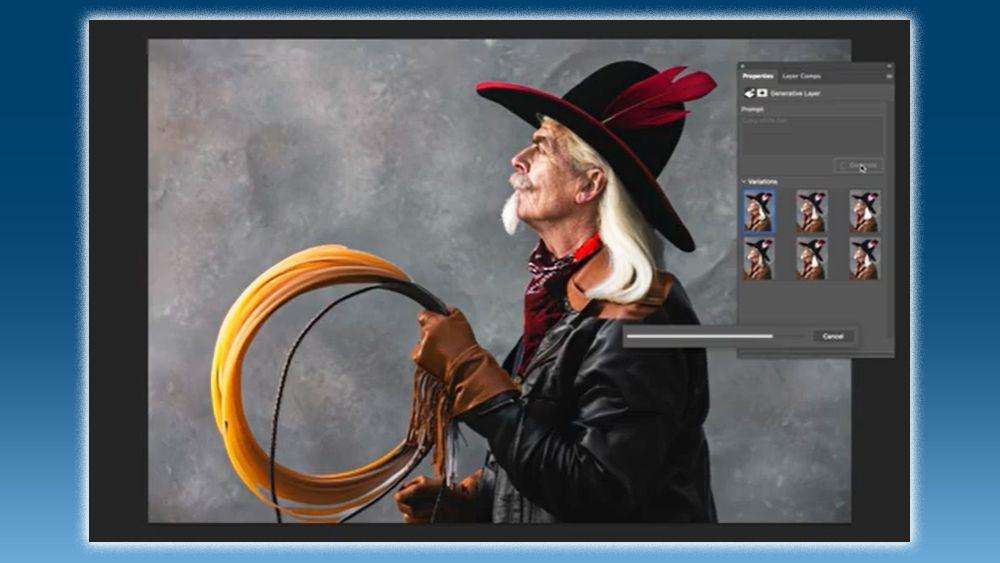
One of Firefly’s biggest strengths is its deep Photoshop integration.
Photographers can access AI-powered features without changing their existing workflow.
Available tools include:
- Generative Fill
- Generative Expand
- AI masking
- Object removal
- Smart selections
- Background generation
- Composite editing
This makes Firefly feel like a natural extension of Photoshop rather than a separate application.
8. Creative Cloud Integration – ⭐⭐⭐⭐⭐
Adobe Firefly connects with multiple Creative Cloud applications.
These include:
- Photoshop
- Lightroom ecosystem
- Adobe Express
- Illustrator
- Premiere Pro (selected workflows)
This connected ecosystem allows photographers to move efficiently between editing, design, marketing, and content creation.
Adobe Firefly Pricing
Adobe Firefly is available through several Adobe plans, and access to generative AI features may depend on your Creative Cloud subscription and available generative credits.
Typical options include:
- Free account with limited AI usage
- Photoshop plans
- Photography Plan
- Creative Cloud All Apps
- Enterprise plans
Note: Adobe occasionally updates pricing, feature availability, and generative credit limits. Always check Adobe’s official pricing page for the latest information.
Pros
- Excellent Photoshop integration
- Professional-quality AI editing
- Fast object removal
- Outstanding Generative Fill
- Powerful Generative Expand
- Commercial-friendly licensing within Adobe’s terms
- Easy learning curve for Adobe users
- Supports professional workflows
- Continually improving AI features
Cons
- Best features require Creative Cloud subscriptions
- Some AI edits still require manual refinement
- Performance depends on image complexity
- Requires internet connectivity for many generative features
- Generative credit limits may apply depending on your plan
Adobe Firefly vs Photoshop AI
| Feature | Adobe Firefly | Photoshop AI Tools |
|---|---|---|
| Generative Fill | ⭐⭐⭐⭐⭐ | Powered by Firefly |
| Object Removal | ⭐⭐⭐⭐⭐ | ✅ |
| Background Replacement | ⭐⭐⭐⭐☆ | ✅ |
| Generative Expand | ⭐⭐⭐⭐⭐ | ✅ |
| AI Image Generation | ✅ | Limited |
| Professional Retouching | Limited | ⭐⭐⭐⭐⭐ |
| Layer Editing | Limited | ⭐⭐⭐⭐⭐ |
Winner
These are complementary rather than competing tools. Firefly provides the generative AI engine powering many of Photoshop’s AI capabilities, while Photoshop offers the broader professional editing environment.
Adobe Firefly vs Midjourney
| Feature | Adobe Firefly | Midjourney |
|---|---|---|
| Photo Editing | ⭐⭐⭐⭐⭐ | ❌ |
| AI Image Generation | ⭐⭐⭐⭐☆ | ⭐⭐⭐⭐⭐ |
| Commercial Photography Workflow | ⭐⭐⭐⭐⭐ | Limited |
| Photoshop Integration | ✅ | ❌ |
| Marketing Graphics | ⭐⭐⭐⭐⭐ | ⭐⭐⭐⭐☆ |
| Photography Editing | ⭐⭐⭐⭐⭐ | Limited |
Winner
Photographers focused on editing existing photographs will generally benefit more from Adobe Firefly, while Midjourney excels at generating original AI artwork and concept imagery.
Adobe Firefly vs Canva Magic Studio
| Feature | Adobe Firefly | Canva Magic Studio |
|---|---|---|
| Professional Editing | ⭐⭐⭐⭐⭐ | ⭐⭐⭐☆☆ |
| Photoshop Integration | ✅ | ❌ |
| AI Object Removal | ⭐⭐⭐⭐⭐ | ⭐⭐⭐⭐☆ |
| Graphic Design | ⭐⭐⭐⭐☆ | ⭐⭐⭐⭐⭐ |
| Photography Workflow | ⭐⭐⭐⭐⭐ | ⭐⭐⭐☆☆ |
| Marketing Templates | ⭐⭐⭐⭐☆ | ⭐⭐⭐⭐⭐ |
Winner
Adobe Firefly is generally better suited for professional photographers working within Adobe Creative Cloud, while Canva Magic Studio is an excellent choice for quick marketing graphics and simple visual content.
Best Use Cases
Adobe Firefly is particularly effective for:
Wedding Photography
- Remove distractions
- Extend backgrounds
- Design marketing banners
- Prepare album artwork
Portrait Photography
- Background cleanup
- Social media crops
- Creative composites
- Promotional graphics
Product Photography
- Replace backgrounds
- Generate advertising assets
- Prepare e-commerce images
Real Estate Photography
- Remove temporary objects
- Improve listing photographs
- Create website banners
Commercial Photography
- Advertising campaigns
- Brand mockups
- Presentation materials
- Client concept visuals
Who Should Use Adobe Firefly?
Adobe Firefly is ideal for:
- Professional photographers
- Wedding photographers
- Portrait photographers
- Commercial photographers
- Product photographers
- Content creators
- Marketing teams
- Graphic designers already using Adobe Creative Cloud
It may be less suitable for users seeking a standalone image generator without an Adobe workflow.
Overall Rating
| Category | Rating |
|---|---|
| Ease of Use | ⭐⭐⭐⭐⭐ |
| AI Editing | ⭐⭐⭐⭐⭐ |
| Photoshop Integration | ⭐⭐⭐⭐⭐ |
| Workflow Efficiency | ⭐⭐⭐⭐⭐ |
| Creativity | ⭐⭐⭐⭐☆ |
| Value for Professionals | ⭐⭐⭐⭐⭐ |
| Overall Score | 4.9 / 5 |
Is Adobe Firefly Worth It for Photographers?
Adobe Firefly isn’t designed to replace Lightroom, Photoshop, or a photographer’s creative expertise. Instead, it enhances the editing workflow by automating repetitive tasks such as object removal, background expansion, and AI-assisted content generation.
For photographers already using Adobe Creative Cloud, Firefly integrates naturally into existing workflows and can significantly reduce editing time without requiring a completely new editing ecosystem.
Whether it’s worth using depends on the type of photography you do, your editing workflow, and how often you perform repetitive retouching tasks.
Adobe Firefly vs Traditional Photo Editing
| Feature | Adobe Firefly | Traditional Editing |
|---|---|---|
| Object Removal | AI-assisted | Manual Clone Stamp & Healing |
| Background Extension | Automatic | Manual Composite |
| Image Expansion | AI Generated | Manual Canvas Extension |
| Selection Tools | AI-assisted | Manual Masking |
| Creative Concepts | Text Prompt | Manual Design |
| Editing Speed | Very Fast | Slower |
| Final Creative Control | Photographer | Photographer |
Which Is Better?
Firefly excels at reducing repetitive editing work, while traditional editing techniques remain essential for precision retouching, advanced composites, and creative control. Most professional photographers benefit from combining both approaches rather than relying exclusively on AI.
How to Choose Whether Adobe Firefly Is Right for You
Before subscribing or integrating Firefly into your workflow, consider the following factors.
1. Your Photography Niche
Different specialties benefit in different ways.
Wedding Photographers
Useful for:
- Removing distractions
- Extending ceremony images
- Album cover designs
- Marketing graphics
Portrait Photographers
Ideal for:
- Background cleanup
- Creative composites
- Social media content
- Promotional banners
Product Photographers
Helpful for:
- Background replacement
- Commercial mockups
- E-commerce images
- Advertising assets
Real Estate Photographers
Supports:
- Object removal
- Sky replacement workflows
- Marketing visuals
- Listing graphics
2. Existing Adobe Workflow
Firefly provides the greatest value if you already use:
- Adobe Photoshop
- Adobe Lightroom
- Adobe Creative Cloud
- Adobe Express
If you’re already invested in the Adobe ecosystem, integrating Firefly into your workflow is relatively seamless.
3. Editing Volume
Photographers who edit hundreds or thousands of images each month can often save significant time using AI-assisted features.
High-volume users include:
- Wedding photographers
- Event photographers
- School photographers
- Commercial studios
For photographers with lighter editing needs, the productivity gains may be less dramatic but can still be valuable for specific tasks.
4. AI Features You Need
Not every photographer uses every AI feature.
Consider whether you regularly need:
- Object removal
- Generative Fill
- Background replacement
- Image expansion
- Marketing graphics
- Concept generation
If several of these tasks are part of your workflow, Firefly can provide meaningful productivity benefits.

5. Budget & Creative Cloud Subscription
Firefly’s AI capabilities are tied to Adobe plans and generative credits.
When comparing options, consider:
- Existing Creative Cloud subscriptions
- Included AI features
- Generative credit availability
- Team collaboration needs
- Long-term software costs
If you’re already paying for Adobe Photography or All Apps plans, Firefly may represent additional value without introducing another editing ecosystem.
Common Mistakes to Avoid
Firefly is a powerful assistant, but thoughtful use is essential.
Avoid these common mistakes:
- Accepting AI-generated edits without careful review.
- Overusing Generative Fill in ways that create unrealistic results.
- Ignoring lighting consistency after background replacement.
- Forgetting to inspect images at 100% zoom before delivery.
- Applying AI edits to documentary or journalistic work without considering ethical implications.
- Relying solely on AI instead of professional retouching when precision is required.
- Assuming AI-generated content is always factually accurate or visually perfect.
Professional editing still requires human judgment.
Privacy & Ethical Considerations
Photographers should use Adobe Firefly responsibly, especially when working with client images.
Best practices include:
- Review Adobe’s current licensing and usage terms before using AI-generated content commercially.
- Obtain appropriate permissions when editing client photographs.
- Be transparent about significant AI-generated modifications when relevant to the project.
- Preserve authenticity for documentary, editorial, and journalistic work.
- Securely store original files alongside edited versions.
- Regularly back up project catalogs and exported images.
Responsible AI use helps maintain trust with clients and protects the integrity of professional photography.
Real-World Workflow Example
Imagine a commercial photographer preparing a marketing campaign for a clothing brand.
After editing the RAW images in Lightroom, the photographer opens the selected files in Photoshop.
Using Adobe Firefly, they:
- Remove distracting background elements.
- Expand the canvas for multiple advertising formats.
- Create additional negative space for promotional text.
- Generate subtle environmental enhancements.
- Refine all AI-generated areas manually.
- Export versions for social media, websites, print ads, and banners.
Instead of creating multiple composites manually, Firefly accelerates production while the photographer maintains complete creative control over the final campaign.
Frequently Asked Questions
Final Verdict
Adobe Firefly represents one of the most significant AI advancements for photographers working within the Adobe ecosystem. Rather than replacing traditional editing, it enhances professional workflows by automating repetitive tasks such as object removal, Generative Fill, background expansion, and AI-assisted content creation.
Its greatest strength lies in seamless integration with Photoshop and Creative Cloud, allowing photographers to adopt AI features without abandoning familiar editing tools. Wedding photographers, portrait photographers, commercial studios, product photographers, and content creators can all benefit from faster editing while maintaining creative control over the final image.
Among today’s AI editing solutions, Adobe Firefly stands out for its balance of automation, usability, and professional workflow integration. When combined with Lightroom and Photoshop, it helps photographers spend less time on repetitive edits and more time on creativity, storytelling, and client service.
Why Trust The Candid Shoot?
At The Candid Shoot, we evaluate AI-powered photography tools using practical criteria that matter to working photographers. Our recommendations are based on official documentation, publicly available feature information, workflow integration, real-world photography use cases, pricing models, and ease of use—not sponsored rankings.
Every AI tool is assessed consistently for:
- Editing capabilities
- Workflow efficiency
- Ease of learning
- Creative flexibility
- Integration with photography software
- Commercial usability
- Long-term value for photographers
How We Evaluated Adobe Firefly
Our review considered:
- Generative Fill performance
- Generative Expand quality
- Object removal effectiveness
- Background replacement tools
- Photoshop integration
- Lightroom workflow compatibility
- Creative Cloud ecosystem
- Learning curve
- Performance and reliability
- Pricing and overall value
References & Official Resources
Use official Adobe resources to verify the latest features, pricing, licensing, and AI capabilities:
Official documentation should always be consulted for current subscription details, supported features, commercial usage terms, and generative credit information.
Related Articles
Continue exploring AI-powered photography tools:
- AI Photography Guide
- Lightroom AI vs Photoshop AI
- AI Image Generator Tools
- AI Background Removal Tools
- AI Album Design Software
- AI Workflow Automation for Photography Businesses
- AI Photo Culling Software
- AI Keywording Software for Photographers
- Best AI Tools for Photographers








Leave a Reply