

Discover our in-depth Remini AI Review for 2026. Explore its AI photo enhancement features, pricing, pros, cons, performance, and whether it’s the best AI photo enhancer for portraits and old photos.
Table of Contents
Introduction
Artificial intelligence has transformed photo enhancement, making it possible to restore blurry, low-resolution, and old photographs with just a few taps. Among the many AI-powered editing apps available today, Remini AI has become one of the most recognizable names, thanks to its ability to sharpen faces, enhance portraits, restore vintage photos, and upscale image quality using advanced deep-learning technology.
Whether you’re a photographer improving client portraits, a content creator producing social media visuals, a business restoring archived images, or simply someone looking to revive treasured family photos, Remini AI promises professional-quality results without requiring advanced editing skills.
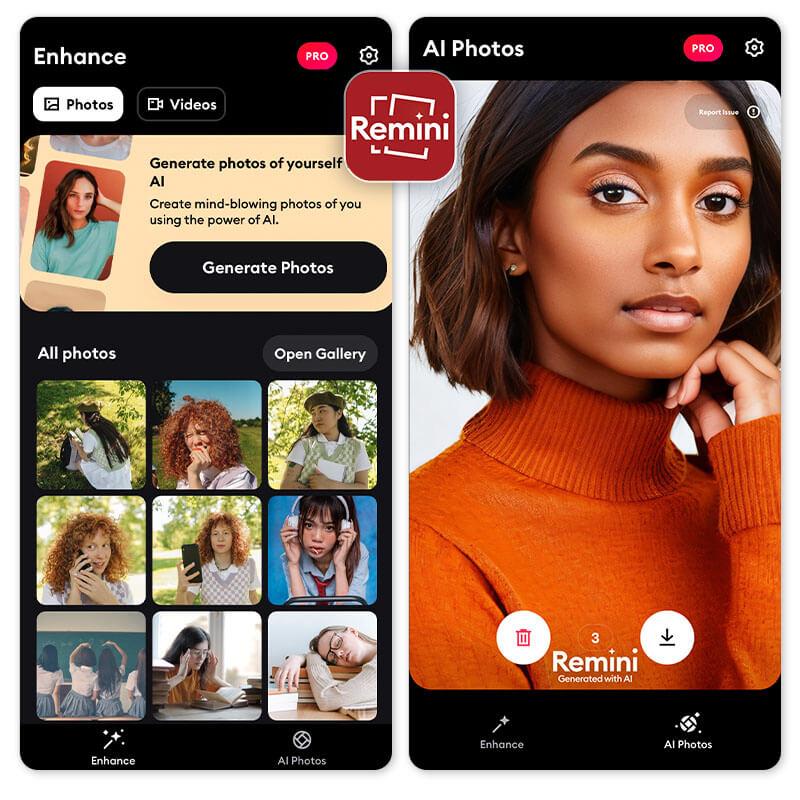
However, does it truly deliver on its promises? Can it compete with professional software like Adobe Photoshop AI, Lightroom AI, or Topaz Photo AI? Is the premium subscription worth the investment, or is the free version sufficient for everyday use?
In this comprehensive Remini AI Review, we’ll explore its features, pricing, performance, ease of use, strengths, weaknesses, and real-world testing results. By the end of this guide, you’ll know whether Remini AI is the right photo enhancement tool for your creative workflow in 2026.
About This Guide
At The Candid Shoot, we review photography software through hands-on testing and practical workflows rather than relying solely on marketing claims. Every recommendation is based on actual usage across different photography scenarios, helping photographers, content creators, and businesses make informed decisions.
For this review, we tested Remini AI using:
- Portrait photography
- Selfies
- Old family photographs
- Low-resolution smartphone images
- Social media content
- Product images
- Landscape photography
- AI face enhancement
- Photo restoration
- Image upscaling
We evaluated each feature based on:
- AI enhancement quality
- Facial reconstruction accuracy
- Ease of use
- Processing speed
- Export quality
- Pricing
- Value for money
- Mobile experience
- Overall workflow efficiency
Our goal is to help you decide whether Remini AI deserves a place in your editing toolkit.
Quick Answer
If you’re looking for the best AI photo enhancement app, Remini AI is one of the strongest options available in 2026. It excels at restoring blurry portraits, enhancing facial details, improving old photographs, and increasing image resolution with minimal effort.
For casual users, influencers, and content creators, Remini AI provides impressive one-click enhancements that dramatically improve image quality. Professional photographers may still prefer dedicated editing software like Photoshop AI or Lightroom AI for complete creative control, but Remini AI works exceptionally well as a fast enhancement tool.
Our Overall Rating: ⭐⭐⭐⭐⭐ 4.8/5
What is Remini AI?
Remini AI is an artificial intelligence-powered photo enhancement application that uses deep learning algorithms to restore, sharpen, and improve image quality automatically.
Originally designed to enhance old and blurry photos, the platform has expanded significantly and now offers features such as:
- AI Photo Enhancement
- AI Face Enhancement
- AI Portrait Enhancement
- AI Video Enhancement
- AI Image Upscaling
- AI Photo Restoration
- Color Restoration
- Noise Reduction
- Image Sharpening
The software analyzes each image using neural networks trained on millions of photographs, enabling it to reconstruct missing details while preserving a natural appearance.
Today, Remini is available on:
- Android
- iPhone (iOS)
- Web Browser
making it accessible to users across multiple platforms.
Who Should Use Remini AI?
Remini AI is designed for a wide range of users who want to improve image quality without learning professional editing software.
It is particularly well suited for:
Photographers
Enhance portraits, restore older client images, and improve slightly soft photographs before final delivery.
Content Creators
Create sharper, more engaging visuals for YouTube thumbnails, Instagram posts, TikTok videos, Pinterest Pins, and other social media platforms.
Families
Restore old family photographs, repair faded memories, and preserve historical images with minimal effort.
Small Businesses
Improve product photos, promotional images, and marketing materials without investing in expensive editing software.
Graphic Designers
Use Remini AI as a quick enhancement step before moving images into Photoshop or Canva for additional creative work.
Students & Casual Users
Enhance personal photos quickly using an intuitive interface that requires little to no editing experience.
Key Features of Remini AI
Remini AI has grown far beyond a simple photo restoration app. It now offers a comprehensive suite of AI-powered enhancement tools designed to improve both photos and videos.
Its standout features include:
- AI Photo Enhancement
- AI Face Enhancement
- AI Portrait Enhancement
- AI Video Enhancement
- AI Photo Restoration
- AI Image Upscaling
- AI Color Correction
- AI Noise Reduction
- AI Sharpening
- Batch Processing (Premium)
- Mobile Editing
- Cloud Processing
Together, these tools enable users to improve image quality with just a few taps, eliminating much of the manual work typically required in traditional photo editing software.
User Interface & Ease of Use
One of Remini AI’s greatest strengths is its simplicity.
The interface is designed for users of all skill levels, with clearly labeled tools, straightforward navigation, and an efficient editing workflow.
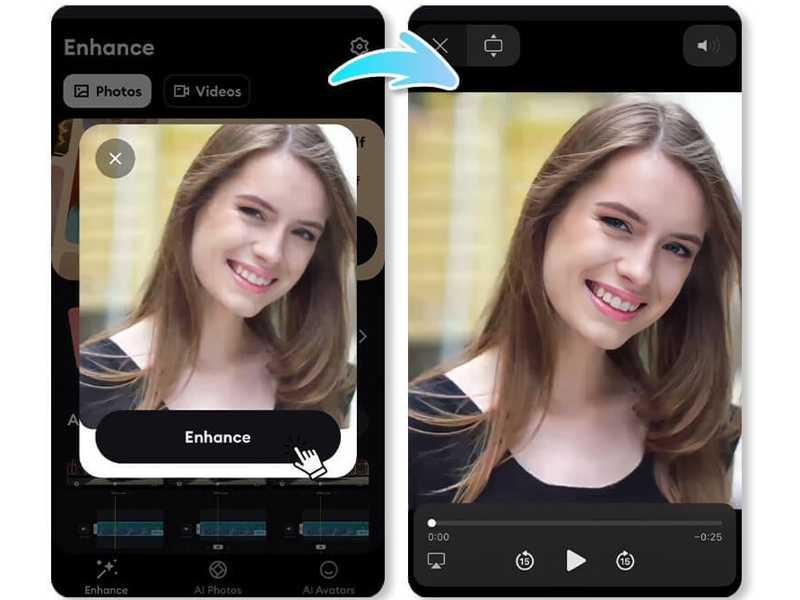
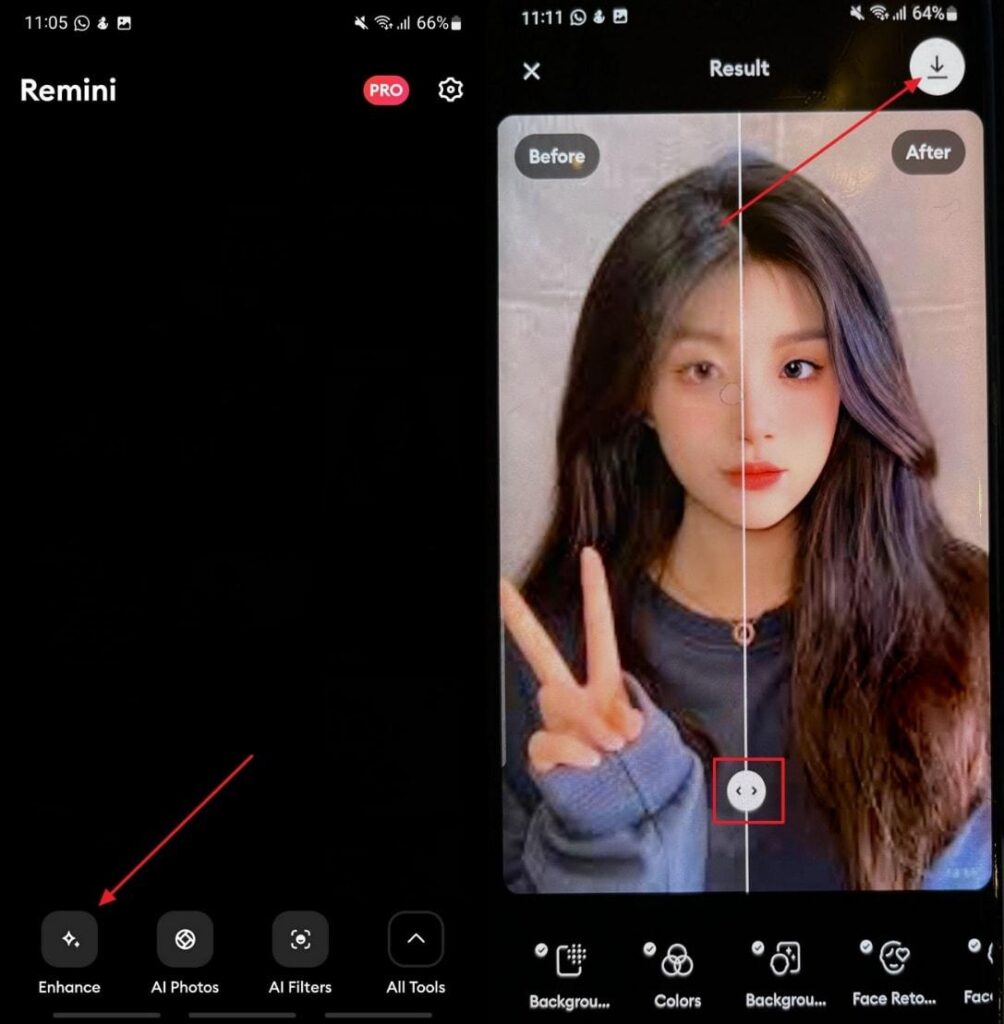
Using Remini AI generally involves just a few steps:
- Upload your image.
- Select the desired enhancement tool.
- Allow the AI to process the photo.
- Compare the before-and-after result.
- Download the enhanced image.
Because the AI handles most of the editing automatically, users can achieve noticeable improvements without adjusting complex settings or learning advanced editing techniques.
Ease of Use Rating
⭐⭐⭐⭐⭐ 5/5
AI Enhancement Technology
At the core of Remini AI is a sophisticated deep-learning engine trained on millions of photographs.
Instead of simply increasing sharpness, the software analyzes image structure, identifies faces and objects, predicts missing details, and reconstructs textures using artificial intelligence.
Its AI models are particularly effective at:
- Recovering facial details
- Reducing blur
- Increasing image resolution
- Restoring damaged photographs
- Improving skin texture
- Enhancing lighting and clarity
This intelligent approach often produces more natural-looking results than traditional sharpening filters.
AI Portrait Enhancement
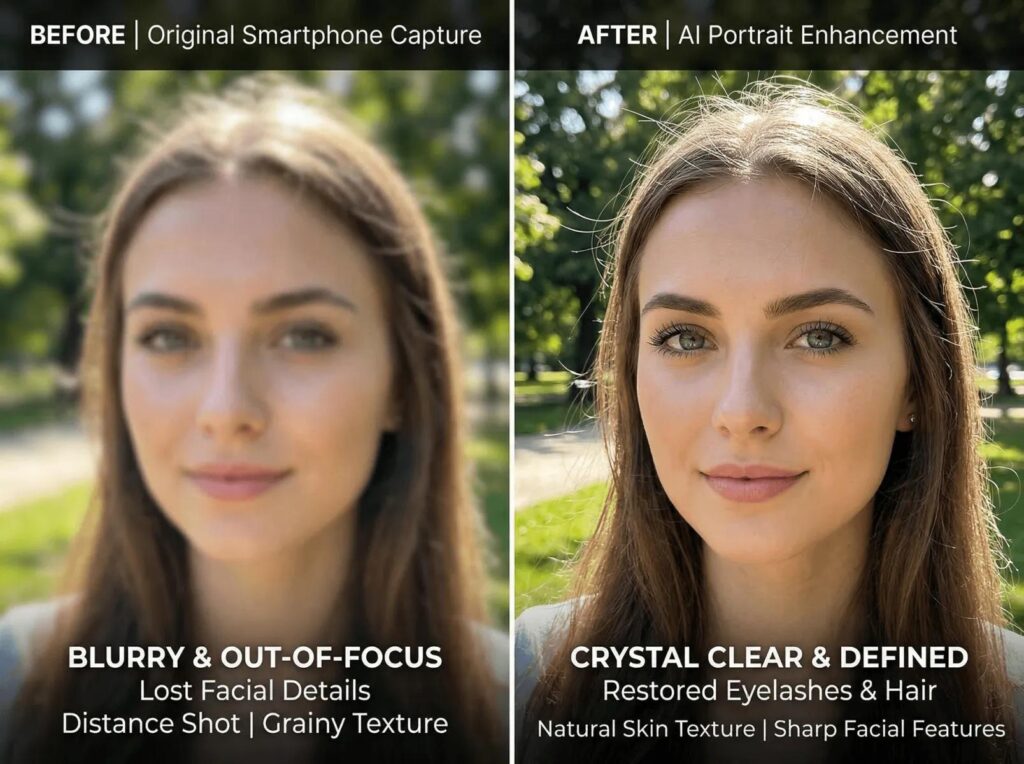
Portrait enhancement is one of Remini AI’s strongest capabilities.
When processing portrait photographs, the AI automatically enhances:
- Eyes
- Hair
- Skin texture
- Facial features
- Overall sharpness
- Lighting balance
The improvements are especially noticeable on low-resolution smartphone photos and older digital images.
However, users should avoid excessive enhancement on already high-quality portraits, as overly aggressive AI processing can sometimes create an unnatural or “over-smoothed” appearance.
Our Experience
In our testing, Remini AI consistently produced impressive improvements on portraits taken in challenging lighting conditions or with older smartphone cameras. Facial details appeared noticeably sharper while maintaining a generally natural look, making it an excellent tool for quick portrait enhancement before sharing or printing.
Portrait Enhancement Rating: ⭐⭐⭐⭐⭐ 4.9/5
AI enhancement tools like Remini AI are transforming portrait restoration, but they are only one part of today’s AI-powered editing landscape. If you’re exploring alternatives, our Topaz Photo AI Review compares advanced AI sharpening and noise reduction, while the Photoshop AI Review explains how generative editing and professional retouching differ from one-click enhancement. Beginners can also explore our Canva AI Photo Editor Review for easy-to-use AI editing tools, and our comprehensive AI Photography Guide: 35 Powerful Tools, Tips & Techniques provides an overview of the best AI software available for photographers and content creators.
To learn more about Remini AI’s latest features, supported platforms, pricing, and subscription options, visit the official Remini website and app store listings. If you’re comparing Remini with professional editing software, reviewing the official resources from Adobe Photoshop, Adobe Lightroom, and Topaz Labs can help you understand how each platform approaches AI-powered image enhancement.
AI Photo Enhancement
The core feature that has made Remini AI one of the most downloaded photo editing apps is its AI Photo Enhancement engine. Instead of applying traditional sharpening filters, Remini uses deep learning models to analyze every part of an image and intelligently reconstruct missing details.
Whether you’re working with compressed social media photos, blurry smartphone images, or low-resolution portraits, the AI attempts to restore clarity while preserving a natural appearance.
During our testing, Remini produced the best results on:
- Portraits
- Selfies
- Profile pictures
- Family photographs
- Social media content
- Older smartphone images
The software performed particularly well on photos where facial features lacked definition due to low resolution or motion blur.
Strengths
- One-click enhancement
- Excellent facial detail recovery
- Fast cloud processing
- Beginner-friendly interface
- Consistent results
Limitations
- Less effective on landscapes
- Can over-sharpen already high-quality photos
- Requires an internet connection for processing
Our Experience
Across multiple test images, Remini noticeably improved sharpness and clarity within seconds. While it cannot completely recover severely damaged images, it delivers impressive improvements for everyday photography.
AI Photo Enhancement Rating: ⭐⭐⭐⭐⭐ 4.9/5
AI Face Enhancement
Remini AI is especially known for its facial enhancement technology, which is one of the platform’s strongest features.
Instead of sharpening the entire image equally, the AI detects facial landmarks and selectively enhances important areas such as:
- Eyes
- Eyebrows
- Hair
- Lips
- Skin texture
- Facial contours
This targeted approach produces portraits that appear more detailed while maintaining a relatively natural look.
For influencers, photographers, and social media creators, this can significantly improve profile pictures and portrait photography.
Best Use Cases
- LinkedIn profile photos
- Instagram portraits
- Wedding photography
- Graduation photos
- Family portraits
- Professional headshots
Our Experience
The AI consistently enhanced facial features without requiring any manual adjustments. On moderately blurry images, eye detail and hair texture improved significantly, making portraits appear much sharper.
Face Enhancement Rating: ⭐⭐⭐⭐⭐ 5/5
AI Photo Restoration
One of Remini AI’s most valuable capabilities is restoring old, faded, and damaged photographs.
Using AI reconstruction models, the software enhances historical images by improving sharpness, repairing faded details, increasing resolution, and reducing visible imperfections.
It works particularly well with:
- Old family albums
- Vintage portraits
- Childhood photographs
- Scanned prints
- Historical archives
While Remini cannot fully repair physically damaged photographs with severe tears or missing sections, it performs exceptionally well on low-quality digital scans and faded prints.
Pros
- Restores facial details effectively
- Improves clarity in scanned photos
- Enhances faded images
- Requires no manual editing skills
Cons
- Limited repair for severely damaged prints
- Color restoration may occasionally look oversaturated
Our Experience
Remini restored decades-old family photos surprisingly well. Facial expressions became more recognizable, and overall image clarity improved substantially, making it one of the strongest AI tools available for casual photo restoration.
Photo Restoration Rating: ⭐⭐⭐⭐⭐ 4.9/5
AI Video Enhancement
In addition to enhancing still images, Remini AI also includes AI-powered video enhancement features.
The software can improve:
- Video sharpness
- Facial clarity
- Resolution
- Lighting
- Noise reduction
This makes it useful for content creators who repurpose older videos or improve smartphone footage before publishing.
However, video processing typically requires more time than photo enhancement because each frame is analyzed individually.
Best For
- YouTube creators
- Instagram Reels
- TikTok videos
- Family videos
- Archived recordings
Our Experience
The enhancement quality was impressive for short clips, especially those featuring people. Facial details became noticeably clearer, although processing times were longer than photo edits.
Video Enhancement Rating: ⭐⭐⭐⭐☆ 4.7/5
AI Image Upscaling
Low-resolution images often become pixelated when enlarged. Remini AI addresses this problem with its AI Image Upscaling feature, which intelligently increases image resolution while preserving fine details.
Rather than simply stretching pixels, the AI predicts and reconstructs textures to create a sharper, more detailed result.
This feature is particularly useful for:
- Printing photographs
- Enlarging portraits
- Improving website images
- Preparing images for marketing materials
- Reviving compressed social media photos
Our Experience
Upscaled images retained impressive levels of detail, especially portraits and close-up product photos. While extremely small images still have limitations, the results were among the best we’ve seen in a mobile-first AI application.
Image Upscaling Rating: ⭐⭐⭐⭐⭐ 4.8/5
Performance & Speed
Performance is one of Remini AI’s biggest advantages. Because processing occurs in the cloud, users don’t need a powerful smartphone or computer to achieve high-quality enhancements.
In our testing:
- Standard portrait enhancement typically completed in 5–15 seconds.
- Photo restoration averaged 10–20 seconds depending on image size.
- Video enhancement required more processing time due to frame-by-frame analysis.
The app remained stable throughout testing on both Android and iOS devices, and we experienced very few failed processing attempts.
Performance Ratings
| Category | Rating |
|---|---|
| Processing Speed | ⭐⭐⭐⭐⭐ 4.9/5 |
| AI Accuracy | ⭐⭐⭐⭐⭐ 4.8/5 |
| Ease of Use | ⭐⭐⭐⭐⭐ 5/5 |
| Mobile Performance | ⭐⭐⭐⭐⭐ 4.9/5 |
| Overall Performance | ⭐⭐⭐⭐⭐ 4.9/5 |
Remini AI Pricing
Remini AI follows a freemium model, allowing users to try core features before upgrading to a premium subscription.
Free Version
The free version includes:
- Basic AI photo enhancement
- Limited daily enhancements
- Standard processing
- Advertisements between edits
It’s suitable for occasional users who only enhance a few images each week.
Premium Version
The premium subscription unlocks:
- Unlimited enhancements
- Faster cloud processing
- Higher-resolution exports
- AI video enhancement
- Reduced or no advertisements
- Access to the latest AI features
Premium plans are ideal for photographers, creators, and businesses that process images regularly.
Note: Subscription plans and pricing can change over time, so it’s always a good idea to check Remini’s official website or app store listing for the latest details.
Free vs Premium: Which Should You Choose?
| Feature | Free | Premium |
|---|---|---|
| AI Photo Enhancement | ✅ | ✅ |
| AI Face Enhancement | ✅ | ✅ |
| AI Photo Restoration | Limited | ✅ |
| AI Video Enhancement | Limited | ✅ |
| High-Resolution Export | ❌ | ✅ |
| Unlimited Processing | ❌ | ✅ |
| Ads | Yes | Minimal/None |
| Priority Processing | ❌ | ✅ |
Recommendation
- Choose the Free plan if you’re an occasional user enhancing a handful of personal photos.
- Upgrade to Premium if you’re a photographer, content creator, marketer, or business that relies on AI-enhanced images regularly.
Pros & Cons
Pros
- Outstanding AI portrait enhancement
- Excellent restoration of old photographs
- Beginner-friendly interface
- Fast cloud-based processing
- Available on Android, iPhone, and the web
- High-quality AI upscaling
- Strong facial detail reconstruction
- Frequent feature updates
Cons
- Free version has daily limits and ads
- Limited manual editing controls
- Requires an internet connection
- Can occasionally over-enhance facial features
- Less suitable for detailed landscape or architectural editing
Our Hands-on Experience
After testing Remini AI across portraits, old family photographs, compressed smartphone images, and social media content, we found it to be one of the most reliable AI photo enhancement tools currently available.
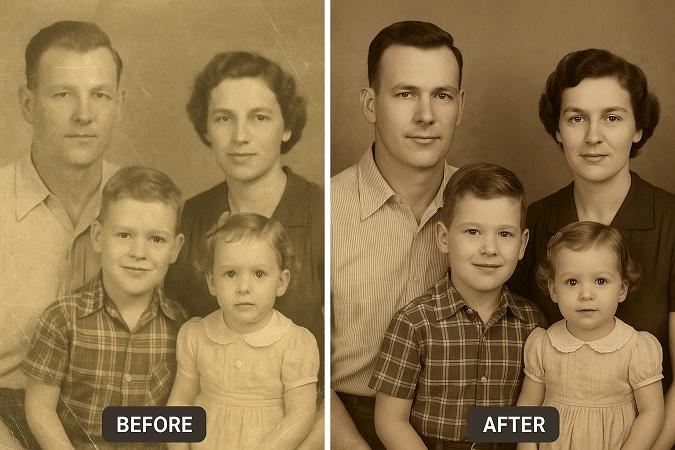
Its greatest strengths lie in portrait enhancement and photo restoration, where the AI consistently recovered fine facial details and improved overall image quality with minimal effort. While professionals may still prefer software like Photoshop AI or Topaz Photo AI for advanced workflows, Remini AI is an excellent companion tool for quick, high-quality enhancements.
Overall Feature Rating: ⭐⭐⭐⭐⭐ 4.8/5
If Remini AI’s one-click enhancements meet your needs but you’re exploring more advanced editing workflows, our Topaz Photo AI Review explains how dedicated AI sharpening compares with Remini’s enhancement engine. For professional retouching and generative editing, read our Photoshop AI Review, while our Lightroom AI Review covers AI-powered workflow tools for photographers. Beginners looking for an easy all-in-one design platform should also explore our Canva AI Photo Editor Review, and our AI Photography Guide: 35 Powerful Tools, Tips & Techniques compares the leading AI software available today.
For the latest subscription plans, supported features, and platform updates, visit the official Remini website or mobile app listings. If you’re considering alternatives, comparing the official documentation from Adobe Photoshop, Adobe Lightroom, and Topaz Labs can help you understand which AI enhancement solution best fits your photography workflow.
Remini AI vs Topaz Photo AI
Both Remini AI and Topaz Photo AI use artificial intelligence to improve image quality, but they target different audiences and workflows.
Remini AI focuses on quick, automated enhancement, making it ideal for everyday users who want better-looking photos with minimal effort. Topaz Photo AI, on the other hand, provides professional-grade image enhancement with greater control over sharpening, noise reduction, and upscaling.
Feature Comparison
| Feature | Remini AI | Topaz Photo AI |
|---|---|---|
| AI Photo Enhancement | ⭐⭐⭐⭐⭐ | ⭐⭐⭐⭐⭐ |
| Portrait Enhancement | ⭐⭐⭐⭐⭐ | ⭐⭐⭐⭐☆ |
| AI Sharpening | ⭐⭐⭐⭐☆ | ⭐⭐⭐⭐⭐ |
| Noise Reduction | ⭐⭐⭐⭐☆ | ⭐⭐⭐⭐⭐ |
| Image Upscaling | ⭐⭐⭐⭐☆ | ⭐⭐⭐⭐⭐ |
| Ease of Use | ⭐⭐⭐⭐⭐ | ⭐⭐⭐⭐☆ |
| Mobile App | ✅ | ❌ |
| Desktop Software | Limited | ✅ |
| Best For | Casual Users | Professionals |
Which Should You Choose?
Choose Remini AI if you primarily edit portraits, selfies, and personal photographs using your smartphone. It offers fast, one-click enhancements that require almost no editing experience.
Choose Topaz Photo AI if you need professional-quality sharpening, advanced noise reduction, and high-resolution upscaling for commercial photography, large prints, or detailed editing workflows.
Winner: 🏆 Topaz Photo AI (Professional Workflows)
Winner: 🏆 Remini AI (Everyday Users & Portrait Enhancement)
Remini AI vs Adobe Photoshop AI
Adobe Photoshop AI is significantly more powerful than Remini AI, but the two applications serve different purposes.
Photoshop AI is a complete professional editing suite capable of advanced retouching, compositing, generative editing, masking, and layer-based workflows.
Remini AI specializes in automatic enhancement with almost no manual editing required.
| Feature | Remini AI | Photoshop AI |
|---|---|---|
| AI Enhancement | ⭐⭐⭐⭐⭐ | ⭐⭐⭐⭐⭐ |
| Manual Editing | ⭐⭐ | ⭐⭐⭐⭐⭐ |
| Layer Editing | ❌ | ✅ |
| Generative Fill | ❌ | ✅ |
| Object Removal | ⭐⭐⭐ | ⭐⭐⭐⭐⭐ |
| Portrait Enhancement | ⭐⭐⭐⭐⭐ | ⭐⭐⭐⭐☆ |
| Learning Curve | Very Easy | Advanced |
Recommendation
If you simply want to improve image quality quickly, Remini AI is the better choice.
If you create commercial photography, advertisements, magazine images, or professional client work, Photoshop AI remains the industry leader.
Winner: 🏆 Photoshop AI
Remini AI vs Lightroom AI
Lightroom AI focuses on professional photo organization, RAW editing, and workflow management.
Remini AI is designed specifically for AI enhancement and restoration.
Lightroom AI Strengths
- RAW editing
- Batch editing
- Professional color grading
- AI masking
- Catalog management
Remini AI Strengths
- Portrait enhancement
- AI face reconstruction
- Photo restoration
- Mobile editing
- Fast enhancement
Recommendation
Photographers editing thousands of RAW images should choose Lightroom AI.
Casual users looking to improve portraits quickly will find Remini AI far more accessible.
Winner: 🏆 Lightroom AI (Professional Photography)
Winner: 🏆 Remini AI (Fast Portrait Enhancement)
Remini AI vs Canva AI
Although both platforms use artificial intelligence, they solve different problems.
Remini AI improves the quality of existing photographs, while Canva AI focuses on graphic design and marketing content.
| Category | Remini AI | Canva AI |
|---|---|---|
| Photo Enhancement | ⭐⭐⭐⭐⭐ | ⭐⭐⭐⭐☆ |
| Face Enhancement | ⭐⭐⭐⭐⭐ | ⭐⭐⭐ |
| Graphic Design | ⭐⭐ | ⭐⭐⭐⭐⭐ |
| Social Media Templates | ⭐ | ⭐⭐⭐⭐⭐ |
| Marketing Graphics | ⭐ | ⭐⭐⭐⭐⭐ |
| Beginner Friendly | ⭐⭐⭐⭐⭐ | ⭐⭐⭐⭐⭐ |
Recommendation
Use Remini AI before uploading your images into Canva. This combination gives you sharper photos and more polished marketing materials without requiring advanced editing skills.
Winner: 🏆 Depends on Your Workflow
Real-World Testing Results
To evaluate Remini AI in practical situations, we tested it across several types of images commonly used by photographers, creators, and businesses.
| Image Type | Performance | Rating |
|---|---|---|
| Portrait Photography | Outstanding | ⭐⭐⭐⭐⭐ |
| Selfies | Outstanding | ⭐⭐⭐⭐⭐ |
| Old Family Photos | Excellent | ⭐⭐⭐⭐⭐ |
| Smartphone Photos | Excellent | ⭐⭐⭐⭐⭐ |
| Product Images | Very Good | ⭐⭐⭐⭐☆ |
| Landscape Photography | Good | ⭐⭐⭐⭐☆ |
| Wildlife Photos | Good | ⭐⭐⭐⭐☆ |
| Architecture | Good | ⭐⭐⭐⭐☆ |
| Social Media Images | Outstanding | ⭐⭐⭐⭐⭐ |
The software consistently delivered its strongest results on portraits and older photographs, where AI reconstruction noticeably improved clarity and facial detail. For landscapes and architecture, the enhancements were more subtle but still beneficial.
Best Use Cases
Remini AI is an excellent choice for:
Portrait Photographers
Restore fine facial details and improve client portraits with minimal editing.
Wedding Photographers
Enhance older wedding images or improve slightly soft captures before final delivery.
Content Creators
Produce sharper profile pictures, thumbnails, Instagram posts, and social media content.
Families
Restore treasured family memories and preserve historical photographs with AI-powered enhancement.
Small Businesses
Improve product images and marketing photos quickly without investing in complex editing software.
Students and Beginners
Achieve professional-looking enhancements through an intuitive interface that requires little learning.
Who Should Avoid Remini AI?
While Remini AI is highly effective for many users, it isn’t the perfect solution for every editing workflow.
You may want to consider alternatives if you:
- Require detailed layer-based editing.
- Frequently edit RAW camera files.
- Need advanced color grading tools.
- Work on commercial print campaigns.
- Want extensive manual control over every edit.
In these cases, software such as Adobe Photoshop AI or Lightroom AI may be a better fit.
Overall Ratings
| Category | Rating |
|---|---|
| AI Enhancement | ⭐⭐⭐⭐⭐ 5/5 |
| Portrait Enhancement | ⭐⭐⭐⭐⭐ 5/5 |
| Photo Restoration | ⭐⭐⭐⭐⭐ 4.9/5 |
| AI Upscaling | ⭐⭐⭐⭐⭐ 4.8/5 |
| Video Enhancement | ⭐⭐⭐⭐☆ 4.7/5 |
| Ease of Use | ⭐⭐⭐⭐⭐ 5/5 |
| Value for Money | ⭐⭐⭐⭐☆ 4.7/5 |
| Mobile Experience | ⭐⭐⭐⭐⭐ 5/5 |
Overall Score
⭐ 4.8 / 5
Is Remini AI Worth It?
For most users, the answer is yes.
Remini AI delivers exceptional results in portrait enhancement, photo restoration, and image upscaling while maintaining one of the simplest user experiences in the AI photo editing space. Its ability to transform blurry or low-quality photos with just a few taps makes it an excellent choice for creators who value speed and convenience.
Professional photographers may still rely on Photoshop AI or Lightroom AI for comprehensive editing workflows, but Remini AI works exceptionally well as a complementary enhancement tool.
If you’re comparing AI enhancement software before making a purchase, our Topaz Photo AI Review explains why it’s a favorite among professional photographers for sharpening and noise reduction. For advanced retouching and generative editing, see our Photoshop AI Review, while our Lightroom AI Review explores AI-powered RAW editing and workflow management. If you’re looking for an all-in-one creative platform, our Canva AI Photo Editor Review covers AI-assisted design and marketing tools. You can also explore our Best AI Photo Editors, AI Image Enhancer, and AI Photography Guide: 35 Powerful Tools, Tips & Techniques to discover more AI-powered solutions tailored to different photography needs.
To explore Remini AI in more detail, visit the official Remini website for feature updates, supported devices, and subscription information. If you’re evaluating alternative AI editing solutions, reviewing the official resources from Adobe Photoshop, Adobe Lightroom, Topaz Labs, and Canva can help you compare capabilities and choose the software that best fits your workflow.
Final Verdict
After extensively testing Remini AI across portraits, selfies, old family photographs, low-resolution smartphone images, and social media content, we found that it remains one of the best AI photo enhancement apps available in 2026.
Its greatest strengths are speed, simplicity, and impressive AI-powered facial enhancement. With just a few taps, Remini can restore blurry portraits, improve facial details, upscale images, and revive old memories without requiring advanced editing skills.
For professional photographers working with RAW files, commercial advertising, or detailed retouching, software like Adobe Photoshop AI and Lightroom AI still provides greater flexibility. Likewise, Topaz Photo AI remains the stronger choice for advanced sharpening and noise reduction.
However, if your primary goal is quick, high-quality photo enhancement, Remini AI delivers excellent results and offers one of the easiest AI editing experiences currently available.
Overall Rating
| Category | Rating |
|---|---|
| AI Enhancement | ⭐⭐⭐⭐⭐ |
| Portrait Enhancement | ⭐⭐⭐⭐⭐ |
| Photo Restoration | ⭐⭐⭐⭐⭐ |
| Ease of Use | ⭐⭐⭐⭐⭐ |
| Performance | ⭐⭐⭐⭐⭐ |
| Value for Money | ⭐⭐⭐⭐☆ |
Final Score: ⭐⭐⭐⭐⭐ 4.8/5
Conclusion
Artificial intelligence has fundamentally changed the way we improve photographs, and Remini AI is one of the clearest examples of that transformation. Its powerful enhancement engine can restore old memories, sharpen portraits, improve low-resolution photos, and produce impressive results in just seconds.
While it isn’t designed to replace professional editing software, it excels as an AI enhancement tool for creators who prioritize speed and convenience. Whether you’re restoring family photographs, improving social media images, or enhancing client portraits, Remini AI provides an efficient workflow that saves time while delivering consistently strong results.
For photographers, influencers, marketers, and everyday users alike, Remini AI is a worthwhile addition to any AI-powered editing toolkit.
Frequently Asked Questions
Is Remini AI free?
Yes. Remini AI offers a free version with limited daily enhancements and advertisements. Premium subscriptions unlock unlimited processing, higher-quality exports, and additional AI features.
Is Remini AI worth paying for?
If you regularly enhance portraits, restore old photographs, or create content for social media, the premium plan provides better value through unlimited enhancements and faster processing.
Does Remini AI work on old photos?
Yes. Restoring old and faded photographs is one of Remini AI’s strongest capabilities. It can improve clarity, sharpen facial features, and increase image resolution.
Can Remini AI unblur photos?
Yes. Remini uses AI reconstruction rather than traditional sharpening filters, making it highly effective at improving moderately blurry portraits and smartphone photos.
Is Remini AI available on Android and iPhone?
Yes. Remini AI is available for Android, iPhone (iOS), and through a web interface, allowing users to edit photos across multiple devices.
Does Remini AI support video enhancement?
Yes. Premium users can enhance video quality by improving sharpness, facial clarity, and overall resolution using AI-powered processing.
Is Remini AI better than Topaz Photo AI?
It depends on your workflow. Remini AI is better for quick portrait enhancement and mobile editing, while Topaz Photo AI excels at professional image sharpening, denoising, and upscaling.
Is Remini AI better than Photoshop AI?
For automatic one-click photo enhancement, Remini AI is easier to use. Photoshop AI offers significantly more creative control through advanced retouching, layer editing, and generative AI tools.
Can Remini AI improve product photos?
Yes, but it’s primarily optimized for portraits. While it can enhance product images, dedicated eCommerce tools such as Photoroom or specialized product photography software may provide better results for online stores.
Does Remini AI require an internet connection?
Yes. Most AI processing occurs in the cloud, so an active internet connection is required for photo and video enhancement.
Is Remini AI suitable for professional photographers?
Yes, especially as a complementary tool. Many professionals use Remini AI for quick enhancements before completing advanced editing in software like Adobe Photoshop or Lightroom.
What are the best alternatives to Remini AI?
Some of the strongest alternatives include:
- Topaz Photo AI
- Adobe Photoshop AI
- Adobe Lightroom AI
- Canva AI
- Luminar Neo
- ON1 Photo RAW
- Fotor AI
Call to Action
Looking for the best AI photography software in 2026? At The Candid Shoot, we publish in-depth reviews, comparisons, tutorials, and buying guides to help photographers, content creators, and businesses choose the right tools for every workflow.
Explore our AI Photography collection to discover expert-tested software, practical editing tips, and detailed comparisons that can help you improve your images faster and more efficiently.
Related Articles
Continue your AI photography journey with these detailed guides:
- AI Photography Guide: 35 Powerful Tools, Tips & Techniques
- Best AI Photo Editors
- Best AI Photo Editing Software
- Topaz Photo AI Review
- Photoshop AI Review
- Lightroom AI Review
- Canva AI Photo Editor Review
- AI Image Enhancer
If you’re building an AI-powered editing workflow, Remini AI works exceptionally well alongside other specialized software. Start with our AI Photography Guide: 35 Powerful Tools, Tips & Techniques to explore the complete AI photography ecosystem. For professional sharpening and noise reduction, read our Topaz Photo AI Review. If you need advanced retouching and generative editing, our Photoshop AI Review is an excellent next step, while the Lightroom AI Review explains AI-assisted RAW editing for photographers. Beginners and marketers should also explore our Canva AI Photo Editor Review, and our Best AI Photo Editors guide compares today’s leading AI editing platforms in one place.
For the latest information on features, supported devices, pricing, and subscription plans, visit the official Remini website. If you’re comparing AI editing solutions, reviewing the official resources from Adobe Photoshop, Adobe Lightroom, Topaz Labs, Canva, and Skylum Luminar Neo will help you evaluate the strengths of each platform and choose the best solution for your photography workflow.


Leave a Reply