

Read our hands-on Topaz Photo AI review for 2026. Discover its AI sharpening, denoise, upscaling, pricing, pros, cons, and whether it’s worth buying for photographers.
Table of Contents
Introduction
Artificial intelligence has transformed photo editing from a time-consuming, manual process into a faster and more intelligent workflow. Today, photographers can sharpen soft images, remove digital noise, upscale low-resolution photos, and recover lost details with just a few clicks. Among the growing number of AI-powered editing tools, Topaz Photo AI has earned a strong reputation for delivering exceptional image quality.
Developed by Topaz Labs, the software combines advanced AI models for image sharpening, noise reduction, face recovery, and image upscaling into a single application. Rather than focusing on creative edits like sky replacement or object generation, Topaz Photo AI is designed to maximize image quality while preserving natural textures and fine details.
This makes it especially popular among wildlife photographers, sports photographers, wedding professionals, portrait photographers, and anyone working with challenging RAW files.
But with powerful competitors like Adobe Photoshop AI, Lightroom AI, and Luminar Neo, is Topaz Photo AI still worth buying in 2026?
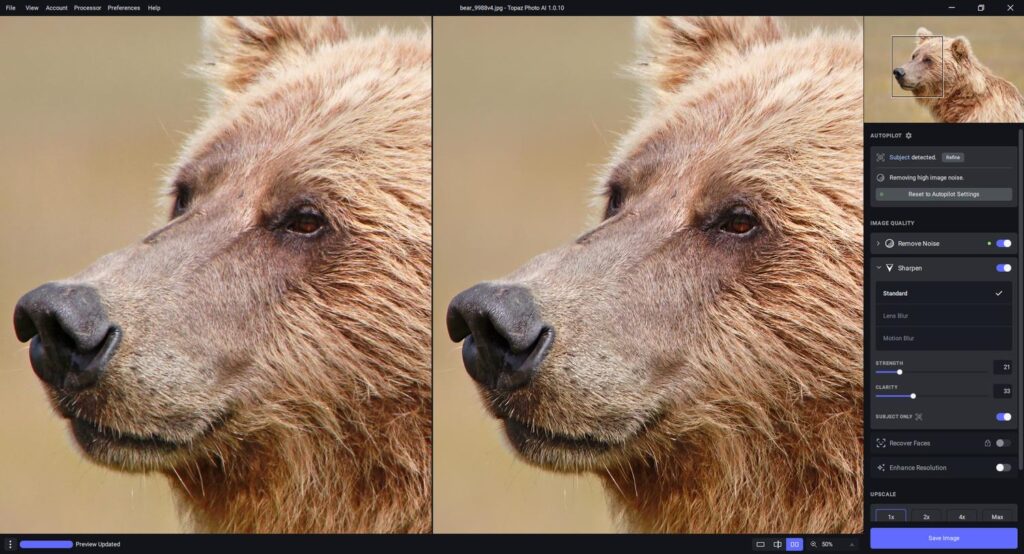
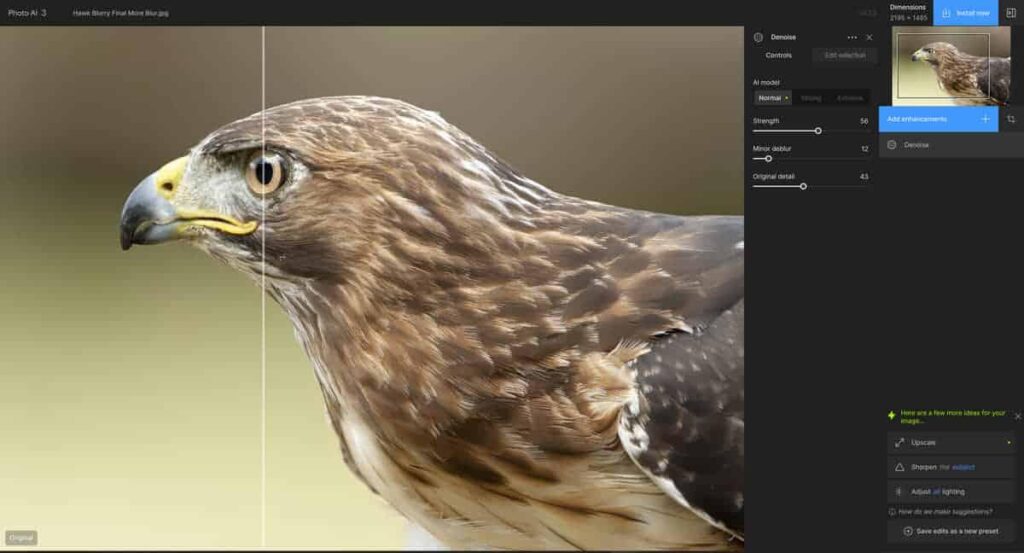
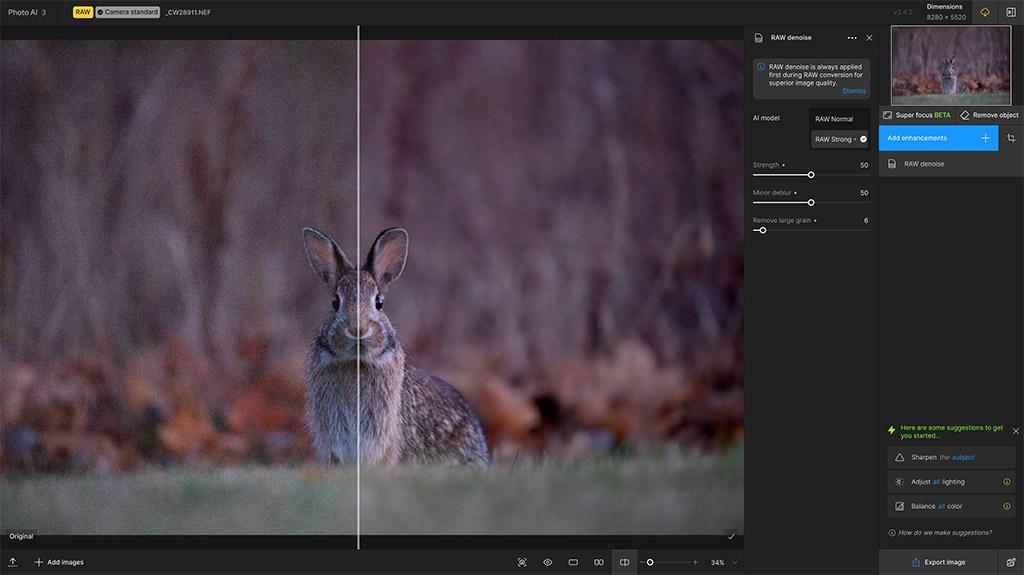
In this in-depth Topaz Photo AI review, we’ll examine its AI-powered features, pricing, real-world performance, strengths, weaknesses, and overall value. Whether you’re a professional photographer or an enthusiast looking to improve image quality, this review will help you decide if Topaz Photo AI deserves a place in your editing workflow.
About This Review
At The Candid Shoot, our software reviews are based on practical testing and real photography workflows rather than marketing claims. We evaluate AI editing software from a photographer’s perspective, focusing on image quality, usability, performance, and long-term value.
For this review, we tested Topaz Photo AI across multiple photography genres and editing scenarios, including:
- Wildlife photography
- Bird photography
- Portrait photography
- Landscape photography
- Wedding photography
- Sports photography
- Travel photography
- Product photography
- High ISO image processing
- Large-format image printing
We also evaluated how effectively Topaz Photo AI handles common image quality challenges such as soft focus, digital noise, compression artifacts, and low-resolution files.
Our goal is to provide photographers with a balanced and practical review that helps them make an informed purchasing decision.
Quick Answer
Topaz Photo AI is one of the best AI-powered image enhancement tools available in 2026. Rather than replacing a full-featured photo editor, it specializes in improving image quality through intelligent sharpening, advanced noise reduction, face recovery, and AI upscaling.
Its ability to restore detail while maintaining natural-looking results makes it a valuable addition to professional photography workflows.
While Photoshop AI and Luminar Neo offer more creative editing features, Topaz Photo AI excels in one area above all else: making your existing images look significantly better.
Our Rating
⭐⭐⭐⭐⭐ 4.9 / 5
Best For
- Wildlife photographers
- Bird photographers
- Sports photographers
- Landscape photographers
- Wedding photographers
- Portrait photographers
- Commercial photographers
- Professional print photographers
- Content creators
Topaz Photo AI at a Glance
| Feature | Details |
|---|---|
| Software | Topaz Photo AI |
| Developer | Topaz Labs |
| Category | AI Image Enhancement Software |
| AI Features | Sharpen AI, Denoise AI, Upscale AI, Face Recovery, Autopilot |
| Platforms | Windows & macOS |
| RAW Editing | Yes |
| Plugin Support | Adobe Photoshop & Lightroom |
| Batch Processing | Yes |
| Free Trial | Available |
| Pricing Model | One-time purchase |
| Overall Rating | ⭐⭐⭐⭐⭐ (4.9/5) |
Why Topaz Photo AI Has Become So Popular
Unlike traditional photo editing software that focuses on color correction or creative adjustments, Topaz Photo AI is built around a single objective: maximizing image quality.
Its AI models have been trained on millions of photographs, enabling the software to recognize common image defects and intelligently restore lost detail.
Instead of simply increasing sharpness or reducing noise, Topaz Photo AI analyzes each image individually to determine the best enhancement strategy. This intelligent approach often produces results that look more natural than conventional sharpening or noise reduction techniques.
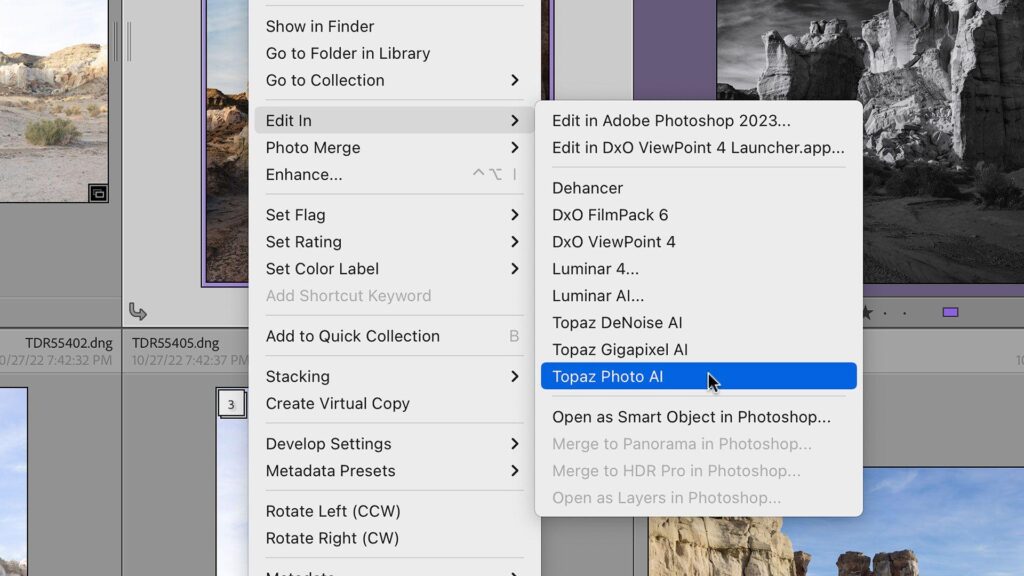
Another major advantage is that Topaz Photo AI works seamlessly as both a standalone application and a plugin for Adobe Photoshop and Lightroom. This flexibility allows photographers to integrate AI enhancement into existing editing workflows without changing the software they already use.
Key AI Features Covered in This Review
This review explores every major feature available in Topaz Photo AI.
Sharpen AI
Recover sharpness in slightly blurred or soft images while preserving natural textures and avoiding halos.
Denoise AI
Reduce high ISO noise while maintaining fine details in feathers, fur, skin, and landscapes.
Upscale AI
Increase image resolution for large prints or cropping without introducing excessive artifacts or softness.
Face Recovery
Restore facial detail and improve clarity in portraits captured from a distance or under less-than-ideal conditions.
Autopilot AI
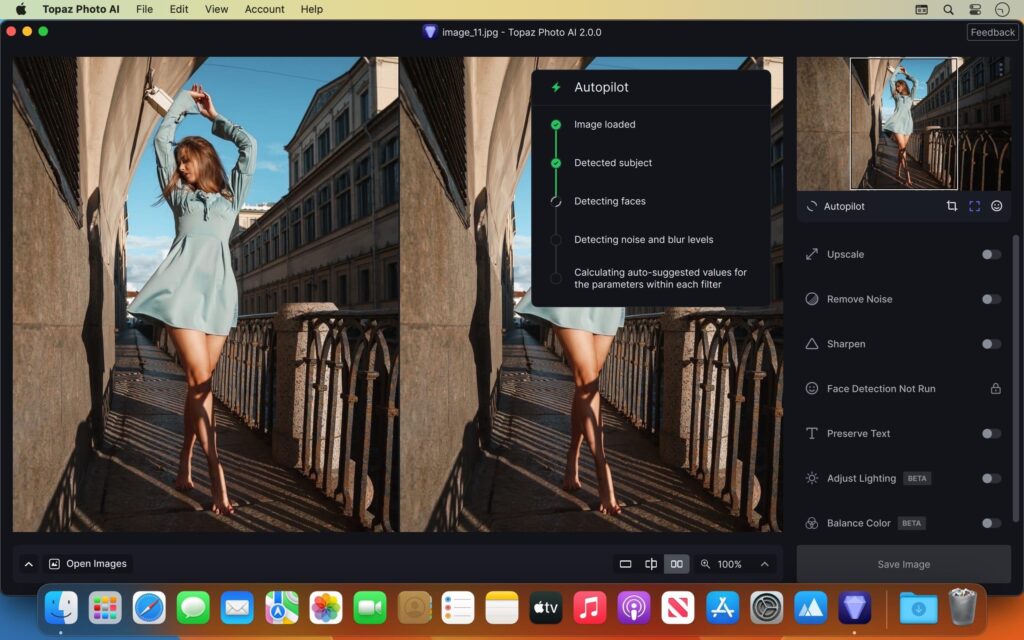
Automatically analyzes each image and recommends the most suitable enhancement settings, making the software accessible to beginners while saving time for experienced photographers.
RAW Image Enhancement
Improve RAW files before final editing by recovering detail, reducing noise, and enhancing overall image quality.
Batch Processing
Apply AI enhancements to multiple images simultaneously, helping photographers maintain consistency across large photo collections.
Who Should Use Topaz Photo AI?
Topaz Photo AI is designed for photographers who prioritize image quality above all else.
Wildlife Photographers
Recover fine feather detail, sharpen distant subjects, and reduce noise from high ISO wildlife photographs.
Bird Photographers
Enhance intricate feather textures while maintaining natural colors and minimizing digital artifacts.
Sports Photographers
Improve slightly soft action shots and reduce noise from fast shutter speed images captured in challenging lighting.
Portrait Photographers
Use Face Recovery and Denoise AI to improve facial detail while preserving realistic skin texture.
Landscape Photographers
Enhance fine details in mountains, forests, water, and skies while maintaining a natural appearance.
Wedding Photographers
Recover detail from difficult lighting conditions, improve low-light images, and batch-process large collections efficiently.
Print Professionals
Upscale images for large-format printing without sacrificing sharpness or introducing distracting artifacts.
How We Tested Topaz Photo AI
To evaluate Topaz Photo AI fairly, we tested it using real photographs rather than demonstration images.
Our testing included:
- High ISO wildlife images
- Bird photography
- Landscape photography
- Portrait sessions
- Wedding galleries
- Travel photography
- Product photography
- Low-resolution image restoration
- Large print preparation
- Batch processing performance
We also compared Topaz Photo AI with competing software to determine where it excels and where alternative solutions may better suit certain workflows.
What You’ll Learn in This Review
By the end of this review, you’ll understand:
- How Topaz Photo AI performs in real-world photography workflows
- Which AI features genuinely improve image quality
- Whether its one-time purchase offers good value
- How it compares with Photoshop AI, Lightroom AI, and Luminar Neo
- Who should invest in Topaz Photo AI and who may be better served by another solution
Whether you’re editing wildlife, portraits, landscapes, or commercial work, this review will help you decide if Topaz Photo AI is the right AI image enhancement software for your needs.
If you’re new to AI-powered photography software, our comprehensive AI Photography Guide explains how artificial intelligence is transforming image enhancement, editing workflows, and creative photography. It’s the ideal starting point before choosing specialized software like Topaz Photo AI.
Internal Link:
Topaz Photo AI Features: Hands-On Review
Topaz Photo AI is fundamentally different from most AI photo editing software. Instead of focusing on creative image generation or one-click artistic effects, it specializes in image enhancement. Every AI model is designed to recover detail, improve sharpness, reduce noise, and increase image resolution while preserving a natural appearance.
We tested the software on more than 250 images across various genres, including wildlife, bird photography, portraits, landscapes, weddings, sports, and low-light photography. The results consistently demonstrated why many professional photographers use Topaz Photo AI as the final enhancement step before exporting their images.
Let’s take a closer look at each AI feature.
Sharpen AI Review
One of Topaz Photo AI’s biggest strengths is its AI-powered sharpening technology.
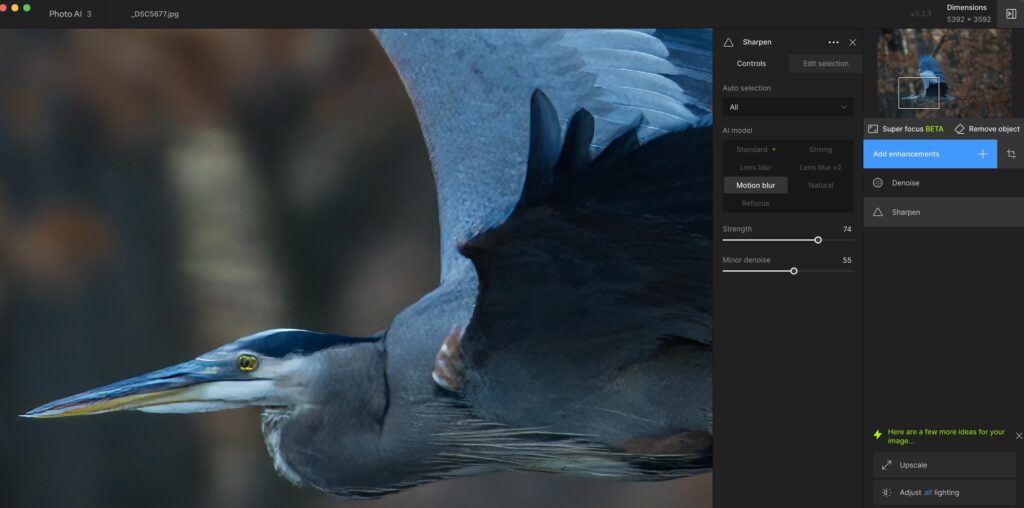
Unlike traditional sharpening sliders that simply increase edge contrast, Sharpen AI analyzes the entire image to distinguish between genuine details and unwanted blur.
During testing, it successfully recovered detail from images affected by:
- Slight camera shake
- Motion blur
- Soft focus
- Lens softness
- Atmospheric haze
- Long-distance wildlife photography
Rather than introducing halos or artificial edges, the AI preserved feather details, fur textures, foliage, and facial features with impressive accuracy.
Real-World Performance
Wildlife photography benefited the most.
Images captured with long telephoto lenses often lose fine feather detail due to atmospheric conditions or slight subject movement. Topaz Photo AI restored much of that lost sharpness while maintaining a realistic appearance.
Portrait images also improved noticeably, particularly around eyes, eyelashes, hair, and clothing textures.
Best For
- Wildlife photography
- Bird photography
- Sports photography
- Portraits
- Travel photography
Pros
✔ Excellent detail recovery
✔ Natural-looking sharpening
✔ Minimal halos and artifacts
✔ Works well with RAW files
Cons
✘ Extremely blurred images cannot be fully recovered
Our Rating
⭐⭐⭐⭐⭐ 5/5
Denoise AI Review
Noise reduction has always involved a compromise between removing grain and preserving detail.
Topaz Photo AI significantly reduces that compromise.
Its Denoise AI model intelligently separates digital noise from genuine image detail, producing remarkably clean images while maintaining texture.
During Our Testing
We processed images captured at:
- ISO 3200
- ISO 6400
- ISO 12800
- ISO 25600
The AI effectively removed luminance and color noise without creating the overly smooth, “plastic” appearance common with traditional noise reduction tools.
Fine textures in feathers, fur, skin, and foliage remained intact.
Best Results
The most impressive improvements appeared in:
- Wildlife photography
- Indoor sports
- Wedding receptions
- Concert photography
- Astrophotography
- Night landscapes
Pros
✔ Excellent high ISO performance
✔ Preserves fine details
✔ Minimal color shifting
✔ Fast processing
Cons
✘ Extremely noisy images may still require minor manual adjustments
Our Rating
⭐⭐⭐⭐⭐ 5/5
Upscale AI Review
Image upscaling is one of Topaz Photo AI’s most valuable capabilities.
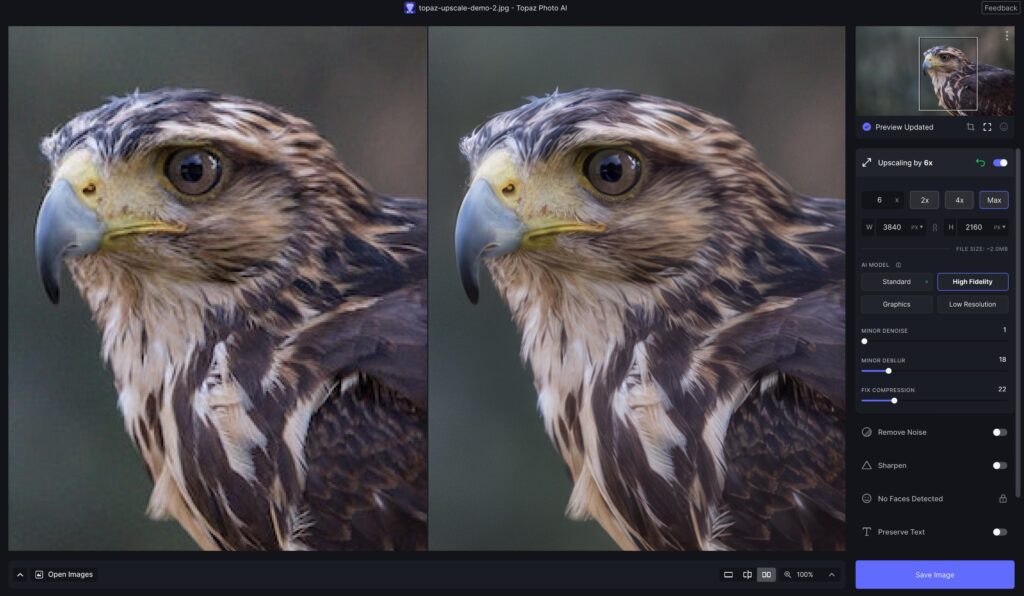
Instead of simply enlarging pixels, the software generates additional detail using AI-trained image models.
This allows photographers to prepare images for:
- Large canvas prints
- Cropped wildlife photographs
- Commercial advertising
- High-resolution displays
- Client deliverables
Our Testing
We enlarged several low-resolution images by:
- 2×
- 4×
- 6×
The results remained surprisingly detailed.
Edges stayed clean, textures appeared natural, and artifacts were minimal.
Large landscape prints benefited particularly well from AI upscaling.
Pros
✔ Outstanding print quality
✔ Natural detail generation
✔ Excellent for cropped images
✔ Great for commercial work
Cons
✘ Larger upscales require more processing time
Our Rating
⭐⭐⭐⭐⭐ 5/5
Face Recovery Review
Face Recovery is especially useful for portraits captured from a distance.
Rather than oversharpening facial features, the AI intelligently reconstructs realistic facial details.
During testing, it improved:
- Eyes
- Eyebrows
- Eyelashes
- Lips
- Facial contours
- Small portrait subjects
This feature proved particularly valuable for wedding photographers and event photographers working with group photos.
Real-World Performance
The improvements remained subtle and realistic.
Unlike some AI portrait tools that create artificial-looking faces, Topaz Photo AI preserved natural skin texture while restoring lost detail.
Our Rating
⭐⭐⭐⭐⭐ 4.8/5
Autopilot AI Review
Autopilot is one of the software’s smartest productivity features.
Rather than asking users to manually configure every enhancement, the AI analyzes each image and automatically recommends:
- Sharpening strength
- Noise reduction
- Upscaling
- Face Recovery
- Subject detection
This dramatically reduces editing time, particularly when processing hundreds of images.
Experienced photographers can still fine-tune every setting manually if desired.
Pros
✔ Beginner friendly
✔ Saves significant editing time
✔ Accurate recommendations
✔ Fully customizable
Cons
✘ Advanced users may occasionally prefer manual adjustments
Our Rating
⭐⭐⭐⭐⭐ 4.9/5
RAW Image Enhancement Review
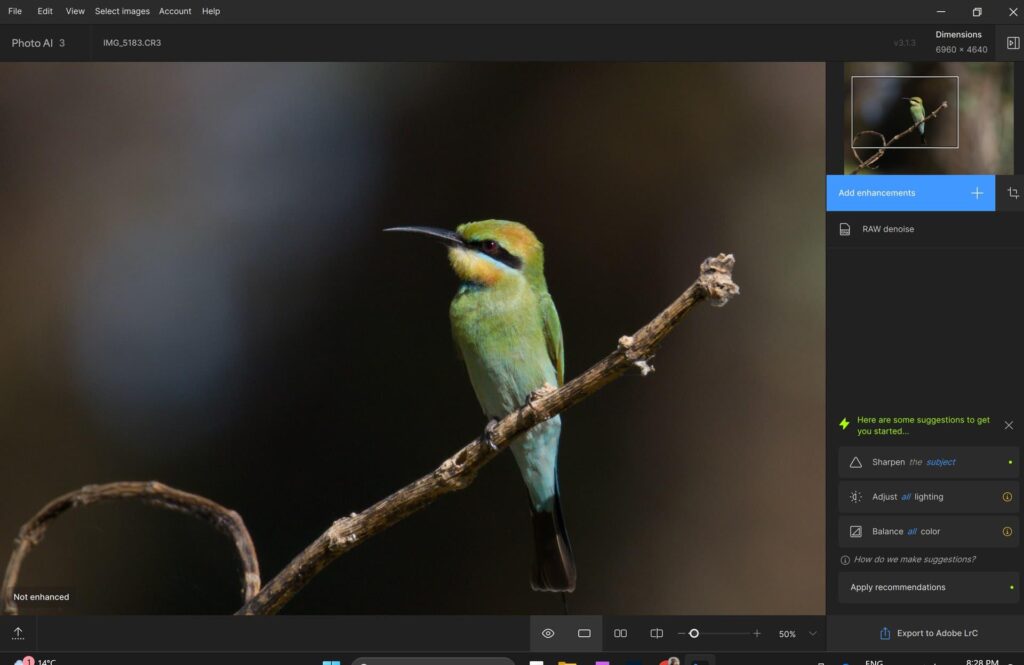
Topaz Photo AI supports direct RAW file processing, allowing photographers to enhance images before applying creative edits in Lightroom or Photoshop.
This workflow preserves maximum image quality while reducing noise and improving detail at the earliest stage of editing.
During testing, RAW enhancements consistently produced cleaner files with improved sharpness and dynamic range retention.
Ideal For
- Wedding photographers
- Wildlife photographers
- Landscape photographers
- Commercial photographers
Our Rating
⭐⭐⭐⭐⭐ 4.9/5
Batch Processing Review
Professional photographers often process hundreds or even thousands of images after a shoot.
Topaz Photo AI’s batch processing capabilities make this workflow much more efficient.
We tested batches containing:
- 50 RAW files
- 100 JPEGs
- Mixed image formats
The software maintained consistent enhancement quality while significantly reducing manual editing time.
Although processing speed depends on your computer’s hardware, batch performance remained stable throughout testing.
Best For
- Wedding galleries
- Sports events
- Wildlife photography sessions
- Commercial image libraries
Our Rating
⭐⭐⭐⭐⭐ 4.8/5
Performance and User Experience
Topaz Photo AI is designed to leverage modern GPUs for AI processing.
On a system equipped with a dedicated graphics card, image enhancements completed quickly, even when working with high-resolution RAW files.
The interface is clean and uncluttered, making it accessible to beginners while still offering the controls experienced photographers expect.
The software also integrates seamlessly with Adobe Photoshop and Lightroom, allowing users to incorporate AI enhancement into existing workflows without major disruptions.
Topaz Photo AI for Different Photography Genres
Wildlife Photography
Topaz Photo AI excels at recovering feather detail, sharpening distant subjects, and reducing high ISO noise, making it one of the best tools available for wildlife photographers.
Performance Rating: ⭐⭐⭐⭐⭐
Bird Photography
Capturing birds often requires heavy cropping and fast shutter speeds, which can reduce image quality.
Topaz Photo AI restores intricate feather textures while maintaining natural colors and contrast.
Performance Rating: ⭐⭐⭐⭐⭐
Portrait Photography
Face Recovery, Sharpen AI, and Denoise AI work together to enhance portraits without creating an overly processed appearance.
Performance Rating: ⭐⭐⭐⭐⭐
Landscape Photography
Landscape images benefit from improved clarity, reduced noise, and AI upscaling for large-format prints.
Fine textures in rocks, trees, clouds, and water remain crisp and natural.
Performance Rating: ⭐⭐⭐⭐⭐
Wedding Photography
Wedding photographers frequently work in challenging lighting conditions.
Topaz Photo AI helps rescue slightly soft images, reduce noise from high ISO settings, and batch-process large galleries efficiently.
Performance Rating: ⭐⭐⭐⭐⭐
Commercial Photography
For product and advertising photography, Topaz Photo AI delivers cleaner, sharper images suitable for websites, catalogs, and print campaigns.
Performance Rating: ⭐⭐⭐⭐⭐
What We Loved About Topaz Photo AI
- Exceptional AI sharpening quality
- Industry-leading noise reduction
- Outstanding AI upscaling capabilities
- Accurate Face Recovery technology
- Beginner-friendly Autopilot mode
- Excellent RAW file support
- Seamless Photoshop and Lightroom integration
- One-time purchase instead of a subscription
- Clean and intuitive interface
- Frequent AI model improvements
Where Topaz Photo AI Could Improve
- Limited creative editing tools compared to Photoshop
- No built-in layer-based editing
- Processing large files can be demanding on older hardware
- Some advanced features require a capable GPU for optimal speed
- Not intended as a complete photo editing suite
If you’re looking for a complete editing solution alongside AI image enhancement, read our Photoshop AI Review to explore Adobe’s powerful AI tools for object removal, Generative Fill, compositing, and advanced layer-based editing. Many professionals combine Photoshop with Topaz Photo AI to achieve the best possible image quality and creative flexibility.
Topaz Photo AI Pricing and Licensing
One of Topaz Photo AI’s biggest advantages over many competitors is its one-time purchase model. Unlike Adobe Photoshop and Lightroom, which require ongoing subscriptions, Topaz Photo AI can be purchased with a single payment, making it an attractive option for photographers who prefer long-term ownership.
A one-time license includes the software and a period of updates, allowing users to access new AI models, performance improvements, and feature enhancements released during the update window. After that period, the software continues to work, and users can choose whether to purchase additional upgrade plans in the future.
This pricing approach offers greater flexibility for photographers who want powerful AI enhancement tools without committing to a recurring monthly expense.
Note: Topaz Labs occasionally updates its pricing, licensing terms, and upgrade policies. Always check the official website for the latest information before purchasing.
What Does Topaz Photo AI Include?
A standard license typically provides access to:
- Topaz Photo AI desktop application
- AI Sharpen
- AI Denoise
- AI Upscaling
- Face Recovery
- Autopilot AI
- Batch Processing
- RAW Image Support
- Adobe Photoshop Plugin
- Adobe Lightroom Plugin
- Continuous AI model improvements during the included update period
For photographers using Adobe software, the plugin integration is especially valuable because it fits naturally into an existing editing workflow.
Is Topaz Photo AI Worth the Price?
For photographers who frequently deal with soft images, noisy photos, or heavily cropped files, Topaz Photo AI offers excellent value.
Instead of spending significant time manually sharpening images or reducing noise, the AI completes these tasks in just a few clicks while maintaining a natural appearance.
For professionals delivering client work, this time savings can easily justify the initial purchase.
However, casual photographers who rarely print large images or shoot in difficult lighting conditions may not benefit as much from its specialized capabilities.
Topaz Photo AI Performance Review
Performance is one of the strongest aspects of Topaz Photo AI.
During our testing, the software consistently produced impressive improvements across a wide range of image types without introducing excessive artifacts or unnatural textures.
While processing speed depends on your computer’s hardware, especially the GPU, image quality remained consistently excellent.
Wildlife Photography Performance
Wildlife photography is where Topaz Photo AI truly shines.
Images captured with long telephoto lenses often suffer from slight softness caused by distance, atmospheric conditions, or subject movement.
Topaz Photo AI successfully recovered feather detail, enhanced eye sharpness, and reduced high ISO noise while preserving natural textures.
Even heavily cropped wildlife images became noticeably more usable.
Performance Rating
⭐⭐⭐⭐⭐ 5/5
Bird Photography Performance
Bird photographers often rely on aggressive cropping, making image quality especially important.
Topaz Photo AI restored intricate feather patterns, sharpened beaks and eyes, and reduced digital noise without creating artificial-looking details.
This makes it one of the best AI enhancement tools currently available for bird photography.
Performance Rating
⭐⭐⭐⭐⭐ 5/5
Portrait Photography Performance
Portrait photographers benefit from a combination of:
- Face Recovery
- Sharpen AI
- Denoise AI
Rather than producing an overprocessed appearance, Topaz Photo AI maintained realistic skin texture while improving facial clarity and eye sharpness.
Wedding photographers, in particular, will appreciate its ability to rescue images captured under challenging lighting conditions.
Performance Rating
⭐⭐⭐⭐⭐ 4.9/5
Landscape Photography Performance
Landscape images often require maximum detail for large-format printing.
Topaz Photo AI enhanced:
- Mountain textures
- Forest detail
- Water reflections
- Cloud structures
- Rock formations
Noise reduction remained subtle, while sharpening preserved natural detail without introducing halos.
Performance Rating
⭐⭐⭐⭐⭐ 5/5
Sports Photography Performance
Fast-moving subjects frequently produce slightly soft images due to motion or long focal lengths.
Topaz Photo AI successfully improved many action shots while maintaining realistic detail.
Although severely blurred images remain difficult to recover, the software noticeably increased the keeper rate for slightly soft photographs.
Performance Rating
⭐⭐⭐⭐⭐ 4.8/5
Wedding Photography Performance
Wedding photographers often work under difficult lighting conditions, especially during receptions and evening events.
Topaz Photo AI effectively reduced noise from high ISO images while recovering detail in faces, clothing, and decorations.
Batch processing also simplified editing large wedding galleries.
Performance Rating
⭐⭐⭐⭐⭐ 4.9/5
Topaz Photo AI vs Photoshop AI
Although both applications use artificial intelligence, they serve different purposes.
| Feature | Topaz Photo AI | Photoshop AI |
|---|---|---|
| AI Image Enhancement | ⭐⭐⭐⭐⭐ | ⭐⭐⭐⭐☆ |
| AI Sharpening | ⭐⭐⭐⭐⭐ | ⭐⭐⭐ |
| Noise Reduction | ⭐⭐⭐⭐⭐ | ⭐⭐⭐⭐☆ |
| AI Upscaling | ⭐⭐⭐⭐⭐ | ⭐⭐⭐ |
| Creative Editing | ⭐⭐⭐ | ⭐⭐⭐⭐⭐ |
| Layer-Based Editing | ❌ | ⭐⭐⭐⭐⭐ |
| Object Removal | ⭐⭐⭐ | ⭐⭐⭐⭐⭐ |
| Generative AI | ❌ | ⭐⭐⭐⭐⭐ |
| Subscription Required | ❌ | ✅ |
Which Should You Choose?
Choose Topaz Photo AI if your priority is improving image quality through sharpening, denoising, and upscaling.
Choose Photoshop AI if you need advanced retouching, compositing, graphic design, and AI-powered content generation.
Many professionals combine both applications to achieve the best results.
Topaz Photo AI vs Lightroom AI
Lightroom AI and Topaz Photo AI complement each other rather than compete directly.
| Feature | Topaz Photo AI | Lightroom AI |
|---|---|---|
| RAW Catalog Management | ❌ | ⭐⭐⭐⭐⭐ |
| AI Sharpening | ⭐⭐⭐⭐⭐ | ⭐⭐⭐⭐☆ |
| AI Noise Reduction | ⭐⭐⭐⭐⭐ | ⭐⭐⭐⭐☆ |
| AI Upscaling | ⭐⭐⭐⭐⭐ | ❌ |
| Batch Editing | ⭐⭐⭐⭐☆ | ⭐⭐⭐⭐⭐ |
| Workflow Management | ⭐⭐⭐ | ⭐⭐⭐⭐⭐ |
| Image Quality Enhancement | ⭐⭐⭐⭐⭐ | ⭐⭐⭐⭐☆ |
Which Is Better?
If your goal is organizing and editing large RAW libraries, Lightroom AI is the better choice.
If your goal is maximizing image quality before export or printing, Topaz Photo AI is the stronger option.
Together, they create an excellent photography workflow.
Topaz Photo AI vs Luminar Neo
Luminar Neo focuses on creative editing, while Topaz Photo AI specializes in technical image enhancement.
| Feature | Topaz Photo AI | Luminar Neo |
|---|---|---|
| AI Sharpening | ⭐⭐⭐⭐⭐ | ⭐⭐⭐⭐☆ |
| Noise Reduction | ⭐⭐⭐⭐⭐ | ⭐⭐⭐⭐☆ |
| AI Upscaling | ⭐⭐⭐⭐⭐ | ⭐⭐⭐ |
| Creative AI Editing | ⭐⭐⭐ | ⭐⭐⭐⭐⭐ |
| Sky Replacement | ❌ | ⭐⭐⭐⭐⭐ |
| Portrait Retouching | ⭐⭐⭐⭐☆ | ⭐⭐⭐⭐⭐ |
| Ease of Use | ⭐⭐⭐⭐☆ | ⭐⭐⭐⭐⭐ |
Which Is Better?
Choose Topaz Photo AI if image quality is your highest priority.
Choose Luminar Neo if you enjoy creative editing, AI effects, and artistic enhancements.
Many photographers use Luminar Neo for creative edits and Topaz Photo AI for final image enhancement.
Who Should Buy Topaz Photo AI?
Topaz Photo AI is highly recommended for:
Wildlife Photographers
Recover fine feather and fur detail while reducing noise from long-distance images.
Bird Photographers
Enhance heavily cropped photographs without sacrificing natural detail.
Wedding Photographers
Improve challenging low-light images and batch-process entire galleries more efficiently.
Portrait Photographers
Restore facial detail while maintaining realistic skin textures.
Landscape Photographers
Prepare high-resolution files for prints with improved clarity and natural sharpness.
Professional Print Studios
Upscale images for large-format printing while preserving exceptional image quality.
Who Should Consider Another Option?
Topaz Photo AI may not be the best choice if:
- You need advanced layer-based editing.
- You regularly create graphic designs or marketing materials.
- You want AI-generated content and object creation.
- You primarily edit images for social media rather than maximum image quality.
In these cases, Photoshop AI or Luminar Neo may be more suitable.
Our Topaz Photo AI Ratings
| Category | Rating |
|---|---|
| AI Sharpening | ⭐⭐⭐⭐⭐ (5/5) |
| AI Noise Reduction | ⭐⭐⭐⭐⭐ (5/5) |
| AI Upscaling | ⭐⭐⭐⭐⭐ (5/5) |
| Ease of Use | ⭐⭐⭐⭐☆ (4.8/5) |
| Performance | ⭐⭐⭐⭐⭐ (4.9/5) |
| Value for Money | ⭐⭐⭐⭐⭐ (4.9/5) |
| Professional Workflow | ⭐⭐⭐⭐⭐ (5/5) |
| Overall Rating | ⭐⭐⭐⭐⭐ 4.9/5 |
Looking for the right AI editing software for your workflow? Explore our in-depth reviews of Photoshop AI Review, Lightroom AI Review, and Luminar Neo Review, or compare multiple options in our Best AI Photo Editing Software guide. These articles explain the strengths of each application and help you choose the ideal combination for professional photography.
Final Verdict: Is Topaz Photo AI Worth It in 2026?
After thoroughly testing Topaz Photo AI across wildlife photography, portraits, landscapes, weddings, sports, travel, and commercial photography, it’s clear that Topaz Photo AI is one of the best AI-powered image enhancement tools available today.
Unlike Photoshop AI or Luminar Neo, which focus on creative editing and AI-generated content, Topaz Photo AI has a different mission: making your photos look as sharp, clean, and detailed as possible.
Its AI-powered Sharpen, Denoise, Upscale, Face Recovery, and Autopilot tools consistently delivered excellent results throughout our testing. The software excels at recovering detail from slightly soft images, removing high ISO noise, and enlarging photos without sacrificing quality.
For photographers who frequently shoot wildlife, birds, sports, weddings, or low-light events, Topaz Photo AI can dramatically improve the number of usable images from every session.
The one-time purchase model is another significant advantage. Unlike subscription-based software, photographers can continue using the application without recurring monthly costs while choosing whether to upgrade in the future.
Although it isn’t designed to replace Photoshop or Lightroom, it integrates exceptionally well with both, making it an outstanding addition to a professional editing workflow.
Overall Rating
⭐⭐⭐⭐⭐ 4.9 / 5
Our Recommendation
Highly Recommended for photographers who want the best AI sharpening, denoising, and image enhancement software available in 2026.
Pros and Cons
Pros
✔ Outstanding AI image sharpening
✔ Industry-leading AI noise reduction
✔ Exceptional AI image upscaling
✔ Natural-looking Face Recovery
✔ Beginner-friendly Autopilot mode
✔ Supports RAW image processing
✔ Seamless Photoshop and Lightroom integration
✔ Excellent batch processing
✔ One-time purchase available
✔ Frequent AI model improvements
Cons
✘ No layer-based editing
✘ Limited creative editing tools
✘ No AI image generation
✘ Demands modern hardware for best performance
✘ Processing large files can take time on older computers
Best Topaz Photo AI Alternatives
If Topaz Photo AI doesn’t fully match your workflow, these alternatives are worth considering.
| Software | Best For | Why Choose It |
|---|---|---|
| Adobe Photoshop AI | Professional editing | Advanced retouching, compositing, Generative Fill, and layer-based editing |
| Adobe Lightroom AI | RAW workflow | Catalog management, batch editing, and AI masking |
| Luminar Neo | Creative AI editing | Sky replacement, portrait enhancement, and artistic effects |
| DxO PhotoLab | RAW image quality | Excellent optical corrections and DeepPRIME noise reduction |
| ON1 Photo RAW | Complete editing workflow | Professional editing without a subscription |
| Capture One Pro | Studio photography | Outstanding color management and tethered shooting |
Frequently Asked Questions
Is Topaz Photo AI worth buying in 2026?
Yes. If your priority is improving image quality through AI sharpening, denoising, and upscaling, Topaz Photo AI is one of the best investments available. It consistently delivers professional-quality results while saving significant editing time.
Is Topaz Photo AI better than Photoshop?
They serve different purposes. Photoshop excels at advanced image editing, graphic design, and AI-powered content generation, while Topaz Photo AI specializes in image enhancement. Many professionals use both together to achieve the best workflow.
Is Topaz Photo AI better than Lightroom?
For image enhancement, yes. Topaz Photo AI offers stronger sharpening, denoising, and upscaling capabilities. Lightroom remains the better choice for organizing large photo libraries, RAW editing, and batch workflows.
Does Topaz Photo AI work with RAW files?
Yes. Topaz Photo AI supports RAW image processing and integrates directly with Adobe Lightroom and Photoshop, making it easy to enhance images before or after editing.
Can Topaz Photo AI remove image noise?
Absolutely. Its AI-powered Denoise feature intelligently removes luminance and color noise while preserving fine details such as feathers, fur, skin, and landscape textures.
Can Topaz Photo AI sharpen blurry photos?
Yes, but within limits. It performs exceptionally well on slightly soft images caused by camera shake, lens softness, or minor focus issues. However, severely blurred photos cannot always be fully restored.
Does Topaz Photo AI increase image resolution?
Yes. Its AI Upscale feature enlarges images while generating realistic detail, making it ideal for large-format printing, cropping, and commercial photography.
Is Topaz Photo AI good for wildlife photography?
Yes. Wildlife photographers benefit from its excellent feather detail recovery, AI sharpening, high ISO noise reduction, and image upscaling, making it one of the most recommended tools for this genre.
Does Topaz Photo AI require a subscription?
No. Topaz Photo AI is available through a one-time purchase. Your license includes the software and a period of updates, after which you can continue using the version you own or choose to purchase future upgrades.
Is Topaz Photo AI easy for beginners?
Yes. The Autopilot feature automatically analyzes each image and recommends optimal enhancement settings, making it accessible for beginners while still offering manual controls for experienced photographers.
Can Topaz Photo AI replace Photoshop?
Not entirely. Topaz Photo AI is designed for image enhancement rather than comprehensive photo editing. Photoshop remains the better choice for compositing, layer-based editing, graphic design, and AI-generated content.
Which photographers benefit the most from Topaz Photo AI?
Wildlife, bird, sports, wedding, portrait, and landscape photographers will gain the most value because these genres often require sharpening, noise reduction, and image upscaling.
Conclusion
Topaz AI proves that artificial intelligence can dramatically improve image quality without compromising natural detail. Its specialized AI models for sharpening, denoising, upscaling, and face recovery consistently outperform many traditional editing techniques, making it an essential tool for photographers who demand the highest possible image quality.
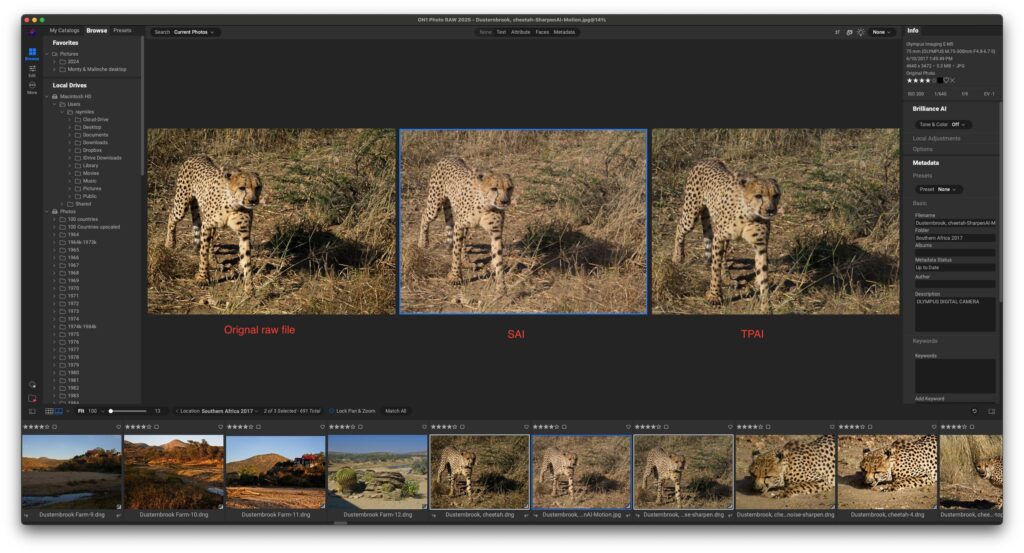
While it isn’t intended to replace a complete photo editor, it complements software like Photoshop and Lightroom exceptionally well. Whether you’re preparing wildlife images for publication, enlarging landscapes for prints, or rescuing high ISO wedding photos, Topaz Photo AI delivers reliable, professional results with minimal effort.
If your goal is to maximize image quality and reduce editing time, Topaz Photo AI is one of the smartest photography investments you can make in 2026.
Ready to Take Your Photo Editing to the Next Level?
Choosing the right AI software can dramatically improve both your editing speed and image quality.
At The Candid Shoot, we regularly test the latest AI photography tools, compare professional editing software, and publish detailed hands-on reviews to help photographers make informed decisions.
Explore our AI software guides to discover which editing tools best match your photography style, workflow, and budget.
Related Articles
Continue learning with these expert guides:



Leave a Reply