
Discover the best AI facial recognition software for photo libraries. Compare tools that automatically recognize faces, organize images, and simplify searching large photo collections.
Introduction

Managing thousands of photos can quickly become overwhelming, especially for professional photographers who regularly capture weddings, events, portraits, sports, or family sessions. Finding images of a specific person weeks or even years later often requires manually browsing entire photo libraries—a process that is both time-consuming and inefficient.
This is where AI facial recognition software for photo libraries transforms the workflow. Using advanced artificial intelligence and computer vision, these tools automatically detect, recognize, and group faces across your image collection. Instead of searching through folders manually, photographers can instantly locate every photo containing a particular individual with just a few clicks.
Whether you’re organizing client galleries, managing a growing Lightroom catalog, or building a searchable digital archive, AI facial recognition software can significantly reduce administrative work while improving photo organization and retrieval.
In this guide, we’ll explore the best AI facial recognition software for photo libraries, compare their features, pricing, privacy, and compatibility with popular photo management applications to help you choose the right solution for your workflow.
If you’re exploring how artificial intelligence is transforming modern photography, check out our AI Photography Guide, where we cover AI-powered editing, keywording, photo culling, image enhancement, and workflow automation for photographers.
Quick Answer
If you’re looking for the best AI facial recognition software for photo libraries, Adobe Lightroom Classic is an excellent choice for photographers already using the Adobe ecosystem, thanks to its built-in People View and AI-powered face grouping. For photographers who need advanced offline organization, Excire Foto provides powerful AI-based face recognition and intelligent photo search. Other strong options include Mylio Photos, PhotoPrism, Google Photos, Apple Photos, and digiKam, each offering unique strengths depending on your workflow, privacy preferences, and library size.
What You’ll Learn
By the end of this guide, you’ll understand:
- What AI facial recognition software is and how it works.
- How photographers use AI to organize large photo libraries.
- The best AI face recognition tools available in 2026.
- Which software works best with Adobe Lightroom and other photo managers.
- The differences between local and cloud-based facial recognition.
- How to choose the right software for your photography workflow.
Quick Comparison Table
| Software | Best For | Face Recognition | Offline Support | Lightroom Compatible |
|---|---|---|---|---|
| Adobe Lightroom Classic | Adobe users | ✅ | Partial | ✅ Native |
| Excire Foto | Professional photo organization | ✅ | ✅ | Plugin Available |
| Mylio Photos | Multi-device libraries | ✅ | ✅ | Import Compatible |
| PhotoPrism | Self-hosted photo management | ✅ | ✅ | Import Compatible |
| Google Photos | Personal photo collections | ✅ | Cloud | Import Only |
| Apple Photos | Apple ecosystem | ✅ | Mostly | macOS/iOS |
| digiKam | Open-source photographers | ✅ | ✅ | Import Compatible |
Why AI Facial Recognition Matters
Modern photographers often manage tens of thousands of images, making manual organization nearly impossible. AI facial recognition software simplifies this process by automatically identifying and grouping people across your photo library.
For example:
- A wedding photographer can instantly find every image of the bride, groom, or family members.
- An event photographer can quickly organize attendee photos for client delivery.
- A portrait photographer can locate previous sessions with the same client in seconds.
- A sports photographer can identify athletes across multiple games and tournaments.
By automating face detection and organization, these tools save valuable time while making large image libraries far easier to search and manage.
Read More Articles:
- AI Keywording Software for Photographers
- AI Photo Culling Software
- AI Image Enhancement Tools
- AI Background Removal Tools
What Is AI Facial Recognition Software for Photo Libraries?
AI facial recognition software is a photo management technology that uses artificial intelligence (AI), computer vision, and machine learning to automatically detect, analyze, and recognize human faces within digital images. Instead of manually tagging every person in your photo library, the software identifies unique facial features, groups similar faces together, and helps you organize your collection with minimal effort.
Unlike traditional photo tagging, which relies on manual input, AI-powered facial recognition continuously improves its accuracy by analyzing facial characteristics such as the distance between the eyes, facial structure, nose shape, jawline, and other unique features. Once a person is identified, the software can automatically locate that individual across thousands of images.
For photographers managing large libraries, this technology transforms hours of manual organization into a process that takes only minutes.
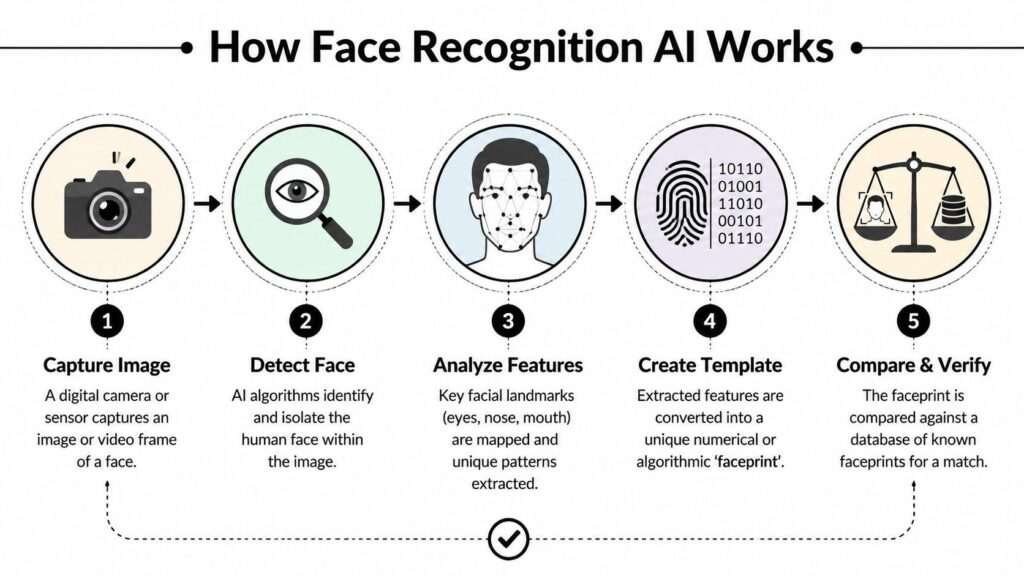
How AI Facial Recognition Works
Although each software platform uses its own proprietary AI models, the overall workflow is similar.
Step 1: Import Your Photos
Begin by importing your images into your preferred photo management software. This could be Adobe Lightroom Classic, Excire Foto, Mylio Photos, PhotoPrism, or another compatible application.
The software scans your library while preserving your original image files and metadata.
Step 2: AI Detects Human Faces
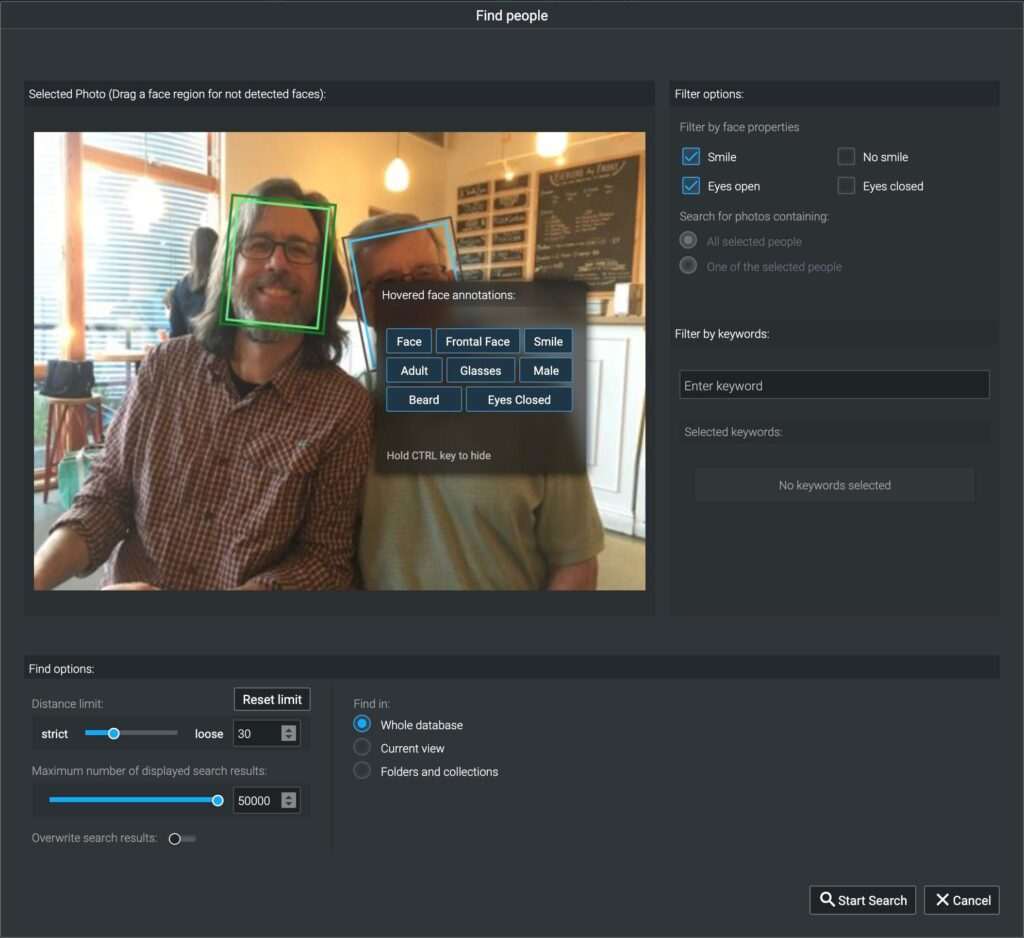
Using computer vision algorithms, the software scans every image to locate human faces, regardless of background, lighting conditions, or camera angle.
Many modern tools can detect:
- Individual faces
- Multiple people in one image
- Side profiles
- Different facial expressions
- Various age groups
- Glasses, hats, or facial hair
This automated detection eliminates the need to manually identify each person.
Step 3: Face Recognition and Grouping
After detecting faces, the AI compares facial features across your entire photo library.
Images believed to contain the same individual are grouped together into a single collection.
For example:
- Every image of the bride from a wedding.
- Every portrait of a returning client.
- Every athlete photographed during a sports season.
- Family members across multiple events.
Some software allows you to confirm or rename these groups, improving future recognition accuracy.
Step 4: Search by Person
Once facial recognition is complete, photographers can search their library using a person’s name instead of browsing folders manually.
Examples include:
- Sarah
- John
- Bride
- Groom
- Client A
- Team Captain
This makes retrieving photos significantly faster, especially when managing large archives.
Step 5: Continuous Learning
Many AI facial recognition tools continue improving as you confirm identities.
The more corrections and confirmations you provide, the more accurately the software recognizes those individuals in future imports.
This adaptive learning helps reduce manual corrections over time.
Why Photographers Need AI Facial Recognition Software
Professional photographers often manage libraries containing tens or even hundreds of thousands of images. Locating every photo of a specific client or subject manually can be frustrating and inefficient.
AI facial recognition solves this problem by making people searchable rather than requiring photographers to remember folders, filenames, or shooting dates.
1. Organize Large Photo Libraries Faster
Instead of spending hours manually sorting portraits, AI groups similar faces automatically.
This is especially useful for photographers with years of archived work.
2. Speed Up Wedding Deliveries
Wedding photographers often capture 2,000–5,000 images during a single event.
With AI facial recognition, it’s easy to collect every image featuring:
- Bride
- Groom
- Parents
- Bridal party
- Family members
This significantly reduces album creation time and simplifies client requests for specific photos.
3. Improve Portrait Photography Workflow
Portrait photographers frequently work with returning clients.
AI face recognition makes it simple to locate previous sessions, compare edits, or build long-term portfolios without manually searching through folders.
4. Better Event Photography Management
Corporate events, conferences, graduations, and school functions often involve hundreds of attendees.
Facial recognition software can group each attendee automatically, making it much easier to deliver personalized galleries or respond to client requests.
5. Simplify Sports Photography
Sports photographers may photograph the same athletes across multiple matches or seasons.
Instead of relying solely on jersey numbers or filenames, AI helps group images of the same player, making portfolio creation and image selection much faster.
6. Save Time on Family Photography
Family photographers can quickly locate:
- Parents
- Children
- Grandparents
- Siblings
across multiple sessions, making annual shoots and repeat client management more efficient.
7. Improve Search Accuracy
Searching for people by name is far more efficient than browsing folders manually.
Combined with AI keywording and metadata, facial recognition creates a highly searchable and organized photo library.
Benefits of AI Facial Recognition for Photographers
Time Savings
AI automatically identifies people across thousands of photos, eliminating repetitive manual tagging.
Better Client Experience
Quickly locating requested images allows photographers to respond faster to client inquiries and deliver galleries more efficiently.
Improved Organization
Face grouping creates a cleaner, more searchable library, reducing the chance of misplaced or forgotten images.
Scalable Workflow
Whether your archive contains 10,000 or 500,000 photos, AI facial recognition scales far better than manual organization.
Reduced Manual Errors
Automated recognition minimizes inconsistent naming and duplicate tagging, especially when combined with periodic manual review.
Read More Articles:
- AI Photography Guide
- AI Keywording Software for Photographers
- AI Photo Culling Software
- AI Image Enhancement Tools
- Lightroom AI vs Photoshop AI
Practical Workflow: During high-volume wedding or event shoots, photographers often need to retrieve every photo of a specific client or family member. AI facial recognition software can automatically group these images, reducing the time spent searching through thousands of files and helping deliver galleries more efficiently.
Best AI Facial Recognition Software for Photo Libraries
The best AI facial recognition software depends on your photography workflow, privacy preferences, photo management software, and the size of your image library. Some applications focus entirely on organizing photos, while others combine facial recognition with AI keywording, editing, and digital asset management.
Below are the top AI facial recognition tools photographers should consider in 2026.
1. Adobe Lightroom Classic – Best Overall for Professional Photographers
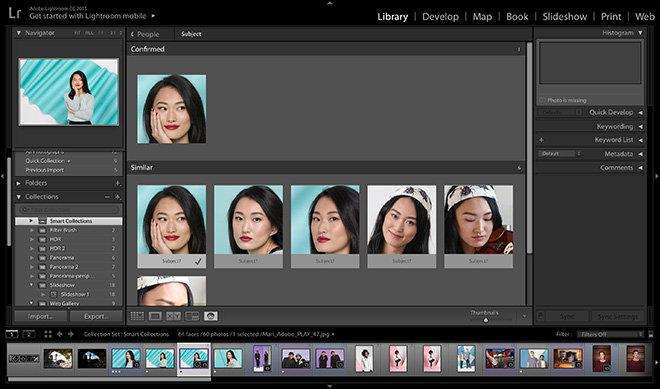
Adobe Lightroom Classic remains one of the most popular photo management applications for professional photographers. Powered by Adobe Sensei AI, it automatically detects and groups faces using the People View feature, allowing photographers to organize images without manually tagging every person.
Once you’ve identified someone, Lightroom continues recognizing that person across newly imported images, making it ideal for photographers who frequently work with repeat clients.
Beyond facial recognition, Lightroom combines advanced catalog management, keywording, metadata editing, AI masking, and professional photo editing in a single workflow.
Key Features
- Adobe Sensei AI face recognition
- Automatic People View grouping
- Smart photo search
- Metadata management
- AI masking and editing
- Smart Collections
- Cloud synchronization
Pros
- Industry-leading photography workflow
- Seamless facial recognition
- Excellent Lightroom ecosystem
- Regular AI improvements
- Powerful catalog management
Cons
- Subscription required
- Facial recognition is available only in Lightroom Classic
- Cloud features depend on Adobe services
Best For: Wedding, portrait, commercial, and event photographers already using Adobe Lightroom Classic.
2. Excire Foto – Best Offline AI Face Recognition Software
Excire Foto is designed specifically for photographers who want powerful AI organization without relying on cloud services.
Its AI analyzes your photo library locally, recognizing faces, objects, colors, scenes, and image content while keeping your files private. Since all processing happens on your computer, it’s an excellent choice for photographers handling confidential client images.
Excire Foto also offers similarity search, duplicate detection, aesthetic ranking, and advanced metadata filtering.
Key Features
- Offline AI facial recognition
- Automatic people grouping
- Face search
- Similar image search
- Intelligent keyword generation
- Duplicate detection
- Windows and macOS support
Pros
- Excellent privacy
- No cloud upload required
- Fast AI analysis
- Designed specifically for photographers
- Handles very large libraries
Cons
- Premium software
- Learning curve for new users
- Editing tools are limited
Best For: Professional photographers prioritizing privacy and offline photo management.
3. Mylio Photos – Best Multi-Device Photo Library Manager
Mylio Photos helps photographers organize large photo libraries across multiple computers, smartphones, and external drives without forcing users to store everything in the cloud.
Its AI-powered facial recognition automatically groups people while maintaining synchronized libraries across devices. Combined with AI search and metadata management, Mylio offers an efficient solution for photographers working from multiple locations.
Key Features
- AI facial recognition
- Multi-device synchronization
- Smart search
- Local storage support
- Metadata editing
- Duplicate management
Pros
- Excellent cross-device workflow
- Flexible storage options
- Strong privacy controls
- Easy organization
Cons
- Advanced features require a subscription
- Initial synchronization can take time
Best For: Photographers managing images across several devices.
4. PhotoPrism – Best Open-Source Facial Recognition Software
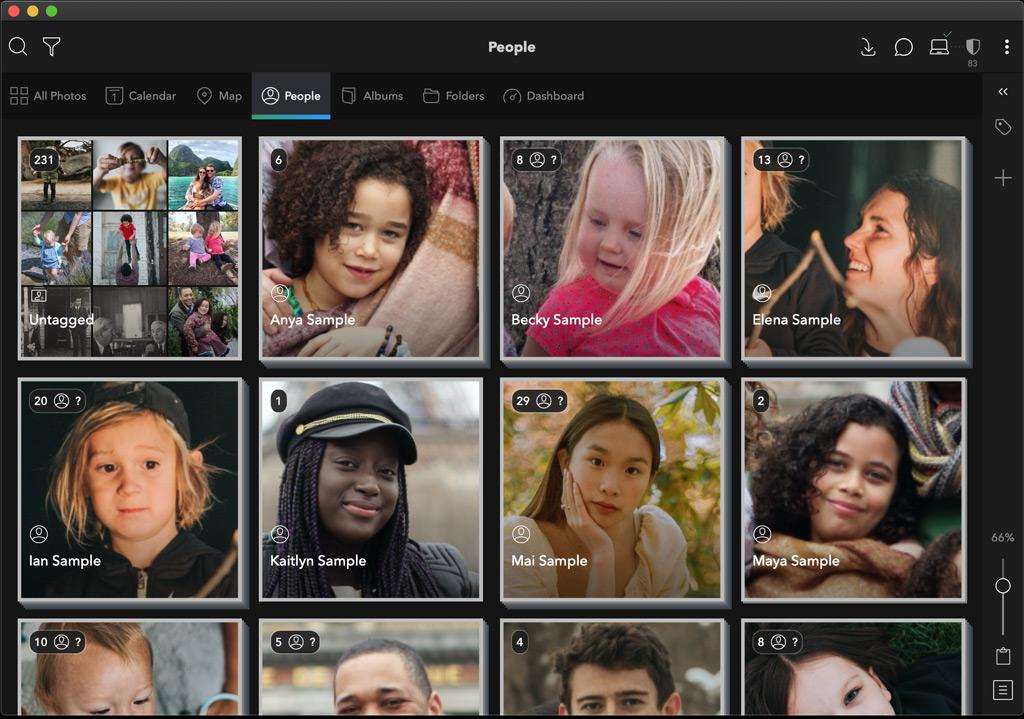
PhotoPrism is a powerful open-source photo management platform that combines AI facial recognition, object detection, geolocation, and metadata indexing.
Because it’s self-hosted, photographers retain complete control over their images and data. It’s particularly attractive for users who prefer privacy-focused workflows and enjoy customizing their software environment.
Key Features
- AI face recognition
- Object detection
- Self-hosted architecture
- Metadata indexing
- Powerful search filters
- Open-source community
Pros
- Free and open source
- Excellent privacy
- Highly customizable
- Supports large collections
Cons
- Technical setup required
- Limited official support
- Better suited for experienced users
Best For: Advanced photographers who prefer self-hosted image management.
5. Google Photos – Best for Personal Photo Libraries
Google Photos remains one of the most recognizable AI-powered photo management platforms. Its facial recognition automatically groups people, making it simple to search for family members, friends, or recurring subjects.
Although primarily designed for consumers rather than professional photographers, Google Photos offers impressive search capabilities, cloud synchronization, and easy sharing.
Key Features
- Automatic face grouping
- AI image search
- Cloud backup
- Smart albums
- Mobile synchronization
Pros
- Extremely easy to use
- Excellent AI search
- Automatic cloud backup
- Free storage options (with limits)
Cons
- Cloud-based processing
- Limited professional workflow features
- Privacy considerations for client work
Best For: Hobbyists, families, and casual photographers.
6. Apple Photos – Best for macOS and iPhone Users
Apple Photos includes built-in AI facial recognition through Apple Intelligence and on-device machine learning.
The software automatically detects and groups people while allowing users to assign names for quick searching. Since much of the processing occurs on Apple devices, privacy is stronger than many cloud-only alternatives.
Key Features
- On-device face recognition
- Smart search
- Automatic people albums
- iCloud synchronization
- Cross-device support
Pros
- Excellent privacy
- Fast face grouping
- Included with Apple devices
- Easy to use
Cons
- Best suited for Apple ecosystem users
- Limited professional catalog features
- Less flexible than dedicated photography software
Best For: Apple users with personal or semi-professional photo libraries.
7. digiKam – Best Free Professional Photo Manager
digiKam is a feature-rich, open-source photo management application trusted by photographers managing extensive image collections.
It includes facial recognition, metadata editing, keyword management, RAW support, and advanced organization features without requiring a subscription.
Its facial recognition engine continues improving through user confirmations, making it a capable free alternative for photographers comfortable with desktop software.
Key Features
- AI facial recognition
- Face tagging
- Metadata editing
- RAW image support
- Duplicate detection
- Advanced search filters
Pros
- Completely free
- Professional organization tools
- Excellent metadata management
- Active development community
Cons
- Interface feels dated
- Learning curve for beginners
- AI isn’t as polished as premium solutions
Best For: Budget-conscious photographers seeking professional photo organization.
Software Comparison Table
| Software | Face Recognition | Offline Processing | Lightroom Integration | Best For |
|---|---|---|---|---|
| Adobe Lightroom Classic | ✅ | Partial | ✅ Native | Professional photographers |
| Excire Foto | ✅ | ✅ | Plugin Available | Offline AI organization |
| Mylio Photos | ✅ | ✅ | Import Compatible | Multi-device workflows |
| PhotoPrism | ✅ | ✅ | Import Compatible | Self-hosted photo libraries |
| Google Photos | ✅ | ❌ | Import Only | Personal collections |
| Apple Photos | ✅ | Mostly | Import Compatible | Apple ecosystem |
| digiKam | ✅ | ✅ | Import Compatible | Free professional management |
Read More Articles:
- AI Photography Guide
- AI Keywording Software for Photographers
- AI Photo Culling Software
- AI Image Enhancement Tools
- AI Background Removal Tools
- Best AI Tools for Photographers
AI Facial Recognition vs Manual Photo Tagging
Before AI-powered photo management became widely available, photographers had to manually tag every person in their image libraries. While this method offers complete control, it becomes increasingly impractical as photo collections grow into the tens or hundreds of thousands.
Modern AI facial recognition software automates most of this work by identifying and grouping faces in minutes rather than days. For many photographers, the most effective approach is to combine AI-generated face groups with a quick manual review for maximum accuracy.
Comparison Table
| Feature | AI Facial Recognition | Manual Tagging |
|---|---|---|
| Speed | ⭐⭐⭐⭐⭐ Very Fast | ⭐ Slow |
| Accuracy | High (improves over time) | Depends on the user |
| Organization | Automatic | Manual |
| Large Photo Libraries | Excellent | Time-consuming |
| Search by Person | Instant | Requires manual tags |
| Consistency | High | Can vary |
| Time Required | Minutes | Hours or days |
| Scalability | Ideal for growing libraries | Difficult to maintain |
Which Method Is Better?
For photographers managing thousands of images every year, AI facial recognition offers a significant productivity advantage. It quickly groups photos of the same person, reducing repetitive work and making image retrieval much faster.
However, no AI system is perfect. Similar-looking individuals, unusual lighting, masks, sunglasses, or extreme camera angles can occasionally affect recognition accuracy. That’s why a brief manual review is recommended, especially before delivering client galleries or creating long-term archives.
A hybrid workflow—using AI for automatic grouping and manual confirmation for final accuracy—provides the best balance of speed and precision.
How to Choose the Best AI Facial Recognition Software
Choosing the right software depends on your photography workflow, privacy requirements, and the size of your image library.
Here are the most important factors to consider.
1. Recognition Accuracy
The quality of face recognition varies between applications.
Look for software that performs well under different conditions, including:
- Side profiles
- Different lighting
- Glasses or hats
- Facial hair
- Children and adults
- Large group photographs
Higher accuracy means less manual correction and faster organization.
2. Privacy and Security
Privacy should be a top priority, particularly for photographers working with weddings, corporate events, schools, or private clients.
Some applications process facial recognition locally on your computer, while others upload images to cloud servers for analysis.
If client confidentiality is important, consider software with offline AI processing.
3. Software Compatibility
Choose software that fits your existing workflow.
Consider whether it integrates with:
- Adobe Lightroom Classic
- Capture One
- Apple Photos
- Windows Photos
- Google Photos
- Existing photo archives
Better compatibility means fewer workflow disruptions.
4. Metadata Support
Professional photographers should ensure the software supports industry-standard metadata formats, including:
- IPTC
- EXIF
- XMP
- Keywords
- Ratings
- Color labels
Good metadata support makes future searches easier and keeps your library portable.
5. Performance with Large Libraries
Some AI tools work well with a few thousand photos but slow down as collections grow.
If you regularly photograph weddings, sports, wildlife, or commercial events, choose software optimized for handling very large catalogs.
6. Pricing
Pricing models typically include:
- One-time licenses
- Monthly subscriptions
- Annual subscriptions
- Free open-source software
Evaluate long-term costs alongside features, updates, and customer support.

Privacy Considerations for Photographers
Facial recognition technology offers tremendous organizational benefits, but photographers should also be mindful of privacy and legal responsibilities.
If you photograph clients, employees, students, or event attendees, consider the following best practices:
- Use reputable software from trusted developers.
- Keep applications updated with the latest security patches.
- Protect your photo library using secure passwords and encrypted storage where possible.
- Review local privacy regulations that may apply to biometric or personal data.
- Be transparent with clients if your workflow includes AI-powered organization tools.
- Back up your photo library regularly to prevent data loss.
Choosing software that processes images locally can also help reduce the need to upload sensitive client photos to external servers.
Common Mistakes to Avoid
Even the best AI software benefits from occasional human oversight.
Avoid these common mistakes:
- Trusting AI without reviewing grouped faces.
- Mixing multiple tagging systems without consistency.
- Ignoring metadata backups before reorganizing a library.
- Failing to update facial recognition databases.
- Using cloud-based services without understanding privacy settings.
- Skipping duplicate cleanup, which can reduce search efficiency.
A few minutes of review can prevent hours of correction later.
Frequently Asked Questions
Final Verdict
AI facial recognition software has become an essential tool for photographers who manage growing image libraries. Instead of manually tagging every person, modern AI can automatically detect, group, and organize faces, making it much easier to locate specific clients, family members, athletes, or event attendees.
Among the software reviewed, Adobe Lightroom Classic stands out as the best overall choice for photographers already working within the Adobe ecosystem, thanks to its seamless People View integration and comprehensive photo management features. Excire Foto is an excellent option for photographers who value offline AI processing and privacy, while Mylio Photos, PhotoPrism, Google Photos, Apple Photos, and digiKam each provide valuable solutions for different workflows and budgets.
Ultimately, the best AI facial recognition software is the one that fits your editing workflow, scales with your photo library, and balances automation with privacy. Combined with AI keywording and metadata management, facial recognition can save hours of repetitive work and create a faster, more organized photography workflow.
Why Trust The Candid Shoot?
At The Candid Shoot, we regularly research AI-powered photography tools, workflow solutions, and photo management software to help photographers work more efficiently. Our recommendations are based on evaluating official product documentation, feature sets, workflow compatibility, privacy considerations, pricing, and practical use cases relevant to photographers.
Rather than focusing only on marketing claims, we compare each tool based on how it performs in real photography workflows—from organizing thousands of client images to improving long-term photo library management. Our goal is to provide balanced, regularly updated content that helps photographers make informed decisions with confidence.
How We Evaluated These AI Facial Recognition Tools
To ensure fair and useful recommendations, we compared each software based on the following criteria:
- Facial recognition accuracy
- Speed of face detection and grouping
- Privacy (local vs. cloud processing)
- Compatibility with Lightroom and other photo managers
- Metadata and keyword management
- Performance with large photo libraries
- Ease of use and learning curve
- Pricing and long-term value
- Suitability for different photography workflows
References & Official Resources
For accuracy and further reading, here are official resources of the software discussed:
- Adobe Lightroom
- Excire Foto
- Mylio Photos
- PhotoPrism
- Google Photos
- Apple Photos
- digiKam
- IPTC Photo Metadata Standard
Related Articles
- AI Photography Guide
- AI Keywording Software for Photographers
- AI Photo Culling Software
- AI Image Enhancement Tools
- AI Background Removal Tools
- AI Image Upscalers
- Lightroom AI vs Photoshop AI
- Best AI Tools for Photographers








Leave a Reply